See Also
The NSProxy service is an advanced high-speed proxy capable of delivering 10Gbps of throughput and up to 6Gbps of SSL Decryption throughput. This feature solves a key filtering issue as more Web sites become SSL-enabled. The Netsweeper NSProxy can optionally break encryption to examine the HTTP requests secured with SSL/TLS. The NSProxy service can also filter HTTPS using the Service-Name-Information contained in the SSL/TLS handshake and filter by hostname without breaking encryption.
Use Cases:
- Selective inspection and decryption at the edge gateway allows trusted SSL traffic through and decrypts per your policies for optimal security and throughput
- Advanced social media SSL protection allows access to safe parts of social media pages while restricting others
- Search keyword and embedded URL filtering features of Netsweeper software can be enabled for SSL/TLS secure websites like Google, Yahoo, and Bing.
- Decryption for individual workstations and or devices operating on Windows, Mac, or Chrome
NSProxy Deployment Options
Prior to considering the NSProxy service, there are several ways it can be deployed:
As an explicit proxy by changing the proxy settings on a workstation, device, or browser.
Transparently by redirecting ports 80, 8080, and 443 to the proxy service on a Netsweeper system installed as a gateway or router in your network.
- Using simple Port redirection where the client’s IP address becomes the IP of the server
- Using TPROXY where the client’s IP is maintained but return traffic MUST be properly routed to the same Netsweeper system. This is easy to setup for single server instances or Policy Based Routing Installed (advanced, not recommended if not required)
- Transparently Redirect All TCP ports to the NSProxy service, a small variation to the above that can be used for specific deployment scenarios.
- The easiest method for demonstration purposes and evaluation is to simply change your proxy settings on your workstation, device, or browser.
| Deployment Options | Advantages | Disadvantages |
|---|---|---|
|
Explicit proxy |
No network change required |
Browser settings must be changed on all devices. |
|
|
Fast and easy to test |
Without proper firewall and workstation/device security can easily be disabled. |
|
Transparent Port Redirection |
Secure and difficult to bypass |
Difficult to implement since Netsweeper must be inline with the filtering network. |
|
|
Easy to load balance between multiple servers |
|
|
Transparent with TPROXY |
Maintains filtered clients IP for upstream firewall processing. |
Difficult to load balance since return path must go to the same server the request originated from. Flow based load balancing must exist prior and after the Netsweeper server. |
Selective Decryption
One of the main features of the NSProxy service is the ability to selectively decrypt connections to websites. This means you can decrypt requests to www.google.com and www.google.ca but allow pass-through for other hostnames like www.bank.com. This feature allows a filtering deployment to mitigate security concerns by setting a policy that meets the customer requirements for filtering while also maintaining security.
- The websites that are not decrypted are filtered by hostname
- The websites that are decrypted are filtered using the complete URL including the Hostname, Path, and any CGI arguments that are present.
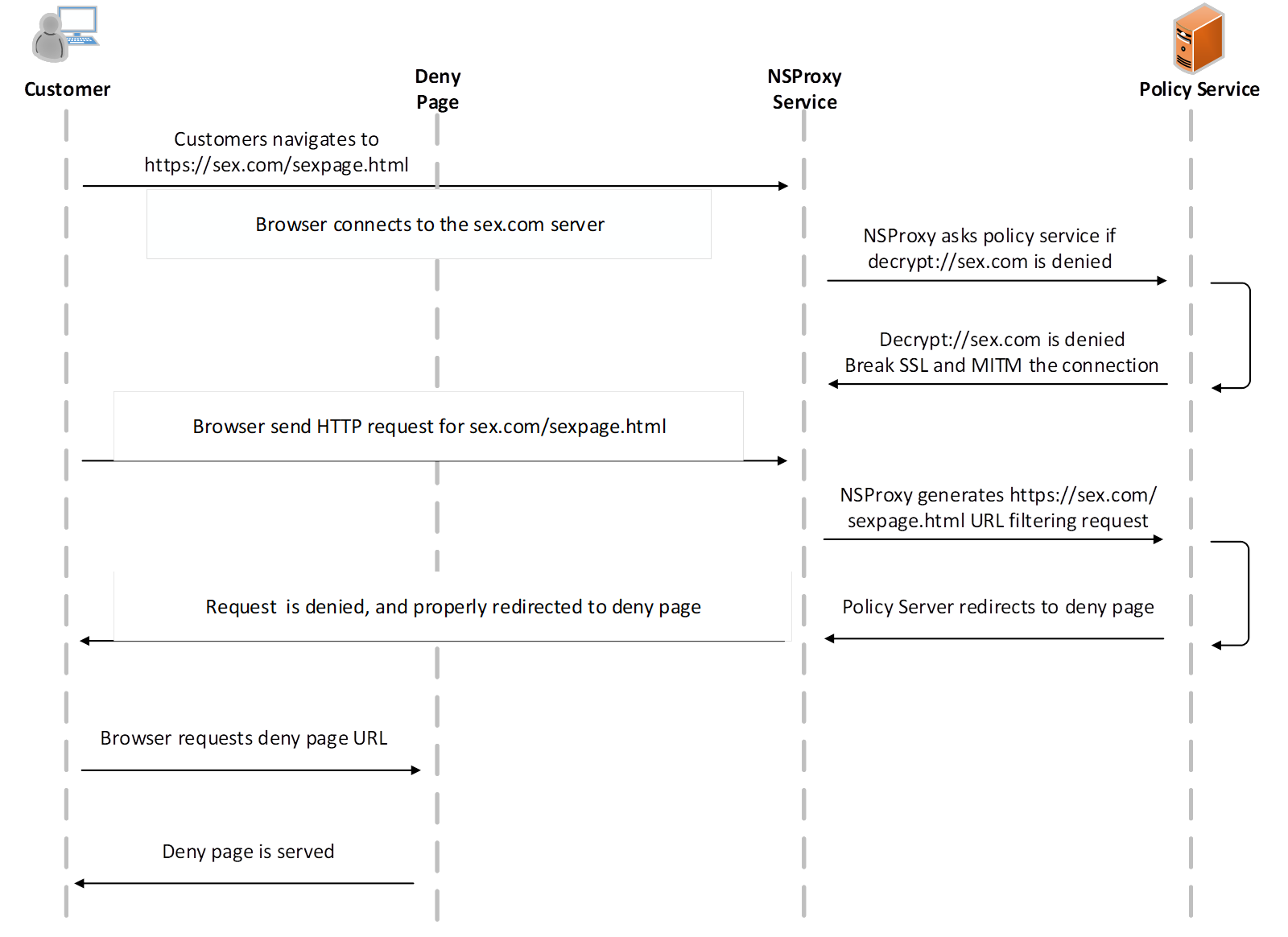
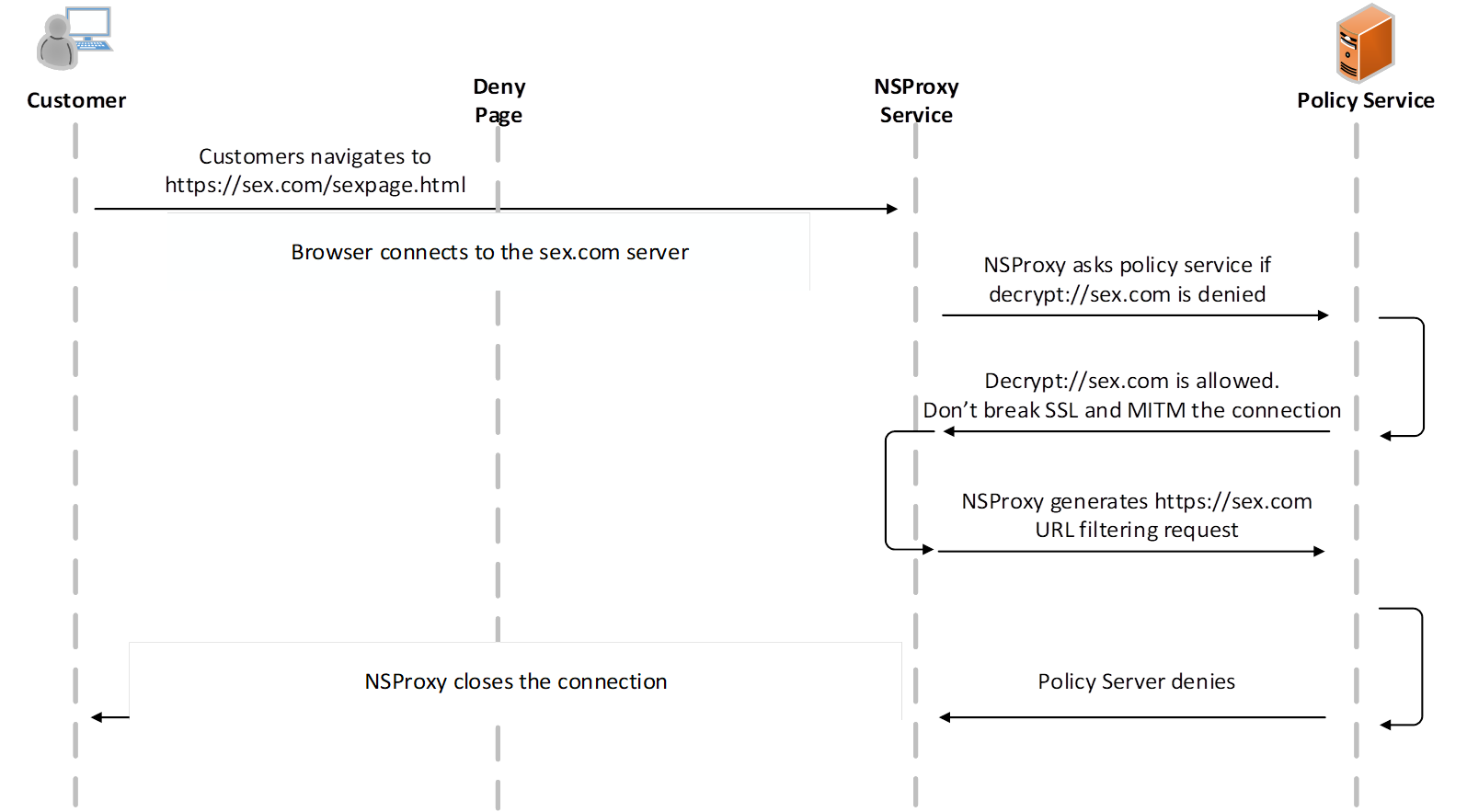
For the task of selective decryption, NSProxy consults the Policy Server sending the special request that consists of the scheme ‘decrypt’ and the hostname/port of the site the NSProxy is going to connect to. For example, decrypt://www.bank.com or decrypt://www.google.ca.). These events are then denied or allowed and based on this decision the NSProxy will break encryption or allow the connection to proceed in a pass-through operation.
Regardless of the decrypt allow/deny response, the policy service is always queried with the https://hostname of the site, or if decryption is enabled, the full URL will be available in the general format of https://hostname/path?query.
Netsweeper’s recommendation is to deny either decrypt:// as a scheme to break everything, or simply add decrypt:// deny list items for those websites you want to decrypt. The reason for the deny state for decrypt events is you can simply add a deny list item of “sex.com” with no scheme to any list, and this will enable decryption and allows for a deny page to be served for any denied URLs.
Traditionally, HTTPS deny pages were only supported in Explicit proxy mode. If you decrypt an HTTPS connection, a deny page can be served.
NS Proxy Decrypt and Deny Diagram
NS Proxy No Decrypt and Deny Diagram
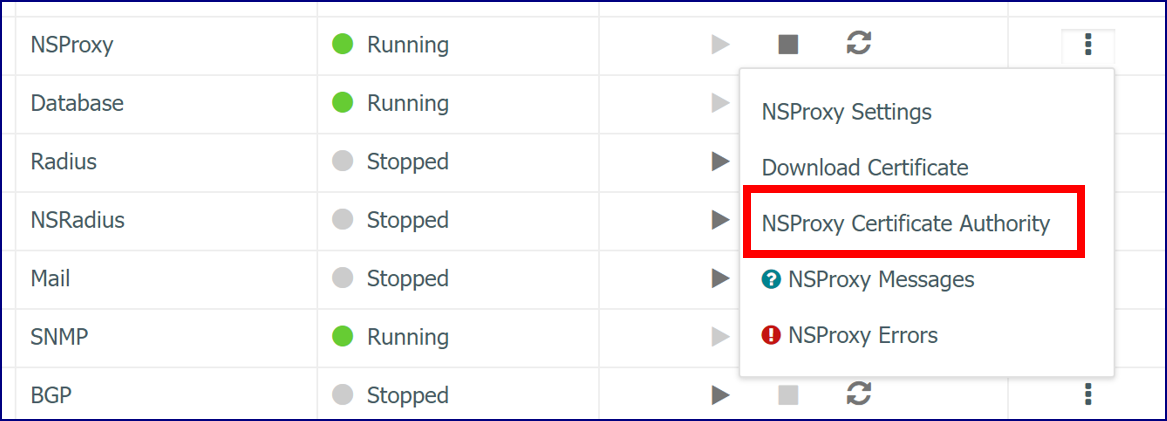
Managing Custom Root Certificate Authorities
The NSProxy service by default uses the Mozilla trusted root certificate authorities. This certificate authority bundle is used to accept temporarily this untrusted certificate. Under no circumstance will Netsweeper forge an invalid certificate to become a valid certificate. However, this can sometimes not be up-to-date or meet the customer requirements in regards to the certificate authorities they want NSProxy to trust. Netsweeper has made it possible in Netsweeper 5.0 for customer to manually adjust this and will be adding GUI/UI features for this functionality in a future release.
Re-signed Certificate Information
The following certificate information is re-signed when Netsweeper Decrypts SSL traffic.
- The public key is re-signed to be the public key used by the specific NSProxy service
- The Root Certificate Authority is re-signed
- Some custom extensions are dropped
The NSProxy has these options for sites with invalid certificates.
- The default option is to forge the certificate but make it invalid too. In this case the NSProxy makes an untrusted self-signed certificate. The client browser shows the error page explaining that the remote site is not trusted. The client can choose to accept temporarily this untrusted certificate or not try to open the site.
- NSProxy can close the connection. For the client browser if it looks like the remote site unexpectedly closed the connection. This is NOT recommended to be enabled as no deny page or warning is displayed to the user.
- By default, the NSProxy doesn’t change the certificate expire time. Therefore, if the original certificate is expired, the re-signed certificate is expired too and the client can choose if this problem can be ignored, this is NOT recommended.
Initiating a Proxied Connection
When initiating a proxied connection to a website or other secure server using the TLS (formerly, and more commonly, referred to as SSL) protocol, NSProxy receives that server's public certificate as part of the connection initiation handshake. In order to be a "man-in-the-middle" between the client (i.e. web browser) and the server, NSProxy must pretend to be that server from the vantage point of the client. To do this, NSProxy forges the original server certificate, maintaining the majority of the information contained within the public certificate, and creates a close facsimile of that certificate.
To do this, NSProxy requires a ‘trusted’* Certificate Authority (CA) certificate and private key pair of its own with which to sign the newly created re-signed certificate. The location of this pair is configured in the nsproxy.conf file according to the "ssl_ca_cert_file" and "ssl_ca_key_file" parameters, respectively. Alternatively, both the certificate and key can be contained within the same file, as is often the case for such configurations, and NSProxy will load both accordingly from it.
For the client to not be shown security warnings (such as browser warning pages) when opening a proxied connection to a server, it must have NSProxy’s CA certificate mentioned above, or the root CA's public certificate that originally signed NSProxy’s CA certificate, added to their list of trusted certificate authorities. This may be done on an individual basis as needed, or as part of group policy when deployed within a controlled network such as within organization.
NSProxy Inputs and Outputs
The NSProxy has the default port for SNMP stats 3167. It also listens for incoming connections but there is no a standard for these ports. By default, it is configured for explicit proxy mode and listens on port 3128.
NSProxy MIBs
These MIBs are found in the NSD_MIBs.txt file.
snmpwalk -v2c -c public localhost:3167 NSD-MIB::nsproxy
See: NSProxy
NSProxy Configuration
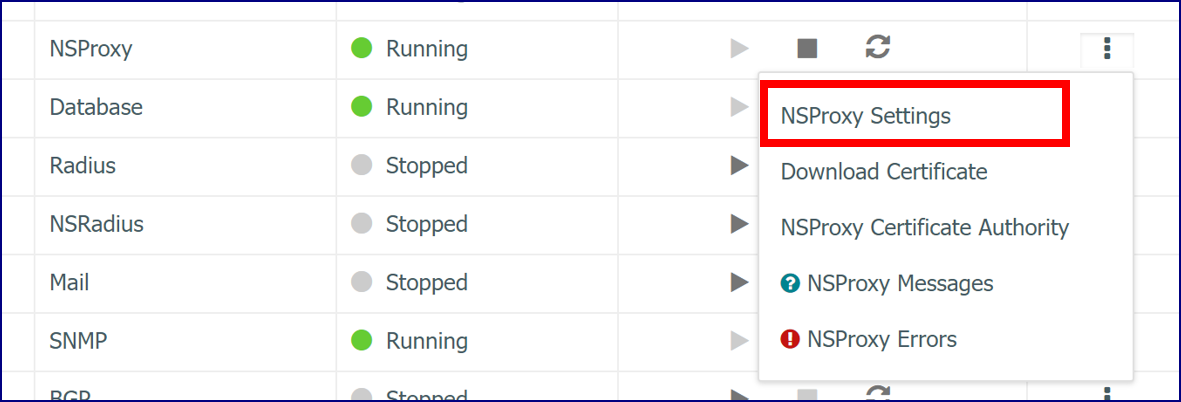
Configure NSProxy by going to Administration > Service and clicking on the host service.
In the NSProxy section, click the NSProxy Settings link.
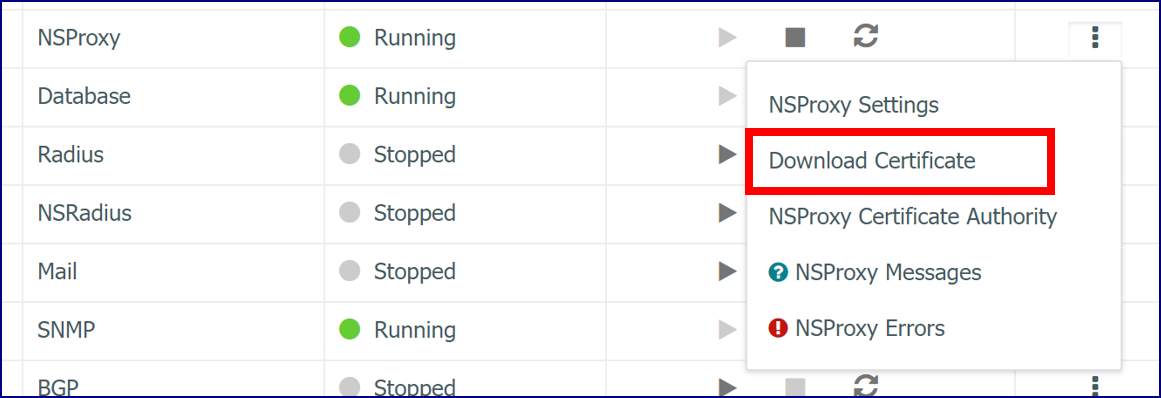
Download Certificate
The Download Certificate link allows you to download the Certificate Authority certificate the NSProxy uses to sign sites certificates. This certificate should be imported into the client browser.
Importing NSProxy Certificate Authorities
One of the important aspects of breaking SSL is importing the proper certificate authority into the browser that you have installed or that is being used in by the nsproxy service. The following sections will go over importing a certificate authority into the following operating systems and browsers
- Windows
- Mac OSX
- Android
- iOS
- Opera
- Firefox
- Linux
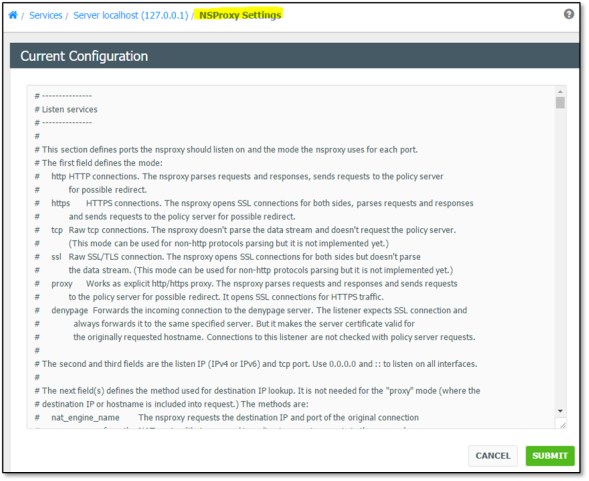
NSProxy Configuration Settings Window
In the ‘NSProxy Settings’ window make the changes to the configuration file and click Submit to accept the changes. Always restart the NSProxy service when done to implement the changes.