Radius Configuration
Before providing alternative Netsweeper RADIUS configurations based on some common network/industry requirements, an overview of all Netsweeper RADIUS configuration settings is necessary. This will ensure a solid understanding of all Netsweeper RADIUS configuration settings.
In many cases, the Netsweeper RADIUS parser and Netsweeper Policy Database integration will be transparent and not require modifications of any sort.
In the case that a small segment of your users require filtering services, it is recommended to forward only the RADIUS traffic of the filtered subscribers. This will reduce the load on the filtering platform since all traffic is not being filtered and increase future scalability.
Netsweeper RADIUS Parser
The Netsweeper RADIUS Parser uses the RADIUS accounting log file to determine how to update the Netsweeper policy database through the Netsweeper WebAdmin APIs. It scans the RADIUS log for accounting detail events, using these events to invoke calls to the APIs.
- Go to Administration > Services.
- Expand the Host you wish to edit.
- For NSRadius, click
the Radius Parser Settings from the More menu.
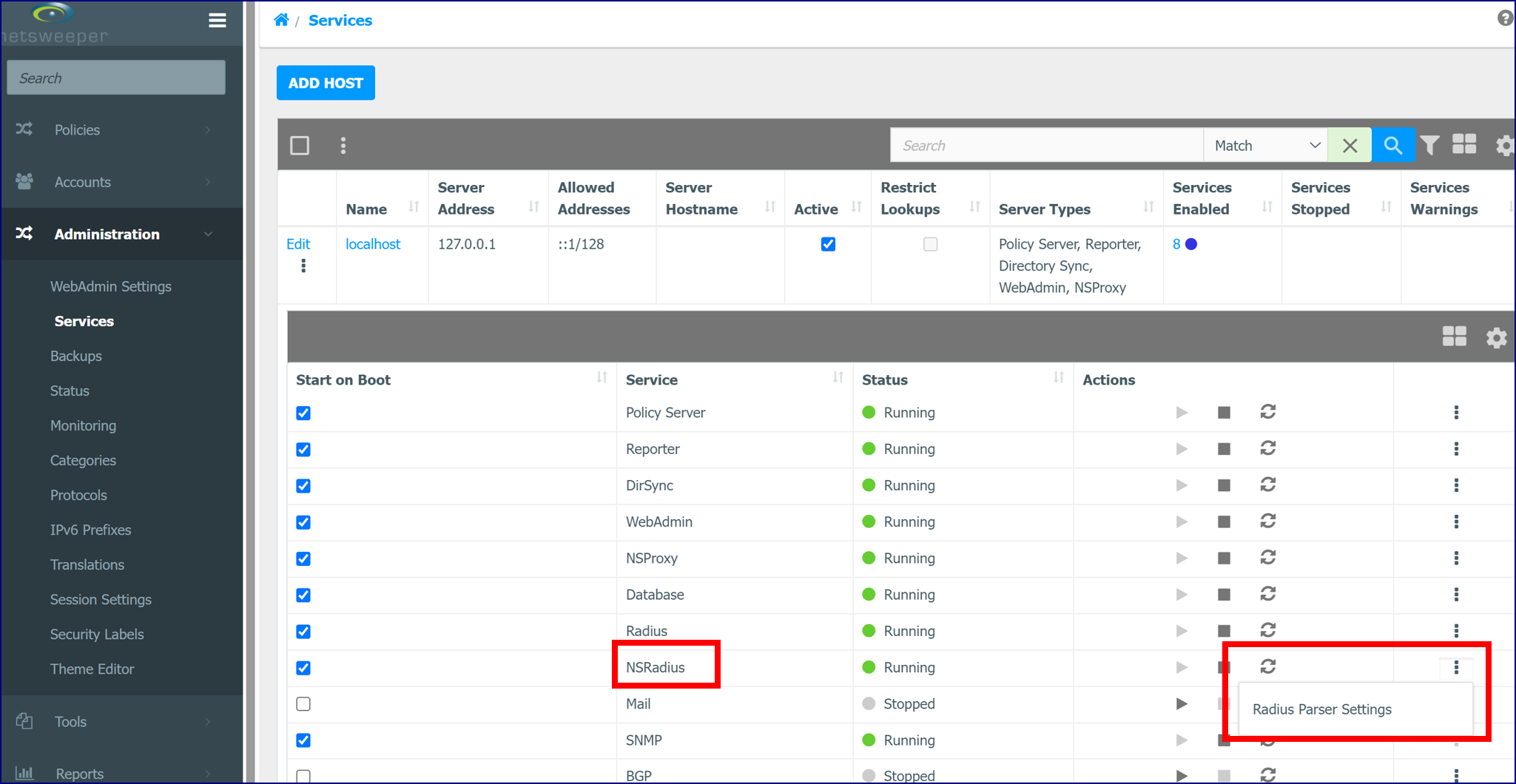
RADIUS Parser Configuration
Then modify the Netsweeper RADIUS parser configuration file at:
A Client can use both IPv4 and IPv6 addresses with the same Client name. If $IP6ADDRESS_ATTRIBUTE is set to false instead of " "Framed-IP6-Address", it will be ignored. The same rule is applied to $IP6PREFIX_ATTRIBUTE and $IPADDRESS_ATTRIBUTE.
| Configuration | Description |
|---|---|
|
$ENABLE_RADIUSPARSER_LOGGING= false; |
Set this to ‘true’ if you want to debug Radius and require logs from the parser. |
|
$RADIUSPARSER_LOGFILE_LEVEL=1; |
The logfile level to log: - 1 INFO -2 STATS - 3 ERROR |
|
$RADIUSPARSER_LOGFILE="radiusparser.log"; |
The logfile, will be in /usr/local/netsweeper/logs/ It will be rotated only once to the filename. We do not keep more history than one single log file. |
|
$RADIUSPARSER_LOGFILE_SIZE = 1048576 * 5; |
The size of the log file before we rotate. We only keep 2 logs default 5 MB each, total 10MB. |
|
$PROCESS_INTERIM = false; |
Process interim updates the same way as we process RADIUS Start packets. |
|
$GROUPNAME_LOOKUP_ |
Allows provisioning of clients in the appropriate group without the need for the CLASS attribute being present in the Accounting-Start packets received. This will cause clients to be looked up within the Netsweeper policy database. It is recommended that this setting is left at its default setting of ‘false’ to ensure efficient parsing performance. This should only be changed if required. |
|
$GROUPNAME_LOOKUP_FROM_ |
If we fail to lookup the groupname from the username in the Clients window, fall through to groupname attribute. |
|
$GROUPNAME_LOOKUP_FROM_ |
If we fail to lookup the groupname from the username in the Clients window, fall through to groupname attribute. |
|
$GROUPNAME_ATTRIBUTE = “Class”; |
Name of the attribute to use to determine the group to place the client into. This attribute MUST exist for the IP Address Assignment and it MUST exist if we are going to create the group. By default, we use the Class attribute for the group name. |
|
$USERNAME_ATTRIBUTE = “User-Name”; |
Name of the attribute that contains the client name to assign to the group. This is used to lookup a client from the WebAdmin. The group this client belongs to is then used. If you have multiple clients, the client with no IP Address or Subnet is first used. Otherwise, the first returned client is used. This does not currently support database partitioning and other advanced features. |
|
$ACCOUNTNAME_ATTRIBUTE = “User-Name”; |
Name of the attribute that contains the Account Name. |
|
$IPADDRESS_ATTRIBUTE = “Framed-IP-Address”; |
Name of the attribute that contains get the IPv4 Address. |
|
$IP6ADDRESS_ATTRIBUTE = " Framed-IP6-Prefix "; |
The attribute we get the IP6 Address from: Framed-IPv6-Address, Login-IPv6-Host, or Framed-IPv6-Prefix |
|
$IP6PREFIX_ATTRIBUTE = "Framed-IP6-Prefix";
|
The attribute we get the IPv6 Prefix from. The setting is used to check if the IP6 address is from IP6PREFIX_ATTRIBUTE. It is not used when the INTERFACEID_ATTRIBUTE is false. The INTERFACEID_ATTRIBUTE will be merged into the IP6ADDRESS_ATTRIBUTE only if the IPv6 address is from IP6PREFIX_ATTRIBUTE |
|
$INTERFACEID_ATTRIBUTE = "Framed-Interface-Id";
|
The attribute we get the IP6 interface identifier: Framed-Interface-Id. This is an optional attribute to merge with Framed-IPv6-Prefix for a full IPv6 address of an interface. Set the attribute false to disable merging of the interface id with the ipv6 prefix. |
|
$IPADDRESS_ATTRIBUTE_VALID_REGEXP = false;
|
The array or | segmented regular expressions for each IPADDRESS_ATTRIBUTE for validation. |
|
$IP6ADDRESS_ATTRIBUTE_VALID_REGEXP = false;
|
The array or | segmented regular expressions for each IP6ADDRESS_ATTRIBUTE for validation. |
|
$INTERFACEID_ATTRIBUTE_VALID_REGEXP = false;
|
The array or | segmented regular expressions for each INTERFACEID_ATTRIBUTE for validation. |
|
$PARTITION_ATTRIBUTE = "Class"; |
This attribute must simply exist and possibly have a value. |
|
$PARTITION_VALUE = false; |
This can be set to false, in which case the value will not be checked. Otherwise, the value must be the specific value for the IP Address assignment to occur. |
|
$PARTITION_CLEAN_START = false; |
This cleans up users that do not have a filtering group on RADIUS Accounting Stop. This will remove the Framed-IP-Address from the database if we cannot lookup the associated filtering group. This can happen if the PARTITION_ATTRIBUTE does not exist, or we cannot find the Client in the Clients window or if we cannot find the group. |
|
$PARTITION_CLEAN_STOP = false; |
This cleans up users that do not have a filtering group on RADIUS Accounting Stop. This will remove the Framed-IP-Address from the database if we cannot lookup the associated filtering group. This can happen if the PARTITION_ATTRIBUTE does not exist, or we cannot find the Client in the Clients window or if we cannot find the group. |
|
$CREATE_ACCOUNT = false; |
Set this to true if you want to create a WebAdmin account dynamically. |
|
$CREATE_ACCOUNT_PASSWORD = “”; |
Password for the account being created dynamically. |
|
$CREATE_ACCOUNT_ORGANIZATION = “radiusparser”; |
Organization for the account being created dynamically. |
|
$CREATE_ACCOUNT_CLASSIFICATION = “user”; |
Classification of the account being created dynamically. |
|
$CREATE_ACCOUNT_ASSIGN_ |
Assigns the account to the group. False is the default if used, the group will not be assigned. |
|
$CREATE_GROUP = false; |
Creates a group if it does not already exist. |
|
$CLIENT_API_DELETE_ |
If this is set to ‘true’ the client is deleted. If set to ‘false’ the client is expired. |
|
$GROUPNAME_LOOKUP_ |
This will not only look for a Client with the Username matching the RADIUS Accounting packet but will also look for Clients with an IP Address and subnet with a matching username. It is recommended that this be disabled. Feature added in 3.1.0 release. Enabling this option has a performance impact when Filtered and Non-Filtered subscriber RADIUS Traffic is sent to the Netsweeper system and the $GROUPNAME_LOOKUP_FROM_USERNAME option is enabled. |
|
$GROUPNAME_ATTRIBUTE_VALID_REGEXP=false; |
This option gives the ability to use arrays instead of the | to segment attributes (regexp may require a |). As an example, you can have an empty filter “/.+/|”; The second filter is empty, which means use the attribute if it exists. |
|
$WORKSTATION_ATTRIBUTE = "NAS-Identifier" |
The Attribute we get the workstation the Client we assign to the group from. |
|
$WORKSTATION_ATTRIBUTE_VALID_REGEXP = false |
The array or | segmented regular expressions for each WORKSTATION_ATTRIBUTE for validation. |
|
$WORKSTATION_STOP_VALIDATE=false |
If true we validate the Workstation matches the client when performing RADIUS Accounting Stop. |
|
$USERNAME_STOP_VALIDATE=false |
If true we validate the Username matches the client when performing RADIUS Accounting Stop. |
Stripping Out Realms
Use these settings to strip out realms in the Radius Parser Settings. Realm handling now works for the Radius Parser and allows for username mangling and removing of the Realm associated with a User-Name RADIUS packet. This also works for the WebAdmin Login when configured in System Configuration> WebAdmin Settings.
$REALM_FIND_PCRE = "/^([^\@]*)\@*.*$/";
$REALM_REPLACE_PCRE = "\$1";
If you want to also include '\' characters, use these settings:
$REALM_FIND_PCRE = "/^([^\@\\\]*)(\@*|\\\*).*$/";
$REALM_REPLACE_PCRE = "\$1";
Restart Radius
Configuration Loading
Policy Server Polling and Client Loading
The groupclient_dynamic_clients setting causes the Netsweeper Policy Server to periodically scan for client changes. By default, the groupclient_dynamic_clients setting is disabled and the policy server will completely reload the entire database because the webdb_applysettingscheck_enabled setting is enabled. webdb_applysettingscheck_enabled is an expensive operation when dealing with many clients.
The following is from the nsd.conf configuration file showing the default settings:
# GroupClient Dynamic
Clients
#
# This enables polling of the clientid table for changes, not deletes.
# Has the same effect of remoteadmin command 200
# Setting this to an integer greater than 0 will scan the clientid table
every X seconds
# The default value is 0 ( disabled )
#
# NOTE! You will want to disable the apply settings check since this reloads
the entire
# database. It is recommended to also add this, or change the
timeout values to a much
# longer interval for the apply settings checking.
# webdb_applysettingscheck_enabled
false
#
# Format:
# groupclient_dynamic_clients
60
It is recommended that the groupclient_dynamic_clients setting is enabled by entering an interval (in seconds.) It is also recommended that the webdb_applysettingscheck_enabled setting is disabled, or the webdb_applysettingscheck_delay setting is utilized (by entering a duration in seconds) to limit the intensity of full configuration reloading by the policy server.
If the webdb_applysettingscheck_delay setting is disabled, then no configuration database changes will be loaded by the policy server (with the exception of clients loaded because of groupclient_dynamic_clients being enabled.)
GroupClient Lookup Order
The Netsweeper Policy Server will lookup clients in the policy database using an ordered list of lookup methods. For RADIUS integration, the dbip module is used, and will most likely be the only module required. The default setting in the nsd.conf is outlined below:
# +-----------------------------+
# | Group Client Lookup Order |
# +-----------------------------+
# This allows you to specify which type of clients are looked up first. This can be used to fine tune how you wish to define the policy server operation
# for group associations.
# Format:
# groupclient_lookup_order dbip dbsubnet dbclientname
#dbipport
#database clients that have a specific IP address and the TCP port or the port range
#Client Modules
# nslam
# nslam clients that are dynamically created dbip
# database clients that have a specific ip address dbsubnet
# database clients that have a subnet mask != 32 or 255.255.255.255
# dbclientname
# database clients that only have a client name and no ip or subnet
# dbclientnamerdns
# database clients that perform a reverse dns query for the requesting ip
# this will act as dbclientname after host name is found
# Note: the current implementation does not provide caching of host
# names and will descrease performance.
# dbclientnamegrouprestrict
# does a dbclientname lookup then proceeds to make sure group
# restrictions pass group restrictions are defined in a group which
# state what ip addresses dbclients can come from groupexternal run
# the groupexternal_program to lookup the group. See the groupexternal_* config settings below for more information. Note: this module uses the NSLAM framework for caching of credentials.
groupclient_lookup_order dbclientname dbip dbsubnet
Change the groupclient_lookup_order to:
groupclient_lookup_order dbip
This will improve performance since only one module is used to lookup groups. If you feel your deployment requires more than only dbip, contact a Netsweeper Systems Engineer.
RADIUS Server Configuration
The default Netsweeper RADIUS configuration will work for most deployments. Typically, all that is required is the addition of a new RADIUS client to the RADIUS Server that resides on the Netsweeper Server.
Configure RADIUS to accept packets
The Netsweeper RADIUS server must be configured to accept packets from a RADIUS client (any entity that is sending the required RADIUS packets.)
For example, if the entity is located at IP 1.2.3.4, then add the following to the RADIUS server (residing on the Netsweeper Server) configuration:
client 1.2.3.4 {
secret = YourSecretYouConfigured
shortname = YourNasDevice
nastype = other
}
The configuration file for the RADIUS server is /etc/raddb/radiusd.conf. You can also access this file on local and remote hosts through the Administration > Services page.
Starting and Stopping the RADIUS Service
When changing the RADIUS server configuration, it must be restarted. The RADIUS service can be restarted from the WebAdmin interface by navigating to Administration > Services and clicking on the Restart link in the RADIUS column. After “Running” has changed to “Stopped”, click “Stopped”, and the service will restart.
Generating Sample RADIUS Accounting Information
Use a fresh install of the Netsweeper product.
Run the following:
Radius will need to be enabled and restarted in the 'Services' window.
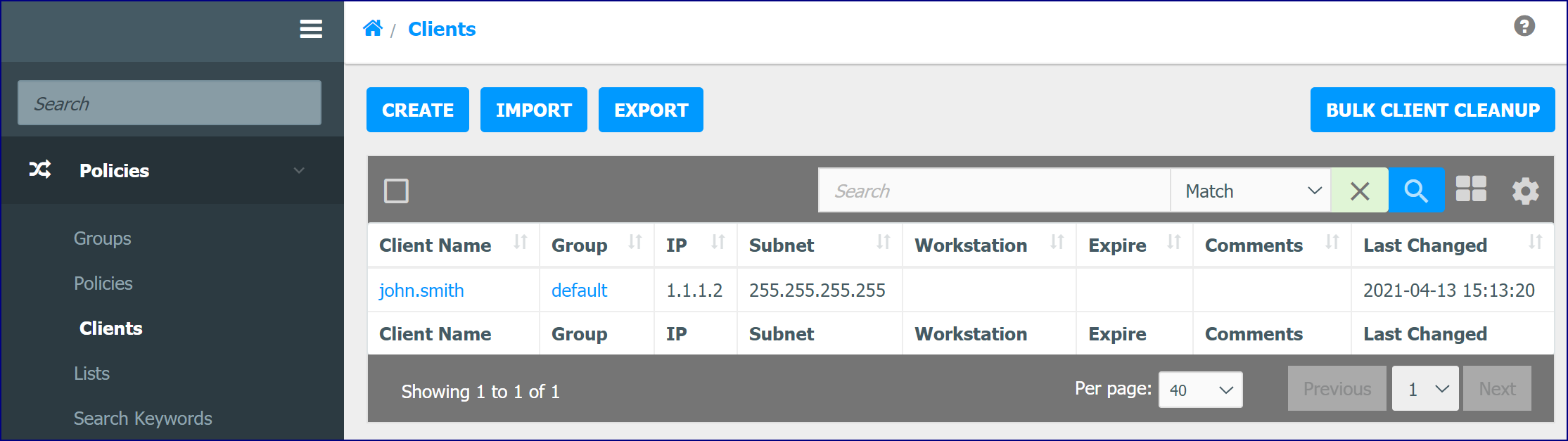
Login a client:
radacct User-Name=john.smith Acct-Status-Type=Start Framed-IP-Address=1.1.1.2 class="default" NAS-IP-Address=1.2.3.4
You will have a new client john.smith in the default group.
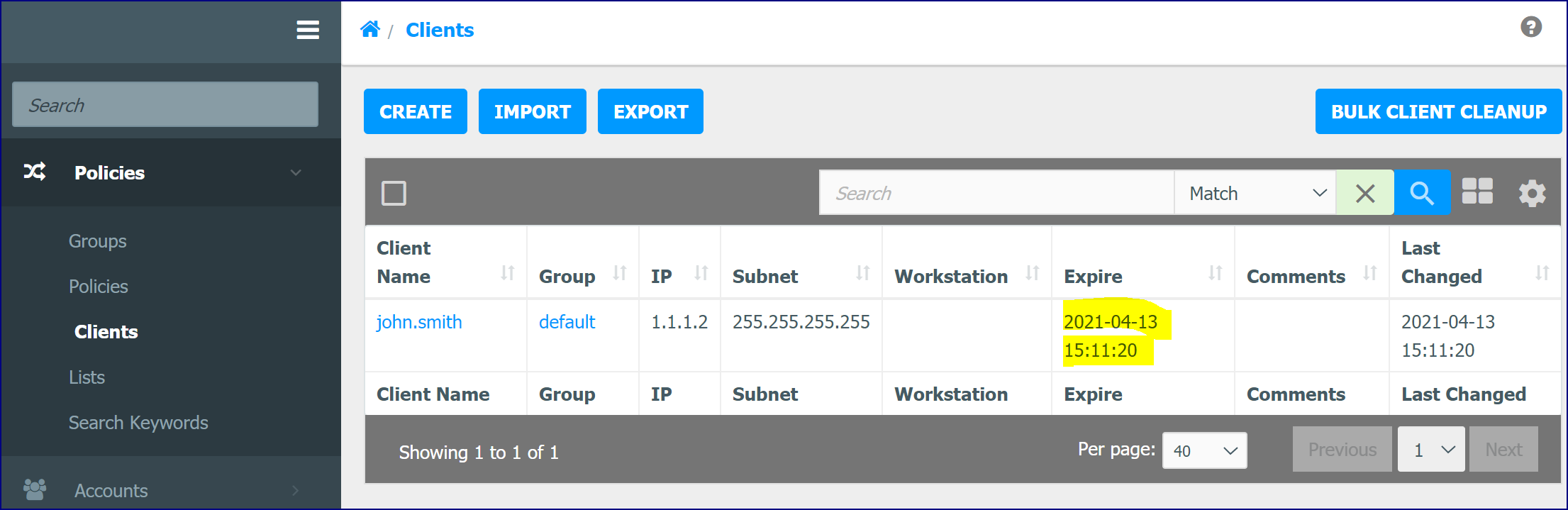
Logout a client:
radacct User-Name=john.smith Acct-Status-Type=Stop Framed-IP-Address=1.1.1.2 class="default" NAS-IP-Address=1.2.3.4
The user john.smith will have an expiry time associated with the username.
Default and Alternate Configurations
Default RADIUS parser configuration
The default Netsweeper RADIUS configuration will work for most deployments. Typically, all that is required is the addition of a new RADIUS client to the RADIUS Server that resides on the Netsweeper Server.
Specific settings
/etc/raddb/radiusd.conf
The RADIUS configuration file must be updated to cause the RADIUS server to accept packets from your RADIUS client.
Radiusparser.php
No changes required.
Requirements and Considerations
- The RADIUS CLASS attribute must contain the filtering group.
- The filtering group must already exist in the Netsweeper database.
Without the CLASS attribute
In some situations, it may not be possible for a network operator to modify the CLASS attribute of RADIUS accounting packets. In this case, the Netsweeper RADIUS parser must know to lookup the appropriate filtering group name from the user name (client name) specified in the RADIUS accounting packets. The lookup is done using the Netsweeper Policy Database; therefore the client must already exist in the Netsweeper Policy Database and be assigned to a valid filtering group.
Specific Settings
/etc/raddb/radiusd.conf
The RADIUS configuration file must be updated to cause the RADIUS server to accept packets from your RADIUS client.
Radiusparser.php
$GROUPNAME_LOOKUP_FROM_USERNAME = true;
Requirements and Considerations
- Users (client names) must exist and be assigned to a filtering group.
- If you have multiple clients the client with no IP address or subnet is first used, otherwise it falls back to the first returned client used.
- This does not currently support database partitioning and other advanced features.
Group Creation on-the-fly
There may be instances where a new filtering group is required to be created when it does not previously exist. This enables dynamic default filtering group/policy creation when an accounting-start packet arrives, and the group is not known. This may be necessary where OSS/BSS integration does not provide pre-configuration of filtering clients/groups/policies before a device comes onto the network.
Specific Settings
/etc/raddb/radiusd.conf
The RADIUS configuration file must be updated to cause the RADIUS server to accept packets from your RADIUS client.
Radiusparser.php
$GROUPNAME_LOOKUP_FROM_USERNAME
= false.
$CREATE_GROUP=true;
Requirements and Considerations
- Due to additional system load, scalability analysis should be performed when using this methodology.
- Additionally, default filtering policy settings should also be considered.
Mixed Deployments – Username and Calling Station ID
In version 3.1 and above, the _ATTRIBUTE settings can be pipe, | , separated. This allows you to use Username and Calling-Station-ID for mixed deployments where RADIUS packets may be different between fixed and wireless subscribers.
Specific Settings
/usr/local/netsweeper/webadmin/bin/radiusparser.php
All webadmin/config/radiusparser.php configuration elements ending with:
_ATTRIBUTE can be PIPE | separated
Radiusparser
This will allow customers to have multiple attributes used. If there is a conflict in the accounting packet the first attribute is used.
radiusparser.php:$GROUPNAME_ATTRIBUTE = "User-Name|Calling-Station-Id|User-Name";
radiusparser.php:$USERNAME_ATTRIBUTE = "User-Name|Calling-Station-Id|User-Name";
radiusparser.php:$ACCOUNTNAME_ATTRIBUTE = "User-Name|Calling-Station-Id|User-Name";
radiusparser.php:$IPADDRESS_ATTRIBUTE = "Framed-IP-Address";
radiusparser.php:$PARTITION_ATTRIBUTE = "Calling-Station-Id|User-Name";
And that the defaults are now this
$GROUPNAME_ATTRIBUTE = "User-Name|Calling-Station-Id|User-Name";
$USERNAME_ATTRIBUTE = "User-Name|Calling-Station-Id|User-Name";
$ACCOUNTNAME_ATTRIBUTE = "User-Name|Calling-Station-Id|User-Name";
$IPADDRESS_ATTRIBUTE = "Framed-IP-Address";
$PARTITION_ATTRIBUTE = "Calling-Station-Id|User-Name";
Typical Metrics
The following metrics outline the performance of the RADIUS Server and the Netsweeper RADIUS Parser that reside on the Netsweeper Server. The performance of the RADIUS Parser is dependent on WebAdmin and Database performance. Generally, the system is capable of handling large amounts of RADIUS accounting packets; however, the RADIUS Parser will be limited in performance.
It is important to note that on most deployments only a small portion of subscribers require WebAdmin and Database operations. Some installations may require an IP Address removal to be operational for all subscribers. The following test results will clearly outline these use cases.
These tests only measured the performance of the RADIUS service: how many RADIUS client packets can be processed and logged by the RADIUS service. Since the Netsweeper RADIUS parser reads and deletes the log entries at the same time, the parser service needs to be disabled.