Netsweeper deployments are intended to be very functional and allow for easy integration, out-of-the-box. The side effect of this ease of use and functionality is that information can be publicly disclosed, and services and ports are open and accessible. This document will guide you through the hardening process with some generic recommendations Netsweeper makes when publicly deploying the Netsweeper filtering platform. All customers should perform their own security assessment to meet their security requirements.
From a product perspective, Netsweeper makes every effort to keep the inherent security of the solution up-to-date with regular security updates. The Netsweeper release contains many enhancements in the WebAdmin management interface to try and counteract misconfigured systems which may be fully publicly accessible. Netsweeper has incorporated a secure approach with many features to increase the security and activate alarms when events take place.
Deploying any service publicly should never be completed without careful analysis, audits, constant review, and monitoring. Netsweeper always recommends that proper security scans and analysis is completed on a regular basis. This document does not replace proper security practices but is only a guide to assist in securing a default install of the product.
What we recommend before implementation
-
Security sign-off prior to production installation
-
Ensure the architecture meets your security policies
-
Ensure the configuration documentation meets your security policies
-
Continued review and audits of the production environment
Netsweeper does not provide automatic updates to packages. Updates must be scheduled into a maintenance window and updated after careful review and testing in a test environment.
Netsweeper Security Enhancement Overview
This section addresses how Netsweeper handles various security concerns.
Cross-Site Scripting (XSS) and Cross-Site Request Forgery (CSRF):
-
‘Referrer Checking’ in the WebAdmin is used to address concerns surrounding XSS and CSRF vulnerabilities.
-
The WebAdmin is regularly audited for XSS vulnerabilities with JavaScript injections.
-
CSRF detection is implemented in the WebAdmin.
Web Directory listings:
-
File listings have been turned off for all web accessible directories.
-
When the WebAdmin is disabled, no content is accessible in the WebAdmin directory.
SQL Injection:
-
The WebAdmin and Reporter web interface framework is regularly audited for SQL Injection attacks. Every release must pass the Netsweeper SQL Injection auditing process prior to creating the release packaging. This ensures that, moving forward, every release will continue to be proactively audited for SQL Injection and vulnerable database queries.
-
Monitoring for Potential Attacks:
-
All database query errors are logged to the WebAdmin Log. This allows customers to be notified when a potential SQL Injection or database integration error has been found and to be notified when a potential attack is being made on the system.
-
When a CSRF (Cross-site request forgery) request is detected that does not originate from the WebAdmin, logs are generated and alerts can be sent to notify the Administrators of potential attacks on the system.
-
WebAdmin Notifications have been improved to include options to filter email notifications based on 'Type'. Type and Search Filter have been added so only emails for specific items will be sent.
Logging:
-
All log files are audited to ensure credentials are never logged.
-
An error handler for all web error codes logs errors into the WebAdmin Log. This allows for 404, 403, and 500 internal server errors to be logged into the WebAdmin Log and allows an Administrator to be notified when potential attacks are being made on the WebAdmin system.
-
The WebAdmin logs all attempts to access authenticated functionality. A 'Security' type is used to track security related logging messages.
-
The ability to disable the web error logging feature can be used to prevent a possible "Denial-of-Service" attack from filling up server logs. In addition, WebAdmin logs can be configured to rotate after a certain number of entries has been reached.
Information disclosure improvements:
-
The service framework will not disclose any information to untrusted systems and sources.
-
Deny Page CGI arguments can display group, policy, and other information in a deny page. Some customers see this as a potential information disclosure issue. To disable this set the following Policy Server configuration option: 'deny_page_send_full_info no'. By default, this option is set to yes.
Please note that disable filter by IP Address will not work with this setting. You will need to disable using either the: ‘Disable by Client Name’ or ‘Disable by Group Policy’ settings found under ‘Disable Filtering Settings’ in the ‘WebAdmin Settings’ page.
Passwords
You should create a process to secure the passwords listed below. Default passwords should be updated at implementation time and should subsequently be changed on a regular basis.
-
WebAdmin User: admin
Please see WebAdmin Password documentation for more information on passwords.
-
MySQL User: netsw
-
Console (linux) User: admin
-
Console (linux) User: root
Firewall Rules
The Netsweeper product in 3.0 and above releases does not run any firewall rules by default.
Security Considerations
The following considerations help ensure that Netsweeper is deployed properly and that no unnecessary or unacceptable risks are introduced during the planning and implementation of a Netsweeper filtering platform. Not all considerations apply to all deployments; some depend on the nature of the deployment.
In situations where security is important, using multiple Netsweeper systems is an ideal way to remove filtering platform components from high-risk exposure to the Internet/External Network/Outside World, and therefore some of the security considerations in this document assume that more than one Netsweeper system is being used in your deployment.
In all cases, where it’s possible, it is suggested to place the Netsweeper product behind a firewall for additional layers of security.
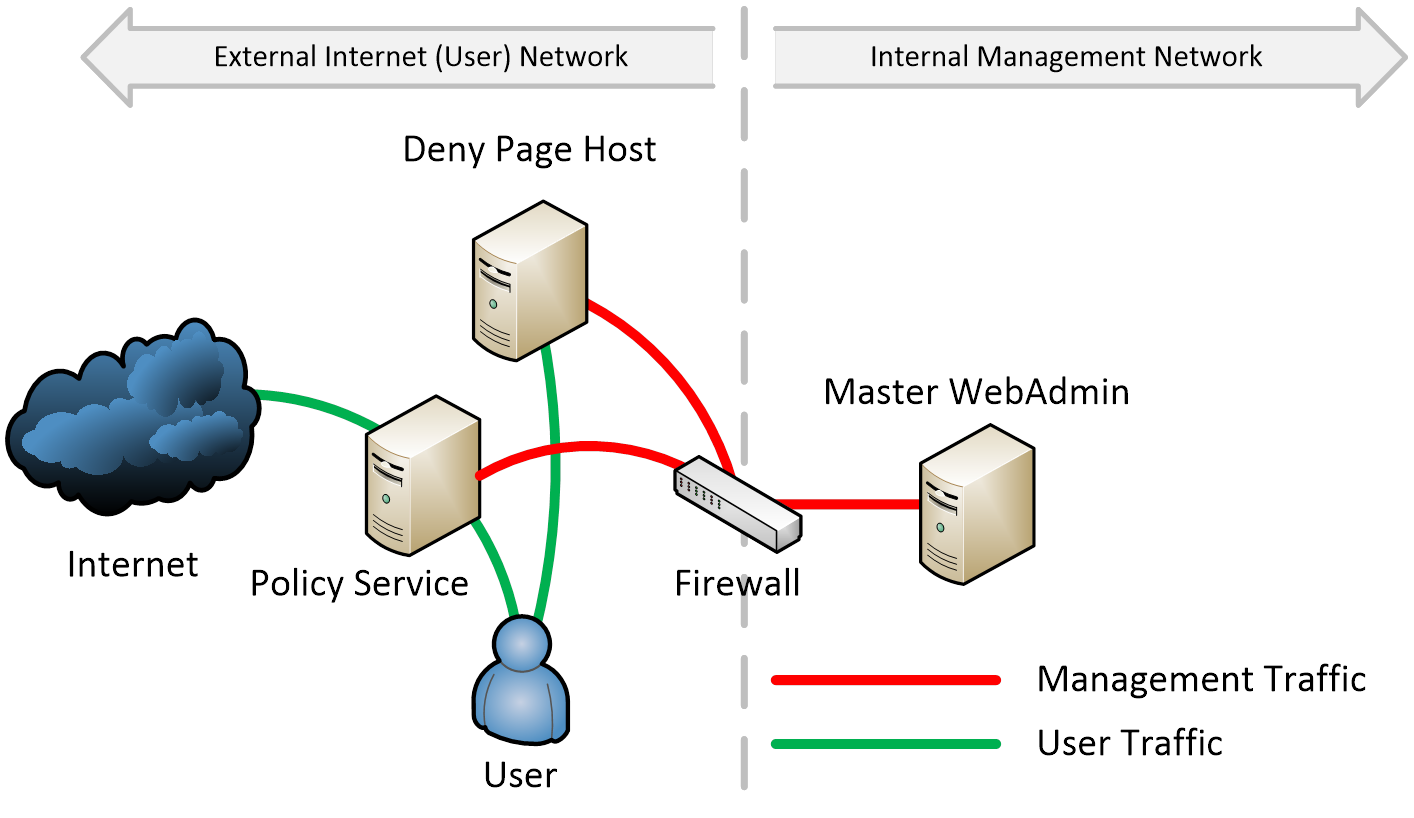
Dedicated Deny Page Host
Hosting deny pages on a dedicated web server (only) allows for delivery of deny pages to all end users without requiring any open ports on a Netsweeper WebAdmin server. This means that the web port (80, 8080, 443) can be closed and the WebAdmin/HTTPD services to be stopped on any publicly accessible Netsweeper system.
Firewalling an Inline Solution
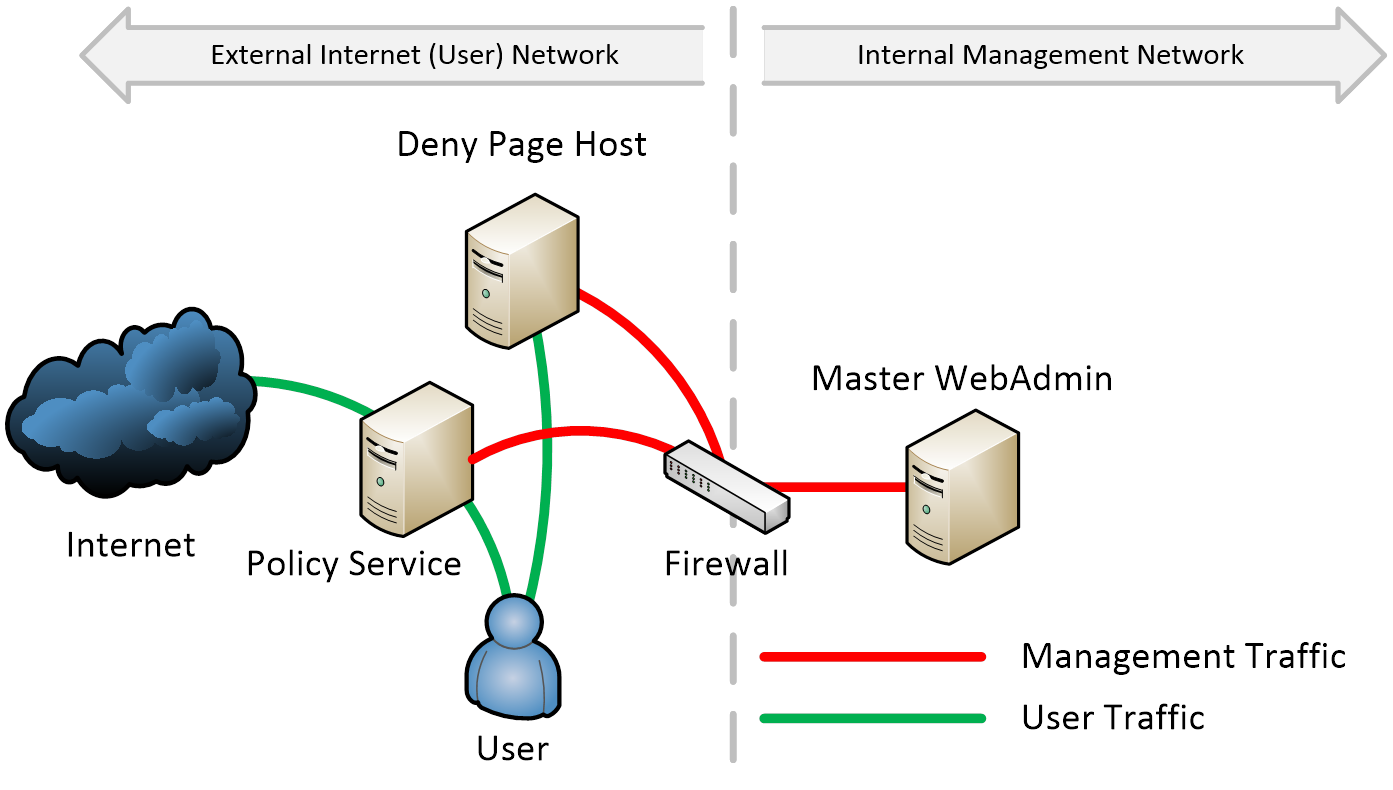
In an inline deployment, a firewall cannot typically be deployed between the Netsweeper Policy Service and the external Internet, due to high traffic levels. This is when having a dedicated WebAdmin Server and Deny Page Host is most important. A firewall between the externally facing network and the internal management network can improve security.
Firewalling a Mirrored Deployment
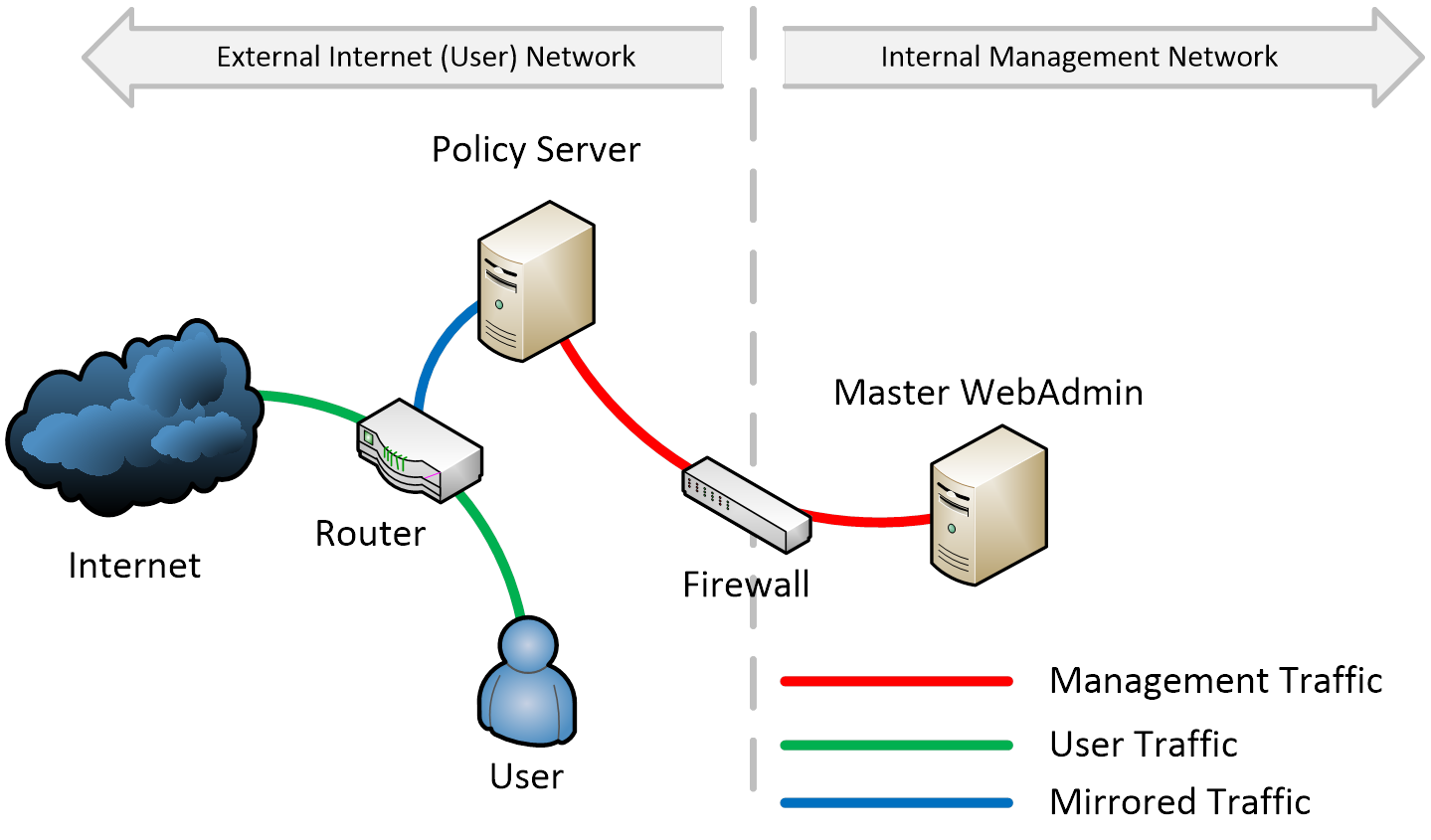
Netsweeper does not come with a firewall, therefore it is important to extend the existing firewalls currently in place around the Netsweeper servers. This allows specific ports to be controlled and managed within the existing infrastructure and management system. It is recommended that all inbound ports be blocked with exceptions based on the deployment type. Netsweeper servers should be allowed to communicate freely outbound. It is also a good idea for Netsweeper Support to be allowed to access to the server for troubleshooting and technical support purposes.
Establish New Management Interface
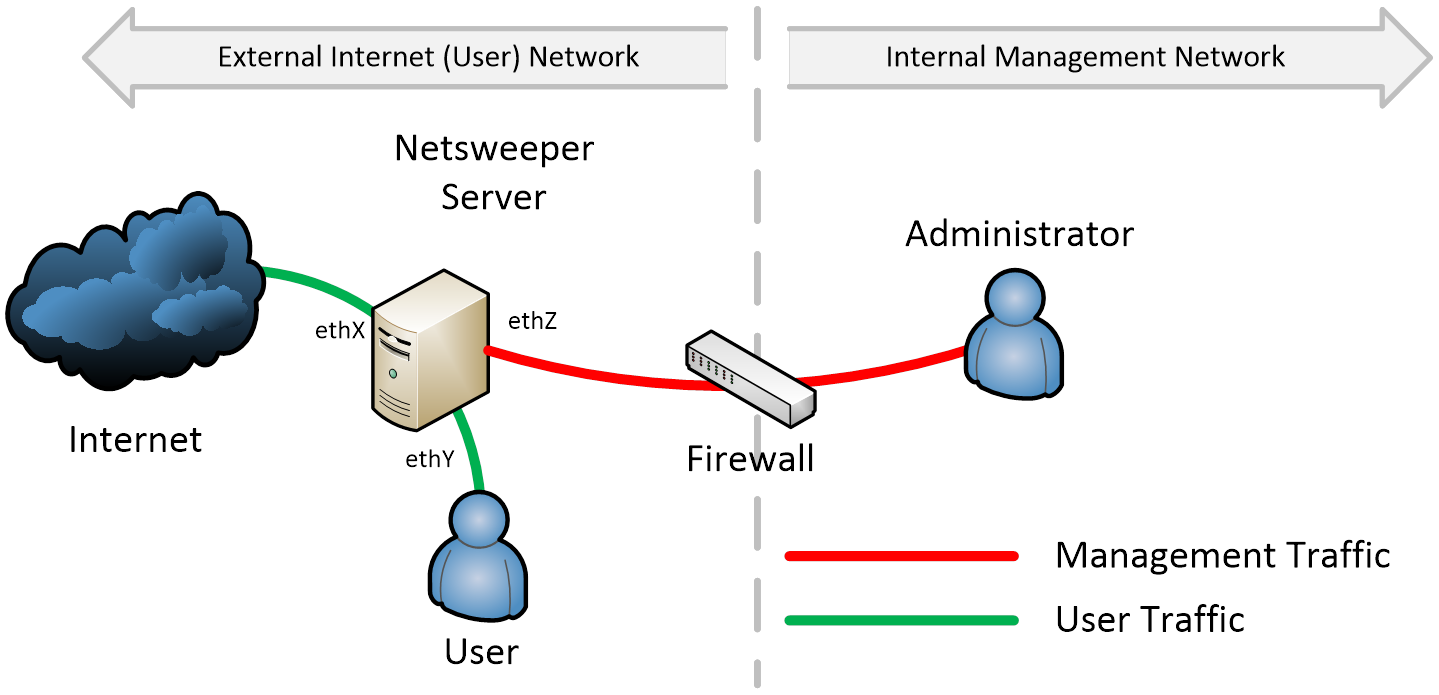
This only allows the management of the system from specific IP addresses within the management network. In addition, the WebAdmin interface is moved to listen only on the specific interface or IP address located on the Management network.
Netsweeper can be configured to allow only specific IP addresses to connect to the HTTPS management port. This will further enhance the security of the system, but this can only be done once the deny pages are moved onto a dedicated remote web server.
Netsweeper Base OS (CentOS)
Netsweeper is built on the CentOS operating system, and therefore makes use of the packages included in the version of CentOS that it is built upon. Netsweeper continually checks to ensure that the base OS for the Netsweeper product is maintained with respect to current packages.
-
Netsweeper is constantly notified of CentOS security advisories.
-
The Netsweeper product is constantly updated with any new CentOS packages.
-
Netsweeper aims to update each new product release with packages, security related or otherwise.
Netsweeper is also continually looking at ways to make this process more automated and resilient and will update customers on any new developments as they become available.
CentOS also provide Continuous Release Announcements and Announce updates (specific security updates) through their mailing lists. You can read more about their mailing lists, and subscribe as well, at the following URL:
File Permissions
By default, the WebAdmin service can adjust configuration files and settings. This can be seen by some customers as a security issue. To raise the level of security you can do one of the following
-
Disable the Web Service
-
Secure the File Permissions
Since most customers will not be able to disable the Web Service, since this is required for management and user policy adjustments, the second option is usually the most realistic. The following file permissions adjustments are recommended.
Performing these changes will make the WebAdmin unable to adjust many settings from the Administration > Services interface. However, from a security perspective this will increase the level of security and is recommended after initial configuration is completed.
Securing System Administration> WebAdmin Settings
chown root:root /usr/local/netsweeper/webadmin/config/settings_local.php
chmod 644 /usr/local/netsweeper/webadmin/config/settings_local.php
Securing System Configuration> Policy Service Settings
chown root:root /usr/local/netsweeper/etc/nsd.conf
chmod 644 /usr/local/netsweeper/etc/nsd.conf
Securing NSProxy
chown root:root /usr/local/netsweeper/etc/nsproxy.conf
chmod 644 /usr/local/netsweeper/etc/nsproxy.conf
Securing NSPortmap
chown root:root /usr/local/netsweeper/etc/nsportmap.conf
chmod 644 /usr/local/netsweeper/etc/nsportmap.conf
Securing NSEF
chown root:root /usr/local/netsweeper/etc/nsef.conf
chmod 644 /usr/local/netsweeper/etc/nsef.conf
Securing IPTables
chown root:root /etc/sysconfig/iptables
chmod 600 /etc/sysconfig/iptables
Readable by non-root users Files and Folders
The following folders are readable by non-root users.
/etc/quagga/bgpd.conf
/usr/local/netsweeper/etc/nsreporter-snmp.conf
/usr/local/netsweeper/etc/NSD-MIB.txt
/usr/local/netsweeper/etc/nsroutes-snmp.conf
/usr/local/netsweeper/etc/nsef.conf
/usr/local/netsweeper/etc/nsd.conf
/usr/local/netsweeper/etc/nsroutes.conf
/usr/local/netsweeper/etc/nsd-snmp.conf
/usr/local/netsweeper/logs
/usr/local/netsweeper/webadmin/ajaxfilemanager/session
/usr/local/netsweeper/webadmin/config/
/usr/local/netsweeper/webadmin/deny/images/
/usr/local/netsweeper/webadmin/logs/
/usr/local/netsweeper/webadmin/soap/NetSweeperNSD.wsdl
Web Service Owned Folders
The following folders are owned by the 'nobody' user which may need to be changed to secure your deployment. Changing permissions may cause the system services to be unable to write to the directory or file.Any changes should be tested before deploying in a production environment.
/var/lib/vnstat
/usr/local/netsweeper/webadmin/logs
/usr/local/netsweeper/webadmin/ajaxfilemanager/session
/usr/local/netsweeper/webadmin/deny/images
/usr/local/netsweeper/webadmin/deny/images/2.6.23
/usr/local/netsweeper/webadmin/deny/images/resources
/usr/local/netsweeper/webadmin/config
/usr/local/netsweeper/var
/usr/local/netsweeper/var/run
/usr/local/netsweeper/var/lib
/usr/local/netsweeper/var/lib/nsroutes
/usr/local/netsweeper/var/lib/webadmin/samlcert
/usr/local/netsweeper/var/lib/webadmin/backups
/usr/local/netsweeper/var/lib/webadmin/appup/compile
/usr/local/netsweeper/var/lib/webadmin/appup/cache
/usr/local/netsweeper/var/lib/webadmin/webdb
/usr/local/netsweeper/var/lib/webadmin/securitylabel
/usr/local/netsweeper/var/lib/nsproxy
/usr/local/netsweeper/var/lib/nsproxy/templates
/usr/local/netsweeper/var/lib/nsproxy/templates/en
/usr/local/netsweeper/var/lib/nsproxy/clamav
/usr/local/netsweeper/var/lib/nsproxy/cache
/usr/local/netsweeper/var/lib/nsd
/usr/local/netsweeper/var/lib/nsd/config
/usr/local/netsweeper/var/lib/nsd/clientfilter
/usr/local/netsweeper/var/lib/lists
/usr/local/netsweeper/var/lib/nsup2d
/usr/local/netsweeper/bin/lm5tools
/usr/local/netsweeper/bin/lm5tools/nsdconf
/usr/local/netsweeper/logs
Ports and Services
The following section outlines the recommended adjustments to be made to secure the listening ports and services. Some of these ports and services cannot be secured with configuration and require simple iptables rules to secure them. Please refer to your configuration documentation for more details on iptables rules.
Policy Service
The Policy Service opened ports for protocols defined in the nsd.conf with the request_protocol line. It also opens ports for SNMP monitoring.
Policy Service Request Protocols
-
request_protocol
-
request_bind_address
In Netsweeper 3.0 and above the ability to specify the request_bind_address for a specific protocol or all protocols is possible. The following can be completed by modifications to the Policy Server Settings (nsd.conf) configuration file. Netsweeper recommends the following changes:
-
Disable all protocols you do not require
-
Restrict the remoteadmin protocol to the management interface
An example of the above may be the following for a single server with Client Filter applications:
request_bind_address 127.0.0.1
request_protocol remoteadmin 0.0.0.0:thinclient 0.0.0.0:rus
For a system acting as a logger with remote WebAdmin and the management IP Address of 10.1.2.3 the following may be used:
request_bind_address 10.1.2.3
request_protocol remoteadmin nslogger
SNMP Ports
Netsweeper utilizes the SNMP service to provide real-time system metrics. To increase security the following ports should be bound to a specific interface IP.
| Target | Configuration File Path | Port | Protocol |
|---|---|---|---|
|
Generic services |
/etc/snmp/snmpd.conf |
161 |
UDP |
|
Policy Service, nsd |
/usr/local/Netsweeper/etc/nsd-snmp.conf |
3161 |
UDP |
|
NSProxy, nsproxyctl |
/usr/local/Netsweeper/etc/nsproxy-snmp.conf |
3167 |
UDP |
|
Reporter Service, nsreportctl |
/usr/local/Netsweeper/etc/nsreporter-snmp.conf |
3163 |
UDP |
|
RAS Service, nsroutesctl |
/usr/local/Netsweeper/etc/nsroutes-snmp.conf |
3165 |
UDP |
|
NSUp2D Service, nsup2dctl |
/usr/local/Netsweeper/etc/nsup2d-snmp.conf |
3166 |
UDP |
These ports can be configured to be bound to a specific interface using the appropriate configuration file listed in the table above.
Example:
Change the following line;
agentaddress 3161
To something of the following nature;
agentaddress 192.168.222.136:3161
This will open port 3161 only on the Interface with the IP Address of 192.168.222.136. This makes sure that the SNMP service can only be accessed from the specific IP. This adds a high level of security since the SNMP service in the Policy Service will NOT be accessible from any other interface.
Database Service (MySQL)
-
Port 3306 listening on all interfaces
If you do not want the database service to listen for ANY remote connections, we highly suggest you add the following to the /etc/my.cnf configuration file under the [mysqld] section
skip-networking
In order to make sure the MySQL database service is only listening on the required IP, instead of skip-networking, add the following to the /etc/my.cnf file
bind-address=192.168.222.136
MySQL is configured by default to allow queries from the localhost only. To allow a remote connection you will need to grant permission for the specific IP in Administration > Services > [hostname] > Database > Allow Remote Access
NSProxy Service
-
TCP Port 31280 listening on all interfaces
-
TCP Port 9443 listening on all interfaces
-
UDP Port 3167
-
More may be configured depending on requirements
Netsweeper recommends that the only interface the NSProxy service listens on is the interface that your clients and workstations will be connecting to.
Netsweeper does not recommend that the NSProxy service is exposed publicly without any authentication mechanism. This is a highly insecure and is not recommend in any deployment scenario.
To make sure the NSProxy service only listens on a specific IP address, you can edit the /usr/local/netsweeper/etc/nsproxy.conf. Find the listen service configurations and change from 0.0.0.0 31280 to the desired interface IP and port:
listen mode ipaddr port
e.g.
listen proxy 192.168.222.136 31280
Using Proxy Authentication Against a WebAdmin Account
Proxy authentication will make sure users authenticate with a username and password prior to being able to use the public proxy. This also has the added benefit of per-user logging and makes per-user filtering possible.
The following example demonstrates how to authenticate users against a WebAdmin account:
auth_param basic program /usr/local/netsweeper/auth/authwebadmin
auth_param basic children 5
auth_param basic realm Netsweeper Filtering example.netsweeper.com
auth_param basic credentialsttl 2 hours
auth_param basic casesensitive off
acl authwebadmin proxy_auth REQUIRED
# look for http_access in other areas, make it this
http_access allow authwebadmin
For more examples of proxy authentication please see ‘Configuration – Authentication Modules’
SSH
-
Port 60104
The SSH service is the secure shell that can be optionally used to access the command-line. This should only be installed and configured on the management and operations network. To configure this, edit the /etc/ssh/sshd_config configuration file and add/adjust the following:
ListenAddress 192.168.222.136
Please refer to your network-use policies regarding configuration of keep-alive timeouts for SSH sessions.
Further hardening recommendations for SSH can be found here.
DHCP Client
-
UDP Port 68
Netsweeper makes no recommendations if you’re using DHCP to configure your interfaces. We do recommend using static IP Address configurations on production installations to avoid misconfiguration and adding configuration dependencies of remote systems. The Netsweeper configuration and deployment guides will not cover how to configure remote network elements, and therefore, it is recommended to always use static IP address configurations.
Web Service (httpd)
-
Port 80, 8080, 443
The apache web service can be used for many purposes. Generally, the apache web service is used for WebAdmin Management, Deny Pages, Report Viewing, and for Remote Server Administration. Only one WebAdmin system should be enabled in a deployment. On all other systems the WebAdmin should be disabled. The apache web service (httpd) can be stopped and disabled from the Services page on the properly configured master WebAdmin for increased security. Please note you should also disable “Enable Remote Control” from Policy Management > Request Servers to prevent System Status errors.
For maximum security the apache web service should be disabled on the following server types:
-
Reporter Servers
-
Deny Page Servers
-
Policy Servers
-
Enterprise Filter Servers
-
Capture Module Servers
-
Remote proxies
If you do not require any remote management of the server, and the server is not used for a reporting service, serving deny pages, or for WebAdmin management you can disable the entire web service (httpd).
Reporter Service
-
UDP Port 3163
-
Requires Web Service via the /remotereporter access to view reports.
The SNMP monitoring for the Reporter uses port 3163. This can be secured to only listen on a specific interface by editing the /usr/local/netsweeper/etc/nsreporter-snmp.conf and changing the following line adding the IP to the port specification. The IP address that should be used in the IP of the management and operations interface is:
agentaddress 192.168.222.136:3163
The WebAdmin uses this port for remote monitoring. The IP Address of the Request Server added to the WebAdmin should be the IP Address of the Management Interface.
NTP (network time protocol)
-
UDP Port 123 (on all interfaces, and IPv6)
It is recommended that the NTP application only listens and communicates via the management network. However, to enforce this you must restrict access to UDP Port 123 on all interfaces except those required for NTP communication.
Directory Sync
-
TCP/UDP port 389 or 636
We recommend customers configure Lightweight Directory Access Protocol (LDAP) over TLS/SSL (LDAPS) on the Directory server using port 636. The port number in Netsweeper WebAdmin for a search base contained in the directory server can then be configured with port number 636. By default, Active Directory servers use port number 389 for the LDAP protocol, so that the Netsweeper WebAdmin provides a default port number of 389 when creating a new search base.
Directory Sync requires the use of WebAdmin API calls. In order for Directory Sync to work, the host running the Directory Sync service must be authorized to make WebAdmin API calls via the WebAdmin Settings > API Settings > Authorized Remote Hosts
More Information
For more information on Inbound and Outbound ports, please see Inbound and Outbound Ports’.