Accounts
An Account is a user with designated privileges that manages filtered clients in their group. Usually this person has some authority over the other users such as a teacher over a class of students, a manager over a group of workers, or a parent over a family. There are a variety of accounts available for delegating filtering administration.
There are two types of created Accounts.
The Simple Account Create interface forces the email to be the login. It removes Advanced Account requirement such as: description, password options, templates, theme, categories, and create options.
Delegated Administration Overview
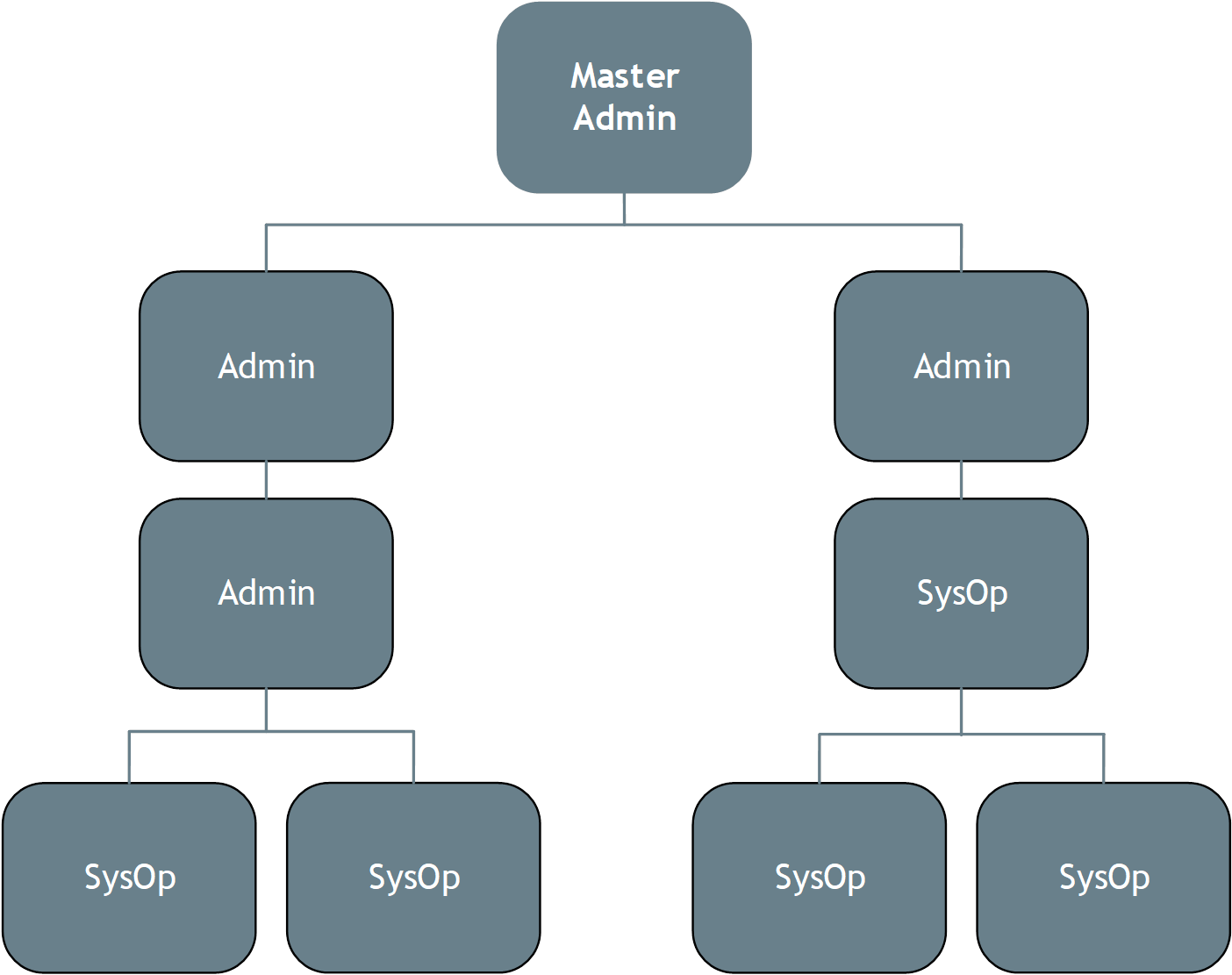
This document looks at how to prepare your system to be administered by a hierarchical management team.
The Master Admin is often an IT team member who may be closely involved in managing hardware and software issues, but not involved in managing filtering policies. In many cases, particularly those governing more than a dozen or so users, this technical person will delegate policy management to others, using one of the three account classes
These are:
General Admins, who have permission-based access to manage the system.
SysOps (System Operators), who have specific permissions to manage filtering for assigned groups
Users who are members of a filtered group or accounts and may be assigned permission to manage some aspects of filtering for their group or accounts. This could be a teacher of a group of students. A user account can be assigned to a customer that belongs to a single group (large or small) with a single Deny List Policy. Users can add URLs to the local Allow and Deny Lists and can access activated Quick Reports through the WebAdmin.
See also: Account Types