Database Configuration
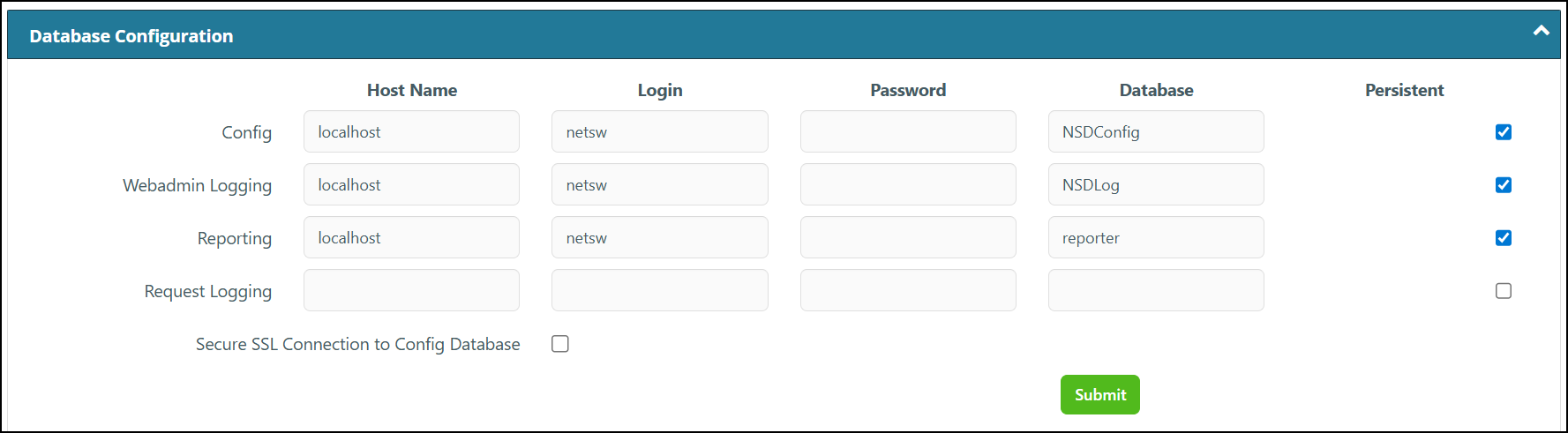
This specifies the Host name for three main components of the of the Netsweeper system: Config (NSDConfig), Logging (NSDLog) and Reporting (Reporter). The default setup will have them all on the same server. As of Netsweeper 9.1, there is also now a Request Logging component, which is can be configured and used to utilize our new Clickhouse-based Reports.
|
Entity Name |
Comments |
|---|---|
|
NSDConfig (db) |
Configuration database that holds the Policy configuration. This is managed by the many Policy management pages within the WebAdmin. This is then loaded by the Policy Service to perform actual Policy actions. |
|
NSDLog (db) > webadmin_log (tbl) |
WebAdmin logging table where activity within the WebAdmin interface is logged. |
|
reporter (db) > demand_reports (tbl) reporter (db) > scheduled_reports (tbl) reporter (db) > continuous_reports (tbl)
|
Reporter database and tables that contains report definitions. WebAdmin will modify report definitions that are then consumed by the Reporter service. |
|
Secure SSL Connection TO Config Database |
This checkbox is used to enable the SSL connection from the WebAdmin to the database, so the transmitted data is encrypted. |
|
Request Logging (ddb) |
Our new logging database, which supports our newer Reporting options. Please note: the new Reports framework is not currently enabled by default in the 9.1 release. |
Recovering Your Settings into the Database
The Netsweeper 7.2 and above release stores all PHP setings for active-active WebAdmin systems into the database. These settings are then exported into webadmin/config/settings_nsup2d.php. In the event that you make an errant change in your WebAdmin Settings that causes you to get locked out of the WebAdmin, you can use the following process to restore access:
-
Create a shell session and make sure you can connect to the database.
nsmysql config
-
In the event you cannot connect, you must restore database connectivity before proceeding.
Please note: If your settingsnsup2d has corrupted database issues you may need to follow the steps in the 'Restoring your WebAdmin Settings to Default section of this document. Best practice is to always keep an export of your WebAdmin settings and make sure it is current before making changes.
-
Stop the NSUp2D service.
systemctl stop nsup2dctl
-
Manually modify the settings_nsup2d.php file with a text editor in order to find and resolve the database issues.
-
Confirm you can now connect to the database with the 'nsmysql config' command.
-
Once database connectivity has been restored, log into the WebAdmin and navigate to WebAdmin Settings and repeat the changes you made in the settings_nsup2d file and then save your WebAdmin Settings.
-
Restart the NSUp2D service to re-serialize the database settings.
systemctl start nsup2dctl
-
Confirm database connectivity still works correctly with the 'nsmysql config' command.
-
You should now have regained access to the WebAdmin.
Restoring your WebAdmin Settings to Default
If instead, you wish to import new NSDConfig.webadmin_config settings you can do so by adjusting the settings_local.php and importing these settings into the database using the following process:
-
Create a shell session and make sure you can connect to the database.
nsmysql config
-
In the event you cannot connect, you must restore database connectivity before proceeding.
-
Review your settings_local.php to make sure these are the settings you wish to override all database settings. You can overwrite the database values with the following php
/usr/local/netsweeper/webadmin/bin/upgrade_config_settings.php