The Suggestions tab compares new and edited List Entries against a list of 'Rules' and existing List entries. These suggestions provide options for managing incorrect and redundant entries before they are added to a List. When a new URL is entered, or pasted into a List, a popup window displays with List Suggestions on how the URL entry should be formatted or expanded to properly block content. You can accept or reject these suggestions.
These popup windows can be found in the:
- 'New Entry' and 'Edit Entry' Popup.
- Single User Interface Allow and Deny Lists
- Profile Manager Allow and Deny List tabs. (These tabs allow only Add and Delete entries but do not provide an entry editor.)
These new and edited Entry Rules can be managed in the List Suggestions tab found under the My Account > Preferences menu. This window allows you to enable, disable or automatically apply a Rule for new or edited entries.
 Available List Suggestion Rules
Available List Suggestion Rules
This section outlines the List Suggestion Rules and examples.
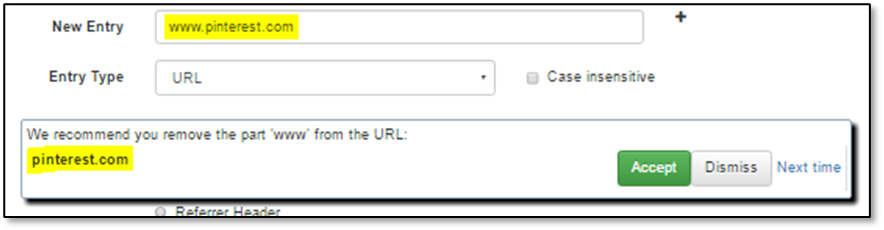
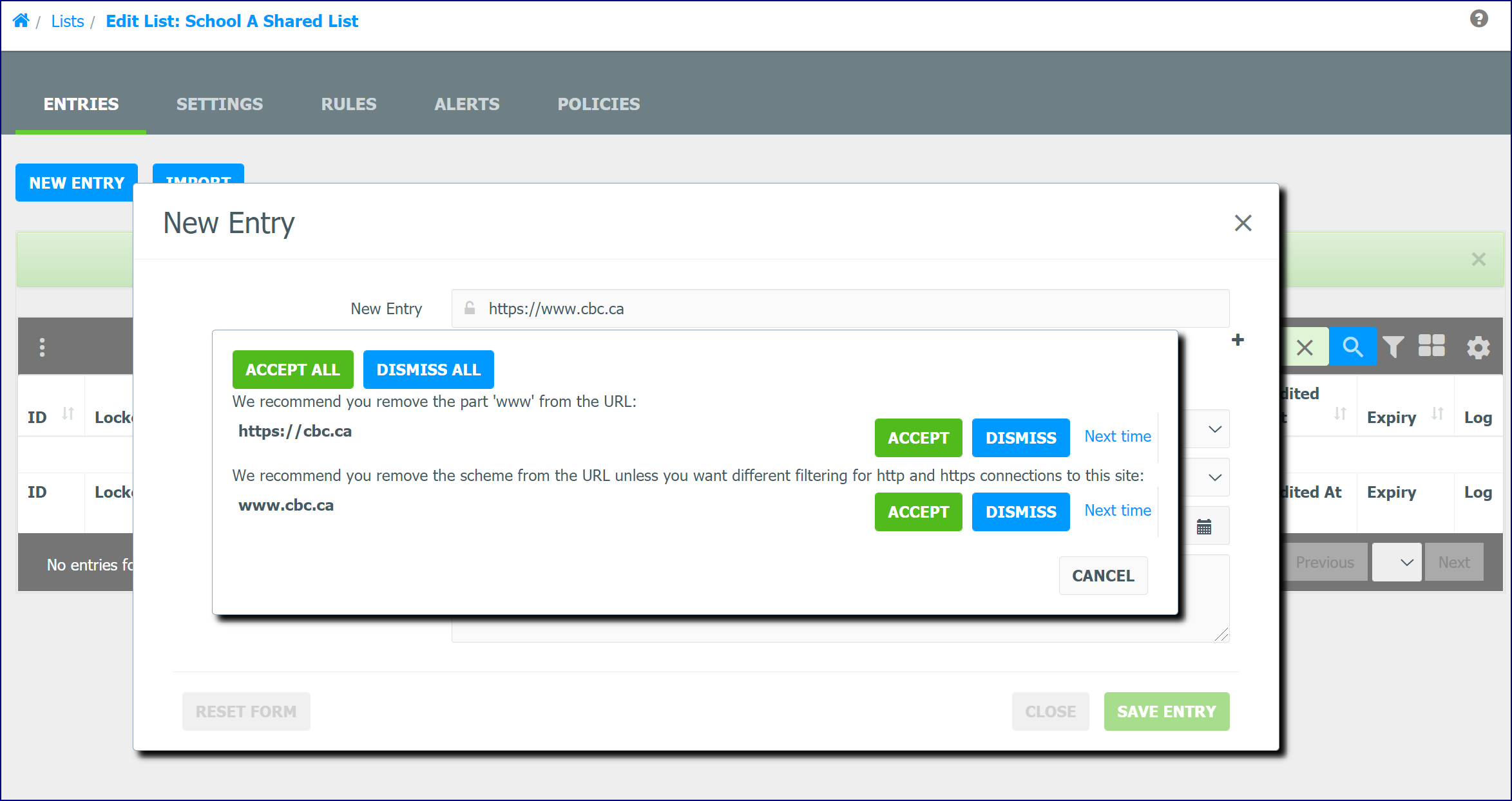
Rule: Remove www from Host Name
Remove the 'www' from the site name if the URL has such a part and doesn't have a path or query.
Rule: HTTPS URL has path or query
The filtering platform cannot parse the path or query from HTTPS web sites. An https URL with a path or query will not match any request URL. It is recommended you remove everything except the scheme and the host name.
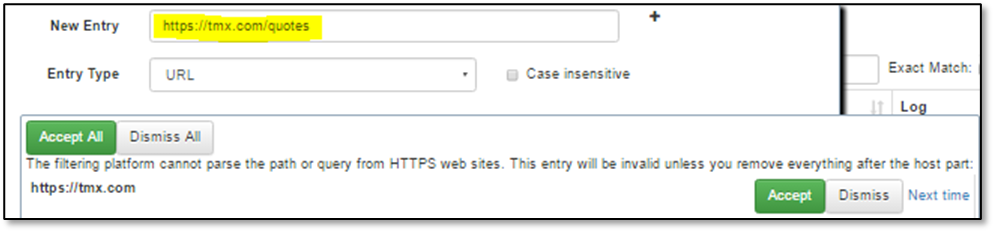
This rule is not necessary if you are using NSProxy with decryption.
Rule: Remove the anchor
We noticed a hash mark or Fragment Identifier (after # sign) usually points to a fragment inside a page. The URL entry with this mark doesn't match the whole page URL. If you mean the whole page, it is recommended to remove this hash mark.:

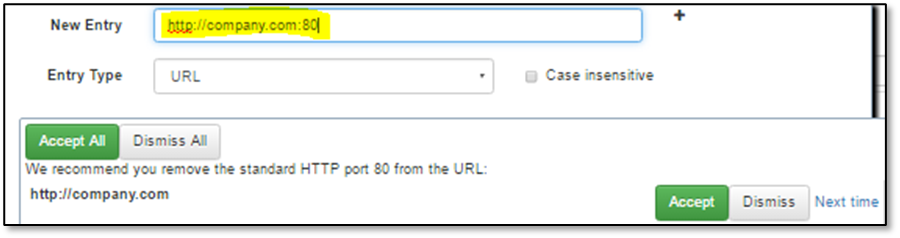
Remove standard HTTP port
If a URL includes an HTTP protocol and port 80, the port specification is redundant. It is recommended that you remove the port.
Remove standard HTTPS port
If a URL includes an HTTPS protocol and port 443, the port specification is redundant. It is recommended you remove the port.
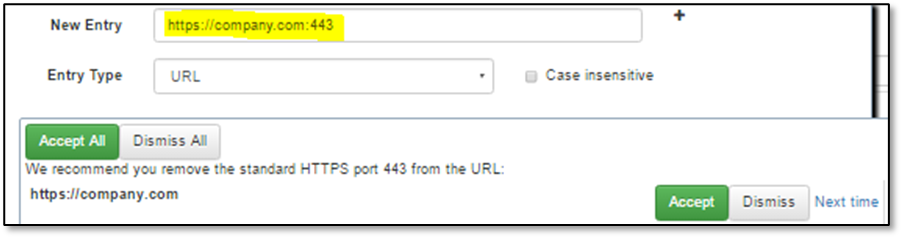
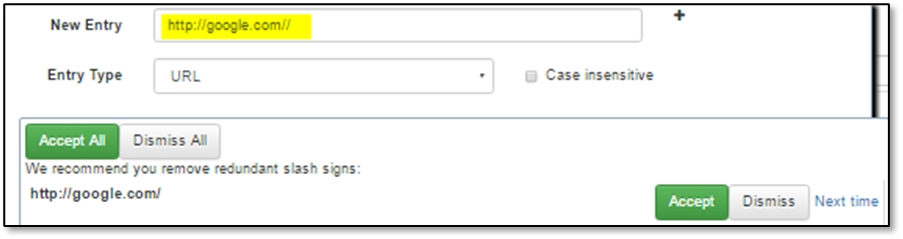
Remove redundant slashes
If a URL has repeated slash signs (except in :// separator) they are redundant. It is recommended to remove redundant slashes.
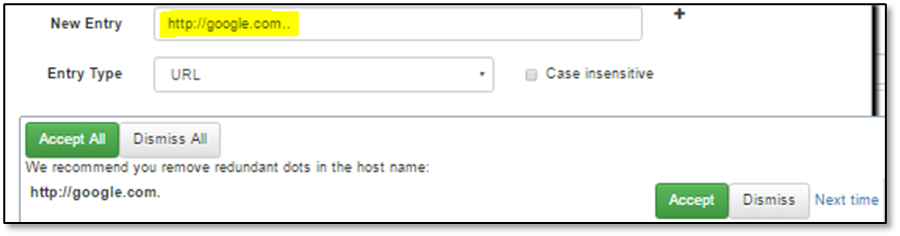
Remove redundant dots
If a URL host name has repeated dot, it cannot be parsed correctly. It is recommended you remove redundant dots.
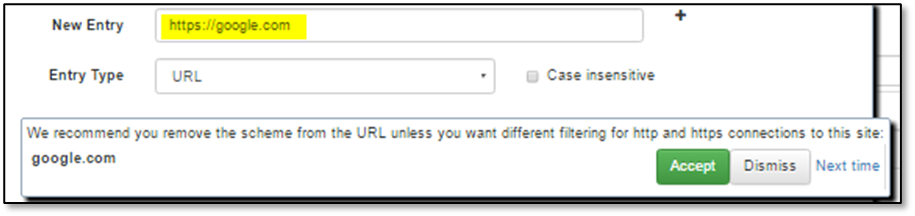
Remove the scheme
It is recommended you omit the scheme part of URL unless you want different filtering for http and https connections to the same site.
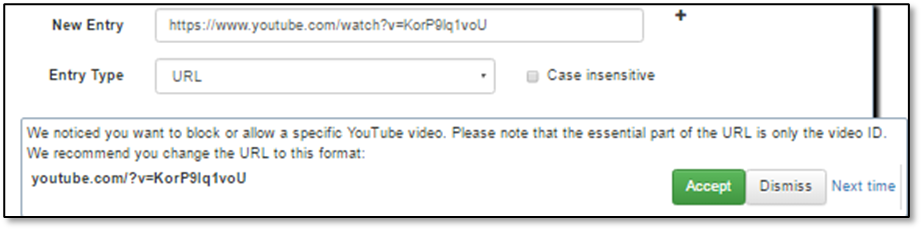
Generalize Youtube video URL
In the YouTube video URL the essential part is only the video ID. If the URL includes other query parts or subdomains it can prevent video filtering if the video is accessed in some other way. It is recommended that you leave only the youtube.com host name and the video ID in the URL.
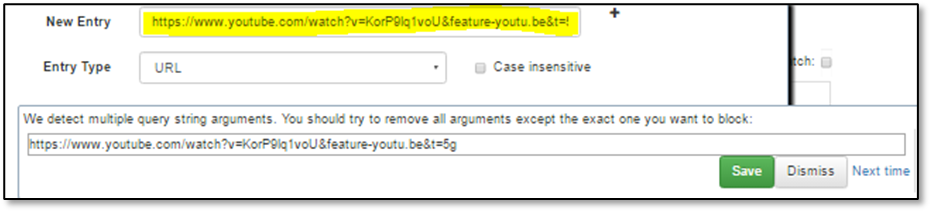
Multiple CGI arguments
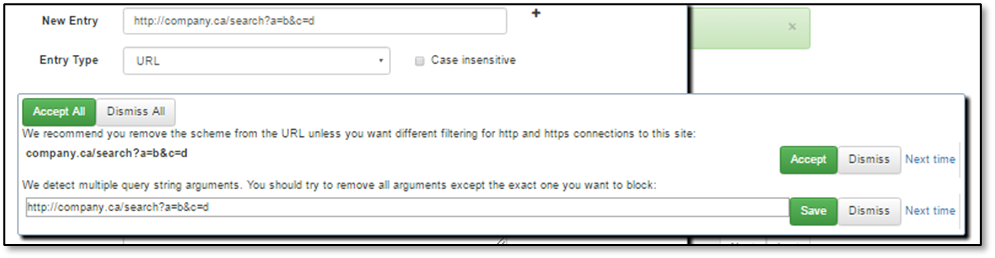
In a URL with a query, usually only one of the CGI arguments identifies the page, image, or video. Other arguments define additional properties such as interface language, image size, video offset, etc. For better filtering it is recommended you leave only the CGI query argument that identifies the document.
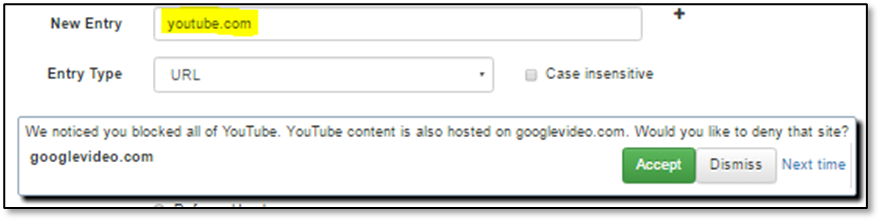
Deny more video sites with YouTube
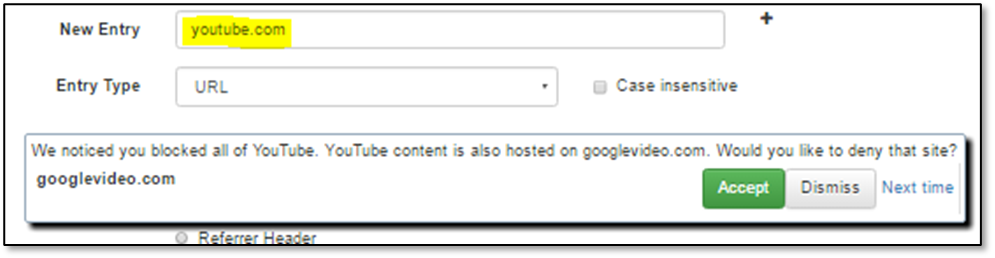
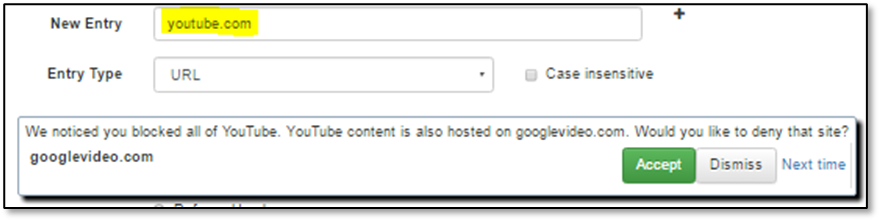
If the host is YouTube and the action is to Deny the site, it is recommended that you deny other video sites, e.g. googlevideo.com.
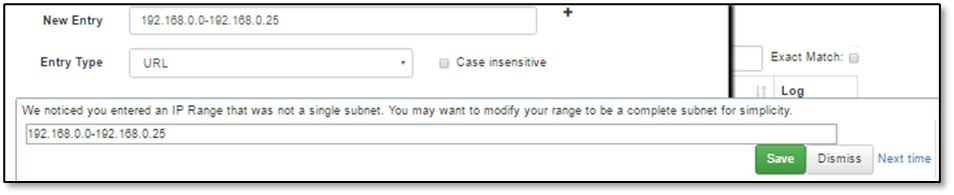
IP range in the URL is not a subnet
If the URL host name is an IP range it is recommended you make the range as big as a complete IP subnet.
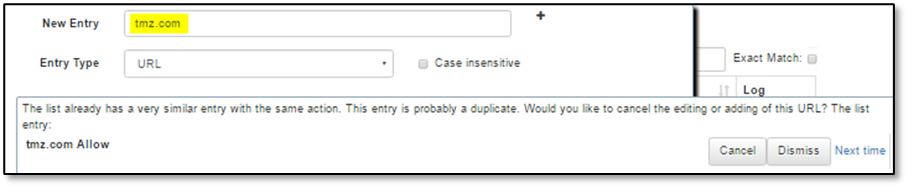
The list already has similar entry
This list already has a similar entry
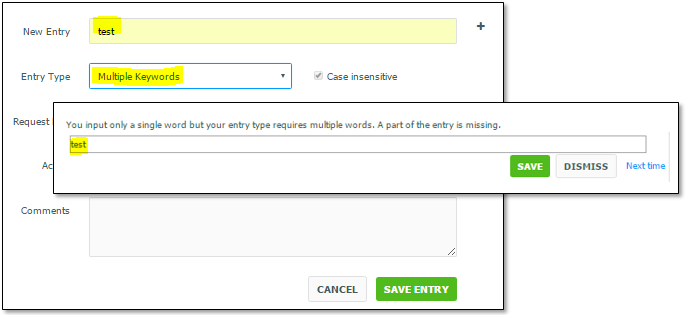
A single word is used where Multiple Words or Multiple Keywords are expected for these Entry Types
If the Entry Type is Multiple Words or Multiple Keywords but only one word is specified, this check warns you that a part of the input may be missing.
Keyword/ Multiple Keywords/ Whole Word/ Multiple Words contain common Scheme
If a Keyword/ Multiple Keywords/ Whole Word/ Multiple Words entry contains a common scheme it will apply the specified action to all URLs with that scheme, often leading to unexpected filtering behavior. If you wish to allow, deny, re-categorize, or modify other Actions for a common scheme, you may want to use the Scheme Entry Type.

Keyword/ Multiple Keywords/ Whole Word/ Multiple Words contains common top level domain
If a Keyword/Multiple Keywords/ Whole Word/ Multiple Words entry contains a common top level domain, it will apply the specified action to all URLs with that domain, often leading to unexpected filtering behavior.

Adding a Scheme Entry Type
Adding a Scheme Entry Type may cause unexpected filtering behaviour for all requests with that scheme.
URL is missing part of host name
If a URL entry is missing either a domain or top a level domain, it will often cause unexpected filtering behavior.
Adding a default action entry type
Adding a Default Action entry type will apply the specified action to all requests where no other entry in the list was applied. This is applied on a per Request Part basis.
Slow processing for Regular Expression entry types
Adding a Regular Expression entry type can cause poor performance due to slower processing speeds. Additionally, improper usage can also cause unexpected filtering behaviour.
Encode URL path and CGI arguments
It is recommended you encode the URL path and CGI arguments. The filtering match is based on an encoded path and CGI argument in Web request URLs. The non-encoded URL path and CGI argument may not block the Web request as expected.
URL Convert to Path
Warn users when creating a URL type entry which starts with a forward slash. This will be automatically converted to a Path type entry.
URL Convert to Query
Warn users when creating a URL type entry which starts with a question mark. This will be automatically converted to a Query type entry.
Managing List Suggestions
Disable and Enabling List Suggestions
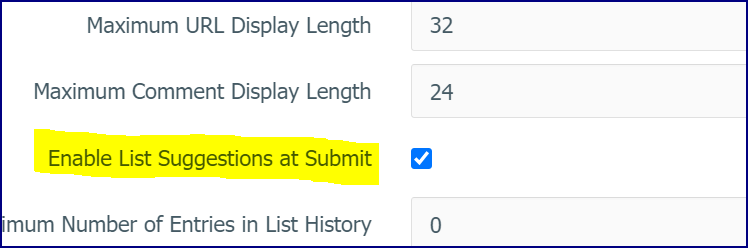
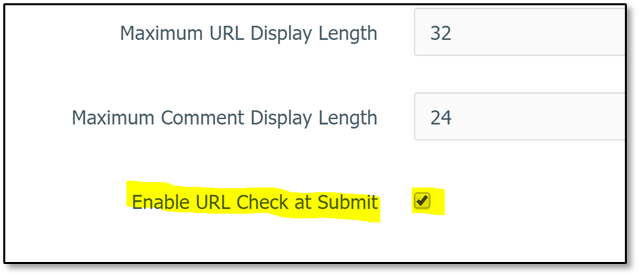
In Administration > WebAdmin Settings, scroll down to URL/Keyword Lists Settings. Go to Enable URL Check at Submit to enable and disable List Suggestions or Rules. This option is enabled by default.
List Suggestion Popup Window
In the WebAdmin, when an entry is added or edited and you click the Save Entry button, a popup window may display with 'suggestions'. Depending on the Rule, you can replace, edit, add, or cancel the entry or in some cases, the rule may offer additional information. The Next Time link lets you access another page where you can decide how you want to handle this rule and similar URLs in the future. When all suggestions are accepted or rejected the page automatically submits the entry and hides all popups.
Disabled Test and Warning Icon
If some tests are disabled, the tool works in the 'background mode' for these tests. It is run for any changes in the Entry input field of Part, Type, and Action setting. If some tests give results the New Entry/Edit Entry shows a warning icon. The icon tooltip shows the total number of test results.
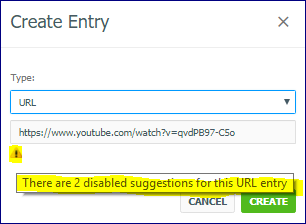
Rules that require comparisons with other list entries (such as similar entry) are not applied here.
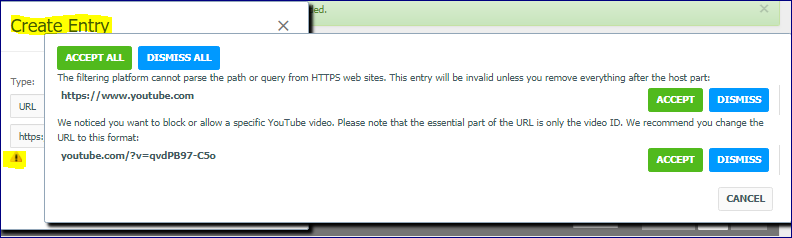
If you click the icon, the tool shows results in a separate popup.
List Suggestions
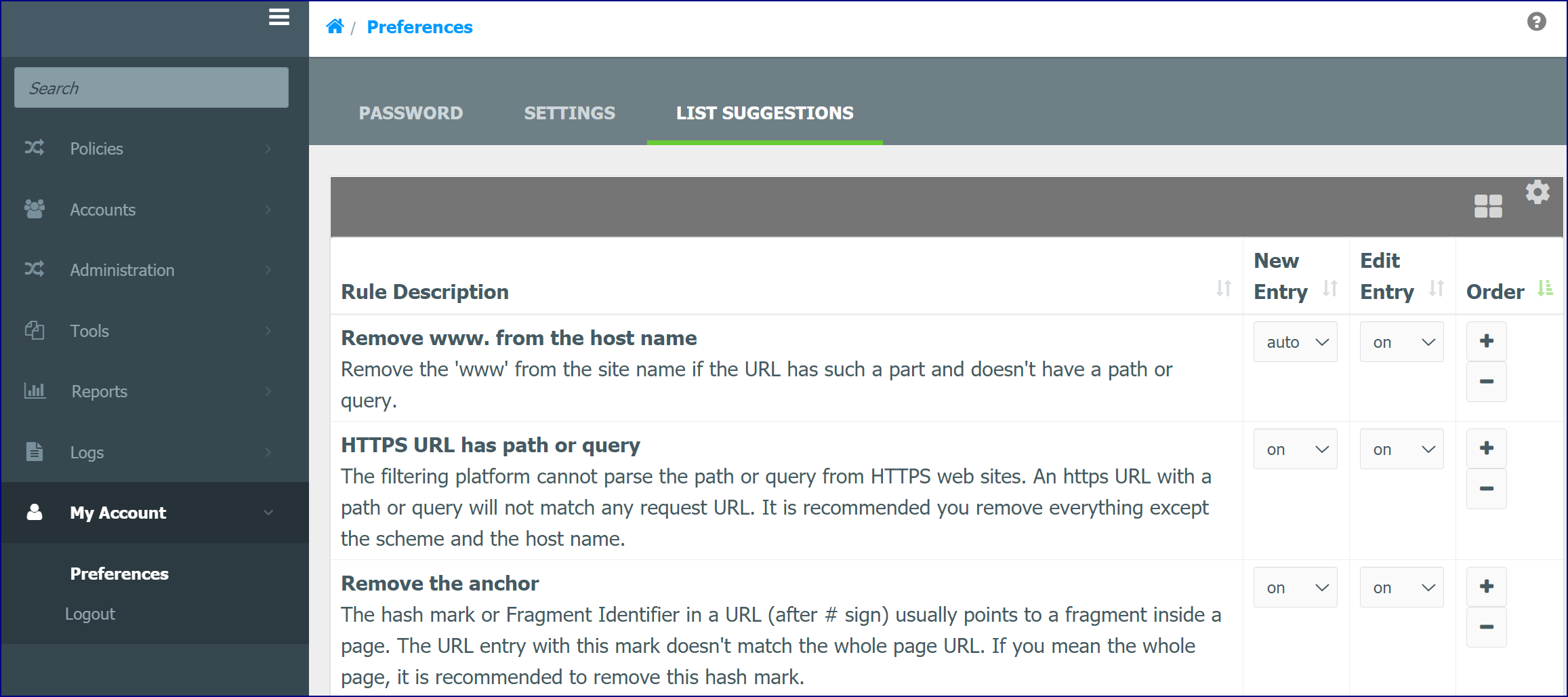
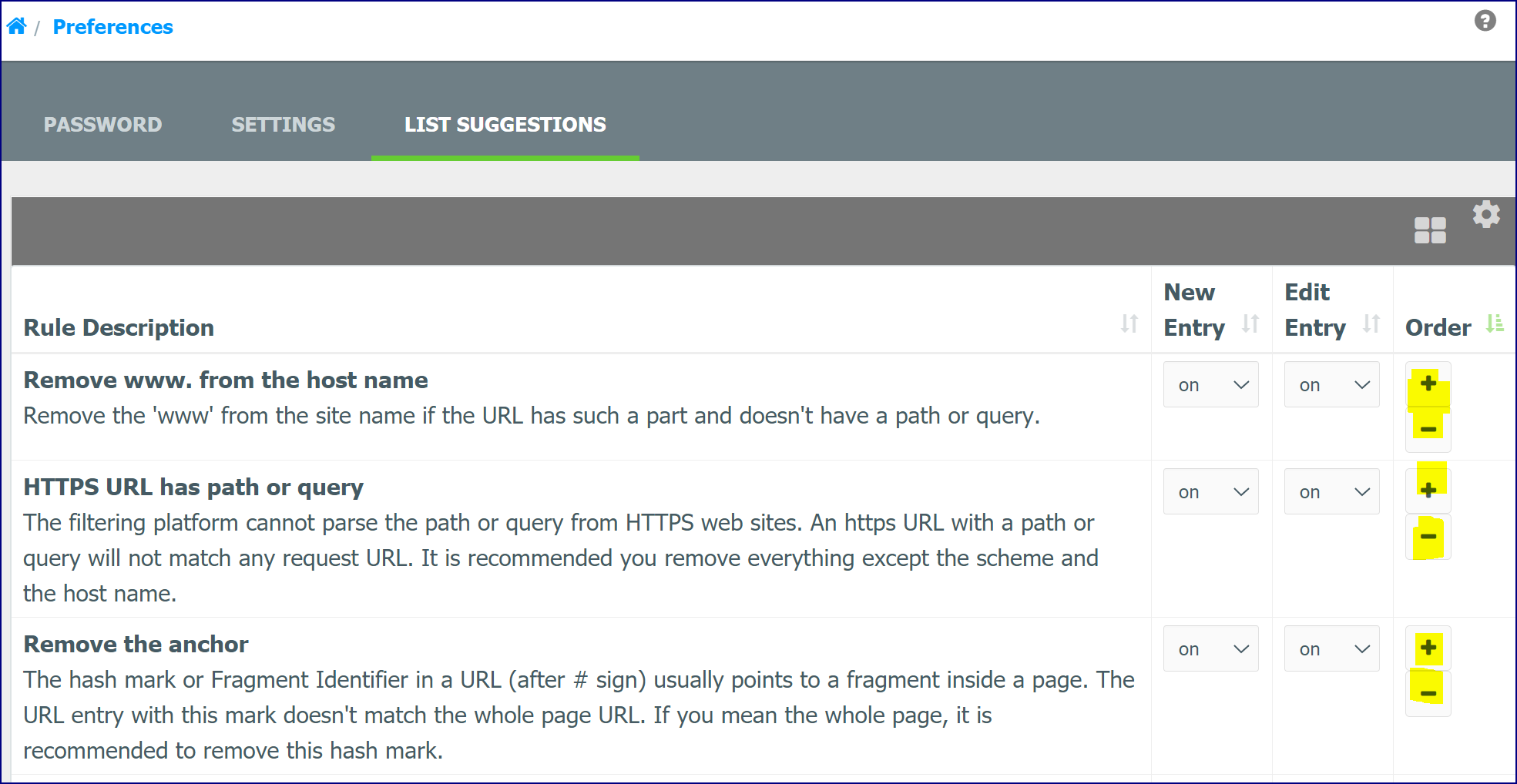
The List Suggestions tab is found under the My Account > Preferences window. This window displays List Suggestion Rules and their descriptions. It allows you to enable, disable or reset a Rule for new or edited entries. This window works with the 'List Suggestions' suggestions in the URL List New Entry popup window that displays when a URL is entered in the 'Lists' window, Policy Local List tab or the Profile Manager Allow and Deny List tabs. From here, you can set a Rule to on (enable), off (disable) or auto (applies recommended changes automatically). These can be set for new entries and edited entries. Use the plus/minus buttons in the 'Order' column to change the Rule display order.
Status Options
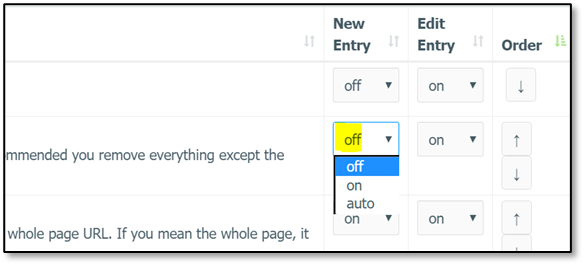
There are three status options: on, off and auto. These statuses can be set for a New Entry or an Edit Entry. The on and off options enable and disable the selected rule. All changes are saved automatically.
Auto Option - Next Time Link
When a popup rule displays on an entry, you can Accept or Dismiss the Rule. There is also a Next Time link.
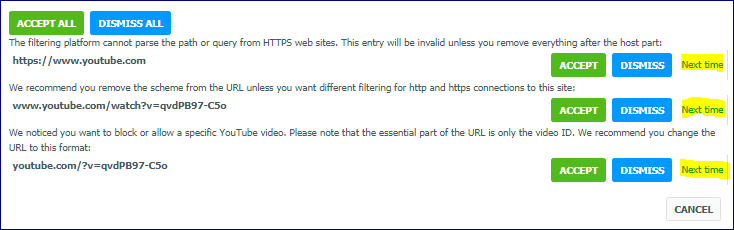
When the Next Time link is clicked, the window expands with two button options on how this rule should be applied the next time it is encountered.
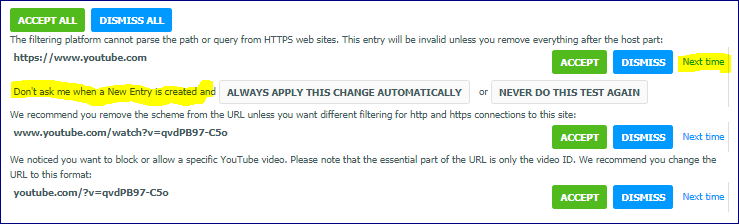
If the Always apply this change automatically button is chosen, the 'Suggestion' will be set to auto.

If the Never do this test again button is clicked, the 'Suggestion' will be set to off.

Please note that if auto or off are already applied to the rule, its corresponding button will not display.
Order Column
Use the plus/minus buttons in the order column to set the priority for how the Rules are applied. Some Rules can provide opposite suggestions such as removing the path from https URL and removing the scheme from the same URL. Other Rules provide a suggestion that makes other Rules useless if accepted. An example of this would be when you cancel the entry input because a similar entry already exists in the list. These buttons allow you to run some tests before others.
Accept All and Dismiss All
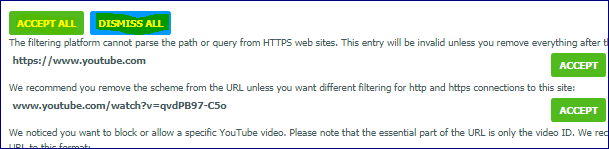
If the popup has multiple results, it also provides two buttons that allows to accept or dismiss all suggestions together.
Cancel Button – List Suggestions Popup
The Cancel button closes the List Suggestion popup without closing the List Entry edit popup.
Types of Tests for Rules
This section outlines some of the tests that are run against a URL entry and the type of responses required.
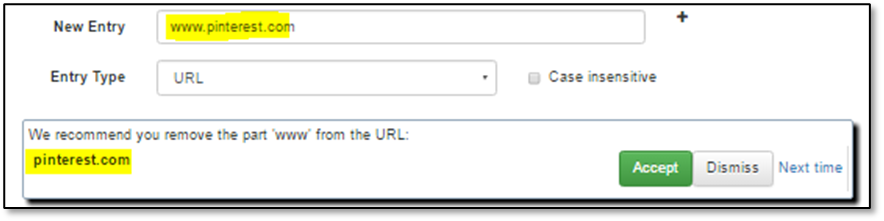
Replace: The Replace test suggests some corrections for the added/edited entry and provides the changed string to replace the entry. If you click to Accept the suggestion, the WebAdmin replaces the entry.
Edit: The Edit test suggests some changes but it cannot do it automatically because a decision is required. For these results, the popup provides an editable input field where you can make changes and save this result into the main Entry Add/Edit form. The Save button doesn't submit the entry immediately if some other test needs interaction.
Add: The Add test suggests adding more URLs with the current URL and provides the additional URL or a list of URLs. You can accept additional URLs and they will be added to the list. This feature works only with 'Lists' window entry popup because it has a multi-line input field. This does not work in the Profile Manager. In the example below, you can see that when denying a YouTube video, it is suggested 'googlevideo.com' should also be added.
Cancel: The Cancel test suggests that you should not add the entered URL to the list (e.g. the list already has a more general entry with the same action or the same entry with different action). It suggests that you cancel the current entry input/edit. If you choose to Cancel the action, the WebAdmin hides all popups and does not save the entry.

Info: The Info test suggests some further action but doesn't provide any other function. This kind of messages is like any information popup dialog and just requires an acknowledgment.

About the List Suggestion Rules
This section outlines the List Suggestion Rules and examples.
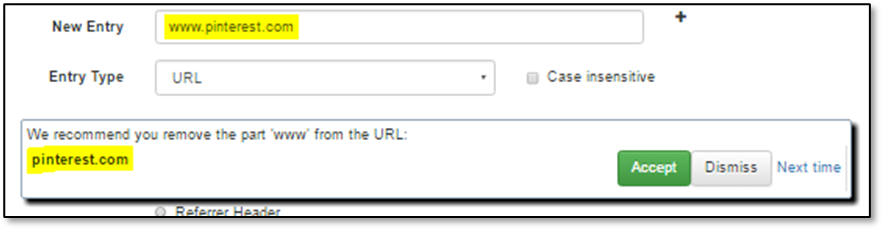
Rule: Remove www from Host Name
Remove the 'www' from the site name if the URL has such a part and doesn't have a path or query.
Rule: HTTPS URL has path or query
The filtering platform cannot parse the path or query from HTTPS web sites. An https URL with a path or query will not match any request URL. It is recommended you remove everything except the scheme and the host name.
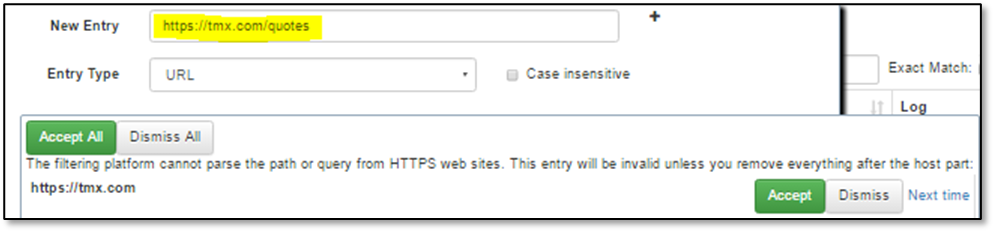
This rule is not necessary if you are using NSProxy with decryption.
Rule: Remove the anchor
We noticed a hash mark or Fragment Identifier (after # sign) usually points to a fragment inside a page. The URL entry with this mark doesn't match the whole page URL. If you mean the whole page, it is recommended to remove this hash mark.:

Remove standard HTTP port
If a URL includes an HTTP protocol and port 80, the port specification is redundant. It is recommended that you remove the port.
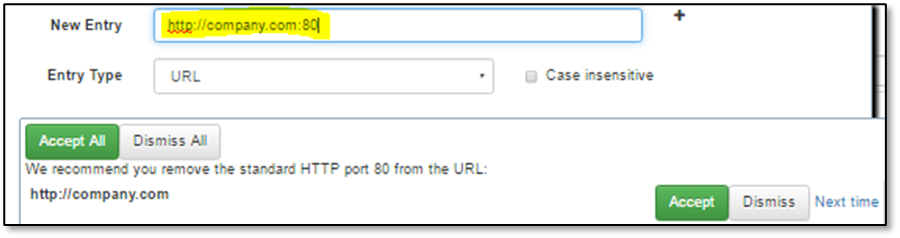
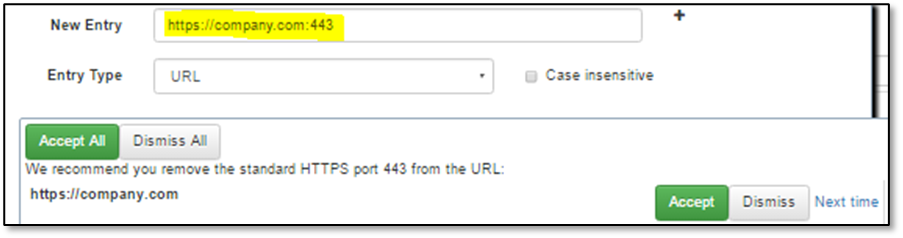
Remove standard HTTPS port
If a URL includes an HTTPS protocol and port 443, the port specification is redundant. It is recommended you remove the port.
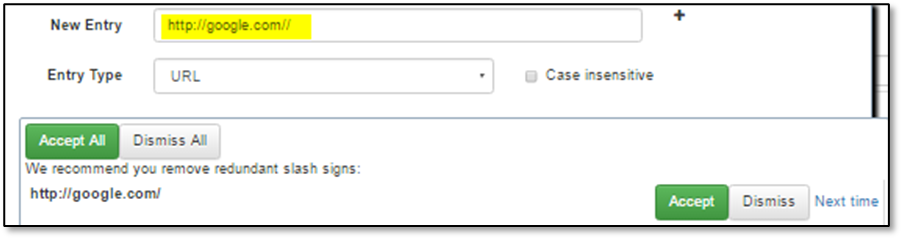
Remove redundant slashes
If a URL has repeated slash signs (except in :// separator) they are redundant. It is recommended to remove redundant slashes.
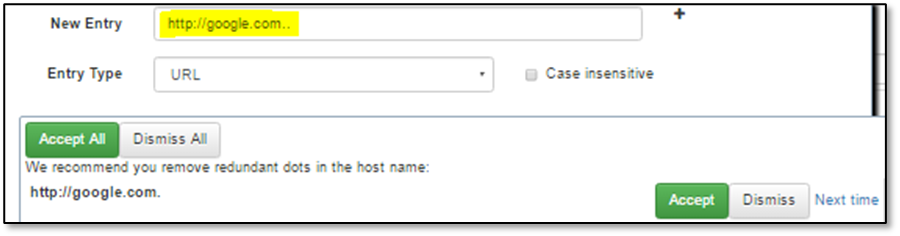
Remove redundant dots
If a URL host name has repeated dot, it cannot be parsed correctly. It is recommended you remove redundant dots.
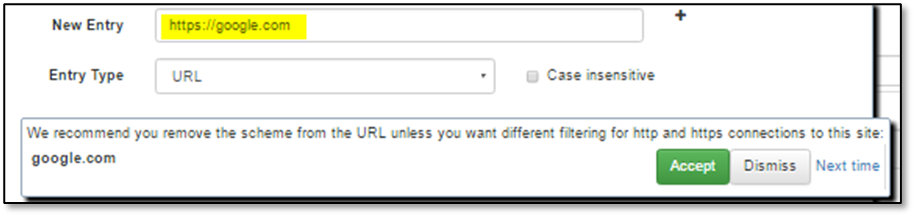
Remove the scheme
It is recommended you omit the scheme part of URL unless you want different filtering for http and https connections to the same site.
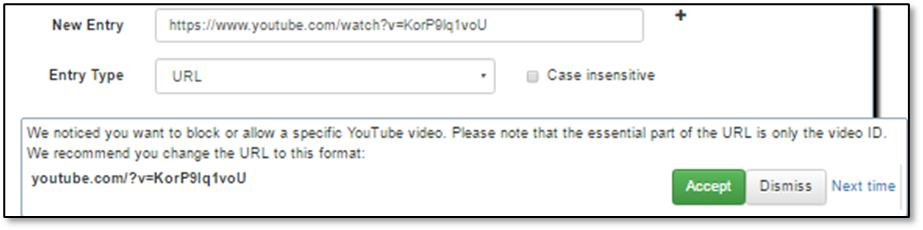
Generalize Youtube video URL
In the YouTube video URL the essential part is only the video ID. If the URL includes other query parts or subdomains it can prevent video filtering if the video is accessed in some other way. It is recommended that you leave only the youtube.com host name and the video ID in the URL.
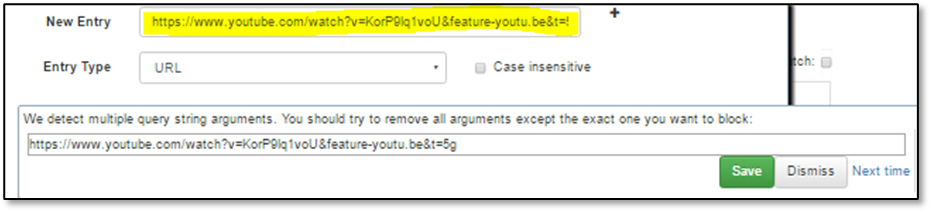
Multiple CGI arguments
In a URL with a query, usually only one of the CGI arguments identifies the page, image, or video. Other arguments define additional properties such as interface language, image size, video offset, etc. For better filtering it is recommended you leave only the CGI query argument that identifies the document.
Deny more video sites with YouTube
If the host is YouTube and the action is to Deny the site, it is recommended that you deny other video sites, e.g. googlevideo.com.
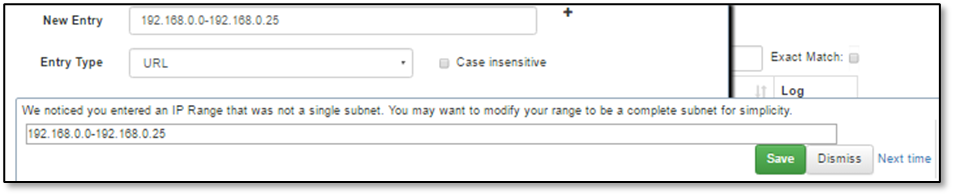
IP range in the URL is not a subnet
If the URL host name is an IP range it is recommended you make the range as big as a complete IP subnet.
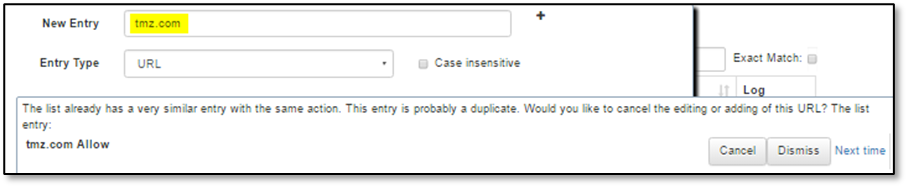
The list already has similar entry
This list already has a similar entry
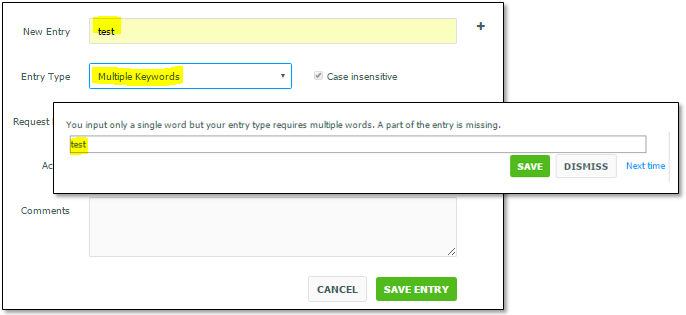
A single word is used where Multiple Words or Multiple Keywords are expected for these Entry Types
If the Entry Type is Multiple Words or Multiple Keywords but only one word is specified, this check warns you that a part of the input may be missing.
Keyword/ Multiple Keywords/ Whole Word/ Multiple Words contain common Scheme
If a Keyword/ Multiple Keywords/ Whole Word/ Multiple Words entry contains a common scheme it will apply the specified action to all URLs with that scheme, often leading to unexpected filtering behavior. If you wish to allow, deny, re-categorize, or modify other Actions for a common scheme, you may want to use the Scheme Entry Type.

Keyword/ Multiple Keywords/ Whole Word/ Multiple Words contains common top level domain
If a Keyword/Multiple Keywords/ Whole Word/ Multiple Words entry contains a common top level domain, it will apply the specified action to all URLs with that domain, often leading to unexpected filtering behavior.

Adding a Scheme Entry Type
Adding a Scheme Entry Type may cause unexpected filtering behaviour for all requests with that scheme.
URL is missing part of host name
If a URL entry is missing either a domain or top a level domain, it will often cause unexpected filtering behavior.
Adding a default action entry type
Adding a Default Action entry type will apply the specified action to all requests where no other entry in the list was applied. This is applied on a per Request Part basis.
Slow processing for Regular Expression entry types
Adding a Regular Expression entry type can cause poor performance due to slower processing speeds. Additionally, improper usage can also cause unexpected filtering behaviour.
Encode URL path and CGI arguments
It is recommended you encode the URL path and CGI arguments. The filtering match is based on an encoded path and CGI argument in Web request URLs. The non-encoded URL path and CGI argument may not block the Web request as expected.
URL Convert to Path
Warn users when creating a URL type entry which starts with a forward slash. This will be automatically converted to a Path type entry.
URL Convert to Query
Warn users when creating a URL type entry which starts with a question mark. This will be automatically converted to a Query type entry.
List Suggestion Editor Options
List Suggestion Editor Options
|
Option |
Description |
|---|---|
|
Title |
Enter the title for this Rule. |
|
Suggested Action |
This section is a list of possible tests that can be assigned to this Rule. Suggest Replacing an Entry (Replace Test): This is a Replace test and it suggests some corrections for the added/edited entry and provides the changed string to replace the entry. If you click to Accept the suggested message, the WebAdmin replaces the entry. The 'Add more URLs' field is not available with this selection. Suggest Editing an Entry (Edit Test): The Edit test suggests some changes but it cannot do it automatically because a decision is required. For these results, the popup provides an editable input field where you can make changes and save this result into the main Entry Add/Edit form. A Save button displays with this test but clicking it doesn't submit the entry immediately if some other test needs interaction. The 'Replace URL with' and the 'Add more URLs' fields are not available with this selection. Suggest Adding Additional URLs (Add Test): The Add test suggests adding more URLs with the current URL and provides the additional URL or a list of URLs. You can accept additional URLs and they will be added to the list. This feature works only with List Manager entry popup because it has a multi-line input field. This does not work in the Profile Manager. This test is already used when denying a YouTube video, the popup window suggests that 'googlevideo.com' should also be added. The 'Replace URL with' field is not available with this selection. Suggest Cancelling an Entry (Cancel Test): The Cancel test suggests that you should not add the entered URL to the list (e.g. the list already has a more general entry with the same action or the same entry with different action). It suggests that you cancel the current entry input/edit. If you choose to Cancel the action, the WebAdmin hides all popups and does not save the entry. The 'Replace URL with' and the 'Add more URLs' fields are not available with this selection. Information Only (Info Test): The Info test suggests some further action but doesn't provide any other function. This kind of messages is like any information popup dialog and just requires an acknowledgment. The 'Replace URL with' and the 'Add more URLs' fields are not available with this selection. |
|
Suggestion Message |
Enter the message that displays when the Rule is checked. |
|
Description |
Enter the description that will display for this Rule in the Suggestions tab. |
|
Regular Expression |
Enter a Regular Expression that will be applied for this Rule. |
|
Replace URL with |
Enter the Replacement URL. This field can also work in conjunction with the 'Regular Expression' field above. This field is not available for the Edit, Cancel and Info tests. |
|
Add more URLs |
Enter additional URLs. This field is not available for the Edit test. |
|
Strict rule |
If this is checked, the Rule suggestion cannot be ignored, dismissed, or disabled. |
|
Only for selected lists |
If this is enabled, the Rule will only be applied to entries of the selected Lists. If there is no link between the current List and the Rule, the Rule is ignored. |
|
Only for Entries |
|
|
Entry Types |
Add the Entry Type. |
|
Request Parts |
Select the Request Parts. |
|
Entry Actions |
Select the Entry Action |
|
Action Argument |
Select the Action Arguments. |
Enabling/Disabling List Suggestions and Rules
The Suggestion can be disabled globally. The WebAdmin Setting 'Enable List Suggestion at Submit' enables/disabled List Suggestions or Rules. It is enabled by default. If it is disabled, the Check popup never appears.