
Setting Up the Training VMWare
WebAdmin Training requires that you set up a VM and install the WebAdmin.
This is a brief Overview of the VMWare Setup.
Name the Virtual Machine

Recommended Processor

Recommended Memory

Add ISO Image
Click Customize. Remove Printer and Sound Card. Then add iso image.

Set System Password
WebAdmincomplex password enforcement is enabled by default.
Create your new password.
Login as root - sudo su -
Type ifconfig to get your IP Address
Log in to WebAdmin
Enter the IP address in your browser and log in to the WebAdmin.

Set the WebAdminPassword
You must set the WebAdminpassword the first time you log in.

Add License
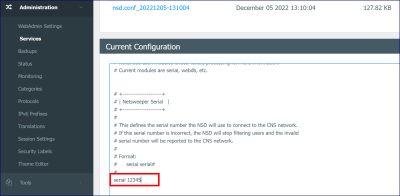
- In the WebAdmin, go to Administration > Services and click to expand the server you wish to edit.
- Click the Policy Server Settings link.
- In the Current Configuration window, scroll to the serial configuration in the 'NetsweeperSerial' section.
-
Type
your serial key replacing the default 12345 invalid serial.
- Click Submit to save the changes.
- Click the Restart button to restart the service.

Restart Workstation
In VMWare window type:
shutdown -r now
to restart