Netsweeper 9.1 Documentation
WebAdmin General Functionality
This section displays provides a brief overview of the general functionality of the WebAdmin, such as:
-
Filtering Table Entries
-
Adding, Removing Columns
-
WebAdmin Menu Help
-
Seach Window Options
-
Multi-Select Options
-
Number of entries displayed on the page
-
Header Toolbar in the WebAdmin
Read: WebAdmin General Functionality
Groups Overview
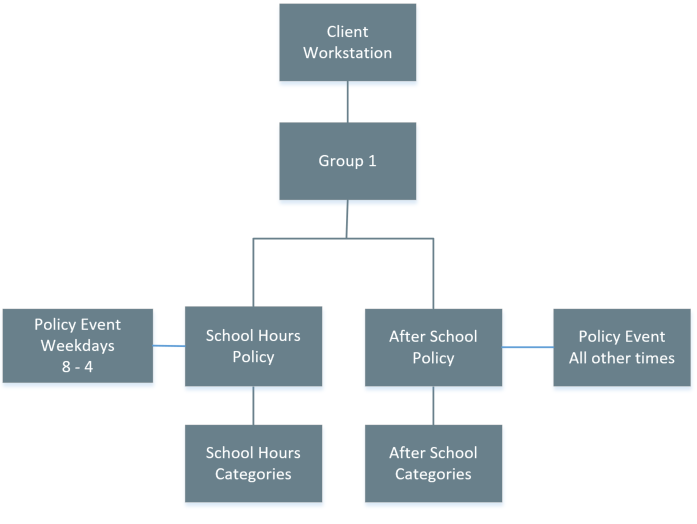
A Group is a set of Clients that share the same set of filtering policies. A Group may be assigned one or more Policies, each covering a different portion of the week.
Read: Groups Documentation
What is a Filtering Policy?
A filtering policy is a set of rules or settings that the Netsweeper Policy Service uses in making decisions about whether requests for Internet content should be allowed or denied.
Each filtering group can have either one or many Policies. If there are many, each policy applies to a different time segment.
Read: Policies Overview
Lists Overview
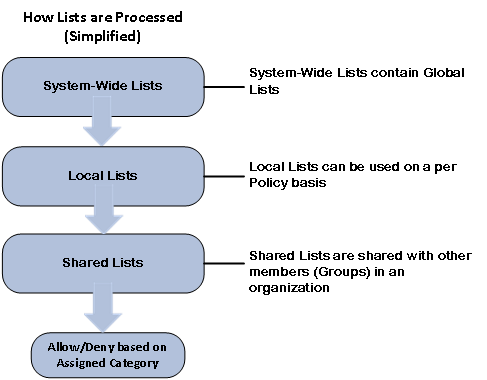
Lists are URL or Keywords that can be used for filtering within a Policy. There are different types of lists with different functions that can be used by Netsweeper customers. A System-Wide List can provide filtering for Global Lists. A Local List can be used on a per Policy basis and assigned to a Netsweeper Group. You can also have Shared Lists that are shared with other Groups in your organization.
Read: List Documentation
Releases and Downloads
Netsweeper Releases and Downloads
This section contains current and past Releases and Downloads for the Netsweeper Server, Client Filter, Redirector, and Workstation Agent products.
Read: Netsweeper Releases and Downloads
9.1 New Features
New features and functionality in the ‘WebAdmin’ and ‘Profile Manager’ interfaces for the Netsweeper 9.1 Release.
Read: New Features 9.1 Combined
Client Filter Releases and Downloads
The Netsweeper Client Filter is an application installed on individual Windows or Apple OSX workstations. It intercepts Internet traffic and communicates with a centralized Netsweeper Policy Service to make allow and deny policy decisions.
Read: Client Filter Releases and Downloads
WAgent Release Notes
The Netsweeper Workstation Agent (WAgent) utility is used to send the IP address of the workstations on your network and their LDAP user information to the Policy Server to put the user into a group. How this process works is defined by the configuration defined in the WebAdmin.
Read: WAgent Releases and Downloads
onGuard Release Notes
onGuard is Netsweeper’s premier digital-safety product, designed from the ground up to monitor for at-risk activity in order to protect students.
Read: onGuard Release Notes
Netsweeper Overview
With millions of new web pages being posted each day, Netsweeper’s categorization engine keeps pace with the ongoing growth of the Internet. Educators, Businesses, Telcos, Service Providers and OEM partners depend on Netsweeper to deliver this service. Netsweeper detects and categorizes millions of new websites every day and adds these to our current base of 8 Billion. Some of the Categories include, but are not limited to:
Adult Pages | Pornography | Profanity | Criminal Skills | Hate Speech | Occult | Gambling | Alcohol | Weapons
Read More: Netsweeper Overview
WebAdmin Overview
The WebAdmin is a web application that administrators (Admins) and system operators (SysOps) can use to manage the Netsweeper content-filtering system. It runs on the Apache Web Service (httpd). You can use the WebAdmin to configure, monitor and troubleshoot Netsweeper components, including the WebAdmin itself.
Read More: WebAdmin Overview
Accounts Overview
An Account is a user with limited privileges to manage filtered clients in their Group. There are a variety of Accounts available for delegating filtering administration.
Read More: Accounts Overview
WebAdmin Overview
Simplified Category Based Processing
Groups Overview
Clients Overview
Delegated Administration Overview
Importing a List
Verifying Filtering
Services Overview
Reporter Service
WebAdmin General Functionality
This section displays provides a brief overview of the general functionality of the WebAdmin, such as:
-
Filtering Table Entries
-
Adding, Removing Columns
-
WebAdmin Menu Help
-
Seach Window Options
-
Multi-Select Options
-
Number of entries displayed on the page
-
Header Toolbar in the WebAdmin