LogMod5 Node Definitions
Node Definitions
This section gives detailed description of each node and provides important details on fault handling, configuration requirements and parameters, and all other details necessary for using each type of node. It is critical that any person configuring a LogMod5 graph, read the relevant parts of this section for the graph they are trying to configure.
Knowing the detailed node definitions is the last piece of the puzzle before being fully qualified to configure and use logmod5.
Disk Writer NodeName
This node writes log entries to the disk. This is basically a copy of the standard log writing facilities and is configured in a very similar way.
Declare as:
lm5_diskwriter <NAME>
Settings must be provided preceded by a node name, e.g. “NAME->disabled yes”. Configure node NODENAME by overriding the defaults explicitly as follows:
NODENAME->disabled
NODENAME->max_disk_usage_size SIZE
NODENAME->max_file_size SIZE
NODENAME->max_file_count NUMBER
NODENAME->max_file_time_range SECONDS
NODENAME->max_file_age SECONDS
NODENAME->flush_interval_sec SECONDS
NODENAME->logfile_type {1|2|3}
NODENAME->log_peeraddress_enabled {TRUE|FALSE}
NODENAME->log_identifier_enabled {TRUE|FALSE}
NODENAME->max_time_gap SECONDS
NODENAME->ip_type {1|2|3}
Logging configurations should be configured once at deployment time. Log files might be orphaned in the event that configuration changes are made to a production system. Whenever modifying the logging configuration, you must be certain that old log files are renamed or manually removed.
There will be log files orphaned if the disk writer node name is modified, or the log file type is modified.
Please consult with your Netsweeper Systems Engineer, prior to altering logging configurations for production systems.
Disable Disk Writer
This will disable the entire disk writer.
Usage:
NAME->disabled {true|false}
Default:
NAME->disabled false
Logmod5 Syslog Node
lm5 Syslog
This node sends all log records to the syslog daemon. It is important to remember that syslog() does not guarantee log delivery. Any interruption to the syslog process will result in log loss. See man 3 syslog for more information.
Declare as:
lm5_syslog <NAME>
Here are the configurable settings for the syslog node.
NAME->logger_fields field1 field2 field3 ...
Specify Log Record Fields
This allows to specify the log record fields that should be added to the logged record. This setting overrides the global logger_fields setting for this node. For available field names see global logger_fields setting description.
Default (if neither NAME->logger_fields nor global logger_fields is specified):
NAME->logger_fields url ip user group denied category
Syslog Ident String
This sets the syslog ident argument. It is the word that is prepended to every message in the syslog file.
NAME->syslog_ident string
Default: none
Syslog Facility
It means that syslog uses the program name "nsd" instead.
NAME->syslog_facility string
This sets the syslog facility argument. It provides syslog the information about message source. It lets the syslog configuration file specify what file these messages should be written to. The facility can be: LOG_DAEMON, LOG_LOCAL0 - LOG_LOCAL7 or LOG_USER.
Default:
NAME->syslog_facility LOG_USER
Syslog Level
This sets the syslog level argument. This determines the importance of the message and extends the facility argument for more flexibility of destination file selection.
NAME->syslog_level string
The syslog node uses the same level (importance) for all request log messages. The level can be: LOG_ALERT, LOG_CRIT, LOG_ERR, LOG_WARNING, LOG_NOTICE, LOG_INFO or LOG_DEBUG.
Default: NAME->syslog_level LOG_INFO
Delimiter String
NAME->delimiter string
The delimiter sign between logged field. The value can be an escaped special character like \t or \044 but it should represent only a single character.
Default: space sign
Maximum Usage Settings
Max Disk Usage Size
This sets the maximum amount of space the logger can use in total.
Usage:
NAME->max_disk_usage_size SIZE
This setting will override the file count setting if it is smaller than the file_count * file_size combination. This allows a hard limit of total disk usage the logger is allowed to use. The size can also contain unit information, such as megabytes (1000 * 1000 bytes),Kilobytes (1024 bytes), etc. For example, the default value of 5368709120 is equivalent to 5 gigabytes.
It is important to remember this sets the size of the log files *.log and does not include the size of the index files, *.ndx and *.rep. Generally, an index file is around 10% of the log file size. So if you set this to 1gb your disk usage may be 1.1gb withthe included index file.
It is recommended you never fully allocate your storage, you should always have more then 10% free space. A example for a Netsweeper system maybe the following storage allocations:
-
20% reserved for Logs and Log files (/usr/local/netsweeper/logs)
-
20% reserved for generated Report output (/usr/local/netsweeper/reports)
-
40% reserved for temporary report files (/usr/local/netsweeper/reports)
Default:
NAME->max_disk_usage_size 5368709120
Max File Size
This sets the size of a single log file.
Usage:
NAME->max_file_size SIZE
We recommend the default setting of 1 Gigabyte is used. This allows for the log files to be copied to any system without running into size limitation and other issues.
Default:
NAME->max_file_size 1GB
Max File Count
This sets the maximum number of local log files we are allowed to have.
Usage:
NAME->max_file_count NUMBER
This setting can be set to -1 or 0 to indicate that an unlimited number of files are allowed as long as the max_file_size and max_disk_usage_size are properly maintained.
Default:
NAME->max_file_count 0
Max File Time Range
Usage:
NAME->max_file_time_range SECOND
This sets the maximum data/time range (difference between the latest records and the first record timestamps) in a single file. Zero value means unlimited range.
Default:
NAME->max_file_time_range 0
Max File Age
Usage:
NAME->max_file_age SECOND
This sets the maximum age (the time since the latest record timestamp) of a file. If it is exceeded the server removes the file at log files rotation. Zero value means unlimited age.
Default:
NAME->max_file_age 0
Flush Interval (Seconds)
Usage:
NAME->flush_interval_sec SECOND
This is the number of seconds we flush the local logs to the disk. By default this is set to 1 second, however, this can be increased on a heavily utilized system to possibly increase performance.
Default:
NAME->flush_interval_sec 1sec
Log File Type
Usage:
NAME->logfile_type NUMBER
This configured the format of the log file we wish to store for local logs.
This can be the following formats
-
Binary Mode
-
Text Mode
-
Extended Binary Mode
Default:
NAME->logfile_type 3
Logger Fields
This allows you to specify the log record fields that should be written into the local Extended Binary or Text log file.
Usage:
NAME->logger_fields field1 field2 field3 ...
It cannot be used with old Binary log files that has fixed list of fields. The date/time field is mandatory and is always written into the file. All other fields can be added or removed from the log record. This setting overrides the global logger_fields setting for the current writer.
For available field names see global logger_fields setting description.
Default (if neither NAME->logger_fields nor global logger_fields is specified):
Text format log:
NAME->logger_fields url ip user group denied category
Extended Binary log:
NAME->logger_fields user group category denied url ip dst
Log Peer Address Enabled (Obsolete)
This allows the peer connection address for a policy request to be logged into the local Extended Binary Log file. The setting is obsolete, use logger_fields instead.
Usage:
NAME->log_peeraddress_enabled {true|false} (Obsolete)
Default:
NAME->log_peeraddress_enabled false
NAME->log_identifier_enabled {true|false} (Obsolete)
log_identifier_enabled (Obsolete)
This will allow logging the logger_identifier into the Local Log file. The logger identifier indicates which policy server processed the request. This is useful for debugging purposes to find out which policy server processed the request. This can also be used for generating load balancing reports to see what policy server is processing the most data. The setting is obsolete, use logger_fields instead
Default:
NAME->log_identifier_enabled false
Max Time Gap
Usage:
NAME->max_time_gap seconds
If the policy server finds request logs with a size that is less than the max_file_size limit, the policy server can append new log records to these request logs. It can cause a problem for log file management if a request is appended to a file that has older records.
This setting limits the "age" of the file that can be appended to. If the time interval between the file's latest log record and the current time is larger than the "max time gap" the policy server ignores this file and searches for another request log file.
Default:
NAME->max_time_gap 24h
IP Type
This setting makes sense only for logfile_type 3 (Extended Binary Mode) and allows you to choose IP address format.
Usage:
NAME->ip_type
The value can be:
1 - 4 bytes that is enough for IPv4 addresses but cannot keep IPv6
2 - 16 bytes, it can keep IPv6 addresses and IPv6 as embedded into IPv6. Use it if you filter mostly IPv6 traffic.
3 - variable size (5 or 17 bytes) where the first byte keeps the address type and the rest is the IP address itself. This is the best type for mixed IPv4 and IPv6 traffic.
Default:
NAME->ip_type 3
This node will produce log files with names containing the node name, so that multiple nodes can all log into the same directory (usually the /usr/local/netsweeper/logs/ directory). This node requires >= 1 upstream neighbor and must be an endpoint (can't have downstream neighbors)
Disk Queue
Declare as:
lm5_disk_queue <NAME>
This node is used to temporarily preserve log entries on disk whenever its downstream node goes temporarily offline. This is useful if placed upstream from a TCP node which can occasionally go offline for a short time during network issues or momentary server outages. Other kinds of node may go offline as well, and this node can connect to them as well. For example, it may make sense in some situations to place one of these nodes upstream from a failover node. Failover nodes will go temporarily offline whenever all of their downstream neighbors are offline. The mirror node can go offline in a similar manner.
Settings for Disk Queue
Here are the configurable settings for the disk queue:
file_path
This sets the location where the disk queue file(s) will be written. This setting is required.
NAME->file_path
file_prefix
This sets the name of the disk queue file(s) on disk. Additional characters may be appended to this. This setting is required.
NAME->file_prefix
disk_write_buffer
This sets the size of the memory buffer where data is buffered before being written to disk.
NAME->disk_write_buffer
Default:
NAME->disk_write_buffer 32M
NAME->disk_read_buffer
disk read buffer
This sets the size of the memory buffer where data is buffered after being read from disk.
Default:
NAME->disk_read_buffer 32M
NAME->max_disk_size
max_disk size
This sets the maximum possible size on disk for the file(s) on disk of this node.
Default:
NAME->max_disk_size 1T
NAME->max_disk_size_thresh
max_disk_size_thresh
This sets the point short of a full disk where this node will stop accepting more entries. The value should be equal or larger than disk_write_buffer. This ensure that the disk_queue can inform upstream of the pending size limit and still accept a full disk_write_buffer which has already sent on its way.
Default:
NAME->max_disk_size_thresh 100K
NAME->num_files
num_files
This sets the number of files on disk this queue will use. These file(s) will all share the max_disk_size setting (if max_disk_size is set to 1T and num_files is set to 5, then each file will be no larger than 0.2T). A number between 2 and 10 is usually sufficient.
Default:
NAME->num_files 2
This node requires >= upstream neighbors and can have only one direct connection downstream (i.e. must have exactly one downstream neighbor).
TCP Client
The TCP client node transmits log entries to a remote server. This node takes the log entries it receives from upstream and transmits them to the configured port and remote host.
Declare as:
lm5_tcpclient <NAME>
This node carefully handles situations where:
-
Server is temporarily unreachable
-
Connection is congested
-
Connection hangs (we send more data but it never gets acknowledged)
-
Server disconnects our connection
-
And other TCP situations
Most of the time, these circumstances are handled by the node entering node failure mode and allowing upstream nodes to react appropriately (usually either queuing up log entries or failing over to a different node). This node will continuously attempt to make its connection, and will attempt to reconnect automatically any time the connection is lost.
|
Object |
Type |
Default |
Description |
|---|---|---|---|
|
block_on_full_buffer |
Boolean |
No |
If the transmit buffer becomes full then it means either the logging server is currently overloaded or there is network congestion. If you set this to block then the logging system will wait for the connection to clear up. If you set this to not block, then the connection will go temporarily offline and entries will need to be queued or failed-over or something upstream. |
|
block_timeout_msec |
Time |
|
If non-zero, then blocking mode will actually have a timeout point at which the send will unblock and will attempt to retransmit |
|
block_timeout_attempts |
Number |
|
If a send block times out then a new send is attempted. This setting controls how many attempts will be made before the packet is marked as a packet failure. |
|
reconnect_delay_sec |
Time |
|
Number of seconds pause between attempts to connect to a remote server that is unavailable |
|
use_keepalive |
Boolean |
|
Send TCP keepalives to keep connection alive and monitor connection health even if no traffic is flowing |
|
keepalive_count |
Number |
|
Disconnect automatically if this number of keepalive packets are sent without ever receiving an acknowledgement |
|
keepalive_idle |
Time |
|
Number of seconds the connection must be idle before keepalives will start to be sent |
|
peer_stall_timeout |
TIme |
|
A peer will be counted as ‘stalled’ if it fails to read any data from our TCP stack’s send buffer (the one in the operating system stack) after this many seconds has elapsed |
|
peer_stall_count |
Number |
|
the number of times a peer can be detected as stalled before it is automatically disconnected and a new connection attempt will be made (in the meantime, the node will be marked as node failure) |
|
send_buffer_len |
Size |
5M |
The number of bytes to allocate for sending log entries. A larger value will tend to make performance a little better. |
|
remote_logger_port |
Number |
None |
The port on which to connect to the remote server. This entry is required and has no default value. |
|
remote_logger_host |
String |
None |
The IP (or hostname) on which to connect to the remote server. This entry is required and has no default value. |
This complex node has many chances for entering a failure state.
|
Failure Type |
Description |
|---|---|
|
Packet Failures |
Packet failure will generally occur if there was some reason packet could not be sent. For example, if there is persistent congestion. |
|
Node Failures |
Node failure on the tcp node happens whenever the tcp node believes it can no longer work effectively. This is usually either when it detects congestion or when the connection is lost or unavailable. |
This node requires >= 1 upstream neighbors and must be an endpoint (having downstream neighbors will raise an error).
|
Option |
Minimum |
Maximum |
|---|---|---|
|
Legal number of upstream neighbors |
1 |
∞ |
|
Legal number of downstream neighbors |
0 |
0 |
Failover
Declare as:
lm5_failover <NAME>
The failover node requires no configuration. When placed in the graph it is used to route log entries to the highest priority, available, downstream neighbor. Priority is determined by the order in which downstream neighbors are added - the highest priority neighbor is the one added first. If the highest priority neighbor ever becomes unavailable, then the next highest priority will be used. If the higher priority neighbor comes back online, then the failover will switch back again.
The failover also automatically handles temporary failures. If there is a single log entry that fails to be processed for some reason, the failover node automatically makes another attempt at the next highest priority downstream neighbor for that single packet.
This node requires no configuration.
|
Failure Type |
Description |
|---|---|
|
Packet Failures |
Packet failure is reported whenever all downstream channels are either unavailable or report packet failure on the packet. |
|
Node Failures |
Failover will enter failure mode when all downstream nodes are non-functional. |
The failover node can have multiple upstream neighbors and requires at least one downstream neighbor (two if you want the node to make any sense).
|
|
Minimum |
Maximum |
|---|---|---|
|
Legal number of upstream neighbors |
1 |
∞ |
|
Legal number of downstream neighbors |
1 |
∞ |
DevNULL Node
The devnull node can be used wherever an endpoint is desired which will not actually write any logs or transmit any network packets. This will rarely be useful.
Declare as:
lm5_devnull <NAME>
This node requires no configuration.
|
Failure Type |
Description |
|---|---|
|
Packet Failures |
This node has no packet failure mode, this node will always report SUCCESS. |
|
Node Failures |
This node has no node failure mode, this node will always report as operational. |
This node requires >= 1 upstream neighbors and is an endpoint (cannot have downstream neighbors).
|
|
Minimum |
Maximum |
|---|---|---|
|
Legal number of upstream neighbors |
1 |
∞ |
|
Legal number of downstream neighbors |
- |
0 |
Mirror Node
Declare as:
lm5_mirror <NAME>
The mirror node copies log entries to multiple downstream neighbors. This node is useful for making multiple copies of log entries (possibly on two different remote servers, or even on two different logs files on the same computer).
If a downstream neighbor reports as offline, then it will not get a copy of log entries for the period that it is offline.
The mirror node has only one configuration option:
|
|
Type |
Description |
|---|---|---|
|
failure_mode |
String |
Three possible settings:
|
|
Packet Failures |
Packet failure depends on the failure mode setting |
|---|---|
|
Node Failures |
Node failure happens if all downstream channels become offline. |
This node requires >= 1 upstream and >= 1 downstream nodes.
|
|
Minimum |
Maximum |
|---|---|---|
|
Legal number of upstream neighbors |
1 |
∞ |
|
Legal number of downstream neighbors |
1 |
∞ |
Loadbalance
loadbalance (by size)
Declare as:
lm5_lb_size <NAME>
The bysize loadbalancer takes incoming packets and sends them to one of the downstream channels. It keeps track of the approximate size of each entry passed downstream and tries to keep all downstream nodes equal in terms of amount of work they have successfully processed.
If one downstream node reports an error on one packet (packet failure) then the packet is sent to the next node in line.
This node has no configurable options.
|
Packet Failures |
Packet failures will be reported if a packet arrives which cannot be processed by any of the downstream nodes. |
|---|---|
|
Node Failures |
This node will enter failure mode as soon as any of its downstream nodes is offline |
This node can have more than one upstream connection. It expects to have at least one downstream node.
|
|
Minimum |
Maximum |
|---|---|---|
|
Legal number of upstream neighbors |
1 |
∞ |
|
Legal number of downstream neighbors |
1 |
∞ |
loadbalance (roundrobin)
The roundrobin loadbalancer takes incoming packets and sends them to one of the downstream channels.
Declare as:
lm5_lb_rr <NAME>
Each time a new packet comes in it is routed to the next downstream channel in line. Packets are distributed roundrobin to each channel.Downstream packet failures are handled by simply routing the packet to the next channel in line.
NOTE: packets containing bundles of log entries may vary GREATLY in size. Some packets may contain only one entry while others contain hundreds. RR distribution of packets does not guarantee RR distribution of individual log entries. The roundrobin distribution loadbalancer is provided for special and probably unusual circumstances. The balancer by-size will generally be the loadbalancer you want to use.
This node has no configurable options.
|
Packet Failures |
Packet failure occurs if all downstream channels also report packet failure on a packet. |
|---|---|
|
Node Failures |
Node enters failure mode if any one downstream node enters failure mode. |
This node requires at least one upstream neighbor and at least one downstream neighbor.
|
|
Minimum |
Maximum |
|---|---|---|
|
Legal number of upstream neighbors |
1 |
∞ |
|
Legal number of downstream neighbors |
1 |
∞ |
Timer Node
Use this node to schedule events in the LogMod5 graph.
Declare as:
lm5_timer <NAME>
The timer node does this by reporting node failure upstream any time it is outside of its scheduled window of operation. This effectively prevents any packets from reaching all the nodes downstream from the timer node.
Using this node, you can, for example, cause log entries to be transmitted to a remote server late at night when bandwidth is available but not queued and saved for later during the day time. To achieve this, you would position a disk queue node directly above the timer and the tcp transmitter below the timer. In this way, when the timer was ‘off’ and reporting node failure, the disk queue above will queue packets. When the timer becomes ‘on’ again, stops reporting node failure, the disk queue will release all the stored packets (in order).
This node has one configurable option:
|
|
Type |
Description |
|---|---|---|
|
schedule |
String |
This is the schedule string, specifying start time and end time. For example:
This argument is required. There is no default setting. |
|
Packet Failures |
This node will report packet failure if the downstream node reports failure. It will also report failure if packets are sent to it when it is in node failure mode. |
|---|---|
|
Node Failures |
This node will report node failure if 1) it is outside its schedule window of operation or 2) if its downstream node reports node failure |
The timer node can have multiple upstream neighbors but must have exactly one downstream neighbor.
|
|
Minimum |
Maximum |
|---|---|---|
|
Legal number of upstream neighbors |
1 |
∞ |
|
Legal number of downstream neighbors |
1 |
1 |
Hash Node
Group Hash Node
Declare as:
lm5_group_hash <NAME>
This node diverts log entries to a different downstream neighbor, depending on the contents of the "group" field in the log entry. Because the function is a hash, it is not easy to predict ahead of time which downstream neighbor will get log entries with a particular group, but it is guaranteed that all occurrences of that particular group will be found in the same downstream neighbor.
This hashing enables optimizations in reporting, making generation of certain group-related reports much faster. Specifically, it allows the optimization of reports which group by the group field or which search for a specific group.
|
Packet Failures |
Packet failure is reported if the downstream channel chosen by the hash reports packet failure. |
|---|---|
|
Node Failures |
This node reports node failure if any one of its downstream nodes reports node failure. |
This node must have at least one upstream neighbor. It must also have at least one downstream neighbor. IMPORTANT: the number of downstream neighbors must be a power of 2 (eg: 1,2,4,8,16,32, etc.) This requirement is in place for efficient and fast hashing across the downstream nodes.
|
|
Minimum |
Maximum |
|---|---|---|
|
Legal number of upstream neighbors |
1 |
∞ |
|
Legal number of downstream neighbors |
1 |
∞ |
IP Hash node
Declare as:
lm5_ip_hash <NAME>
Refer to the description for the lm5_group_hash. This node hashes by client IP, and is otherwise identical to the group hash node.
Username Hash node
Declare as:
lm5_username_hash <NAME>
Refer to the description for the lm5_group_hash. This node hashes by client username, and is otherwise identical to the group hash node.
Denied Hash node
Declare as:
lm5_denied_hash <NAME>
Refer to the description for the lm5_group_hash. This node hashes by whether or not the request was allowed or denied, and is otherwise identical to the group hash node.
The denied hash requires exactly two downstream neighbors.
logmod5 Hash nodes
Such nodes divert log entries to a different downstream neighbor, depending on the contents of the particular field in the log entry. Because the function is a hash, it is not easy to predict which downstream neighbor will get log entries with a particular field value, BUT it is guaranteed that all occurrences of the same field value will be found in the same downstream neighbor. This hashing enables optimizations in reporting, making generation of certain reports much faster.
All such nodes require >=1 upstream neighbors and >=1 downstream neighbors.
IMPORTANT: the number of downstream neighbors must be a power of 2
(e.g.: 2,4,8,16,32, etc.)
Since the logmod5 configuration with such node requires specification of multiple downstream nodes, it is not recommended to use them directly ( at least for simple cases. The logmod5 framework provides a "Hash Combo" node (see below) that is a macro automatically expanded to the specified hash node, required number of disk writer nodes and all needed links.
Group Hash Node
lm5_group_hash <NAME>
This node hashes by the policy group.
IP Hash Node
lm5_ip_hash <NAME>
This node hashes by client IP.
Username Hash Node
lm5_username_hash <NAME>
This node hashes by client username.
Denied Hash Node
lm5_denied_hash <NAME>
This node hashes by whether or not the request was allowed or denied.
Since this field has only two possible values the hash size greater than 2 doesn't make sense.
URL Hash Node
lm5_url_hash <NAME>
This node hashes by requested URL.
Policy Event Type Hash Node
lm5_type_hash <NAME>
This node hashes by Policy Event Type. Since this field has a few fixed values the hash size much greater than the number of known types (see the policy_event setting description) doesn't make sense.
LogMod5 Filter Nodes
Such node diverts log entries based on whether they match or don't match a configured filter. If the node has one downstream neighbor, then it is assumed that that downstream neighbor should receive all entries matching the filter (entries not matching the filter are simply thrown away).
If the node has two downstream neighbours then matching entries are sent to the higher priority (first neighbor) and the non-matching entries are sent to the other neighbor.
The filter node can have >= 1 upstream neighbours and == 1 or == 2 downstream neighbors.
This node requires one configuration item: NAME->filter <string>
The string the node will filter by.
Group filter node
This node filters by the Policy Group. The filter for this node must be a group name.
lm5_group_filter <NAME>
IP Filter Node
This node filters by client IP. The filter text for this node must be an IPv4 address in dot notation.
lm5_ip_filter <NAME>
Username filter node
lm5_username_filter <NAME>
Denied Filter Node
This node filters by the client username. The filter for this node must be a client username.
lm5_denied_filter <NAME>
This node filters by whether or not the request was allowed or denied. The filter string for this node should be one of two words: either "allowed" or "denied".
URL Filter Node
This node filters by requested URL.
lm5_url_filter <NAME>
The filter string should be the beginning part of a URL. The URL will be compared only up to the end of what is provided to the filter and all remaining chars in the log entry are ignored. For example, the filter: "http://www.google.com/" will match the entry "http://www.google.com/q=search"
Policy Event Type Filter node:
This node filters by the Policy Event Type.The filter for this node must be a Policy Event type name.
lm5_type_filter <NAME>
Category Filter Node
This node filters by Category.
lm5_category_filter <NAME>
The filter for this node must be a Category number set, and must also have a filter set operation type that indicates how the category filter is to be applied.
Category Filter Format
NAME->filter <string>
<string> is a comma-delimited list of category numbers
NAME->filter_set_operation <operation>
<operation> options for the filter_set_operation include:
|
Option |
Description |
|---|---|
|
set_match |
set has at least one match in the filter set (intersect) |
|
set_no_match |
set does not intersect the filter set |
|
set_exact_match |
set is identical to the filter set |
|
set_subset |
set is a subset of the filter set |
|
set_superset |
set contains all of the filter set (but may contain more) |
Hash Combo Node
Declare as:
lm5_hash_macro <NAME>
This node combines the functionality of all the hash nodes and a configurable number of disk writer nodes. This makes it easy to declare that you want to hash log entries into several log files. If you don’t use the 'hash macro' node then you will have to individually declare every disk node. For a hash of 32, 64, or 128 buckets (for instance) this will require a very long nsd.conf configuration file. The hash macro makes this much easier by allowing very large hash configurations to be declared in just a few lines.
This node (which is actually several nodes all in one) will create several log files and distribute log entries into log files based on a hash function.
This node requires two configuration items:
|
|
Type |
Description |
|---|---|---|
|
hash_type |
String |
Enter the type of hash desired, this should be one of:
|
|
hash_size |
Number |
How many different 'directions' or 'buckets' should log entries be hashed into? This will determine how many different log files will be produced. This number MUST be a power of 2 (2,4,8,16,32,64,128, etc). |
Optional Nodes Independent of the Hash Type
Also, the node can have optional settings independent of the hash type:
NAME->mask_size NUMBER
If the hash_type is "ip", this setting allows you to calculate hash using only the network part (set with this mask) of the IP address. It means that requests from all workstations within this network will be logged into the same partial file. By default the whole IP address is used, i.e. mask size is 32 bits for IPv4 and 128 bits for IPv6.
NAME->substring_offset NUMBER
NAME->substring_length NUMBER
If the hash type is "group" or "username", these setting allow you to calculate hash using only substring of the complete group or user name. It allows you to log requests whose group or user name have common parts (e.g. school1-students, school1-teachers) in the same file.
The offset can be a negative number. In this case it is counted from the end of the string. If offset is not specified it is 0. If the length is not specified or equal zero it means the substring from the offset to the end of the string. If both settings are not specified or equal to zero, the whole name is used for hash.
NAME->substring_offset NUMBER
NAME->substring_length NUMBER
If the hash type is 'group' or "username", these settings allow to calculate hash using only substring of the complete group or user name. It allows you to log request whose group or user name have common part (e.g. school1-students, school1-teachers) into the same file. The offset can be a negative number. In this case it is counted from the end of the string. If offset is not specified it is 0. If the length is not specified or equal zero it means the substring from the offset to the end of the string. If both settings are not specified or equal zero, the whole name is used for hash.
NAME->diskwriter->
It allows you to specify disk writer settings for all disk writer nodes created by the macro node. For the complete list of settings see lm5_diskwriter node settings.
(Obsolete settings are not supported here.)
|
Packet Failures |
This node has no packet failure mode, this node will always report SUCCESS. |
|---|---|
|
Node Failures |
This node has no node failure mode, this node will always report as operational. |
The hash combo node must have exactly one upstream neighbor and cannot have any downstream neighbors.
|
|
Minimum |
Maximum |
|---|---|---|
|
Legal number of upstream neighbors |
1 |
1 |
|
Legal number of downstream neighbors |
0 |
0 |
Logmod5 MultiWriter Combo node
Declare as:
lm5_multiwriter_macro <NAME>
Group Segmented Logging
Group Segmented Logging allows you to segment your log files by Group or by a specific tag. This makes it easier to manage and search through request log archives for specific logs.
multiwriter_macro Node
The LogMod5 'multiwriter_macro' node that creates a log writer for each group.
Declare as:
lm5_multiwriter_macro <NAME>
This kind of nodes is similar hash nodes but instead of numbered buckets it creates a separate disk writer for each value of the specified field. E.g. the Group Mutiwriter reads the list of all policy groups at policy server start and creates a separate disk writer node for each group. Then each group requests are written into the designated file.
This node can use a "log file tag" instead of the group. This tag can be set in the group properties and allows to log requests for multiple groups shared the same tag to the same file. If the log file tag is used for file selection but a group doesn't have the tag specified, its request have the default tag "-".
Also this kind of nodes can be used for Policy Event Types.
NAME->logger_field {group|tag|type}
It specifies if the group name or the log file tag or the Policy Event Type should be used for file selection.
NAME->diskwriter->...
It allows you to specify disk writer settings for all disk writer nodes created by the macro node.
For the complete list of settings see lm5_diskwriter node settings.
(Obsolete settings are not supported here.)
The multiwriter combo node must have exactly one upstream neighbor and cannot have any downstream neighbors.
logmod5 Default Configuration
The default LogMod5 configuration that ships with the product simply writes up to 5 GB of logs to the local disk. It uses all defaults and does not override any node configurations. Customers are encouraged to override the default node configurations Example:
NAME->max_disk_usage_size 100G
Below is the graph describing the default configuration:
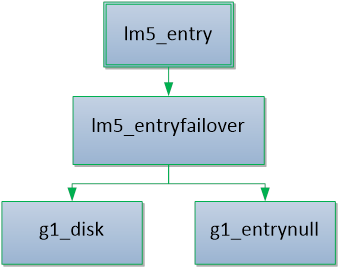
This graph can be implemented with the following configuration:
# Define nodes
lm5_entry g1_entry
lm5_failover g1_entryfailover
lm5_diskwriter g1_disk
lm5_devnull g1_entrynull
# Connect nodes
logger_logmod5_connect g1_entry g1_entryfailover
logger_logmod5_connect g1_entryfailover g1_disk
logger_logmod5_connect g1_entryfailover g1_entrynull
Always have a devnull failover so that we never error out inside the entry node. Errors on main stream will always result in failover to devnull (discard entries).