Netsweeper Overview
With millions of new web pages being posted each day, Netsweeper’s categorization engine keeps pace with the ongoing growth of the Internet. Educators, Businesses, Telcos, Service Providers and OEM partners depend on Netsweeper to deliver this service. Netsweeper detects and categorizes millions of new websites every day and adds these to our current base of 8 Billion. Some of the Categories include, but are not limited to:
Adult Pages | Pornography | Profanity | Criminal Skills | Hate Speech | Occult | Gambling | Alcohol | Weapons
Multi-language Support
Millions of web pages are being posted each day all around the world in different languages and a substandard filtering engine cannot keep up with this growth of the Internet. Netsweeper pioneers Multi-language filtering support. Netsweeper solutions are embedded with a highly dynamic artificial intelligence engine and the centralized web-based administration console.
Please see 'Category Languages' for more information.
URL Filtering Architecture
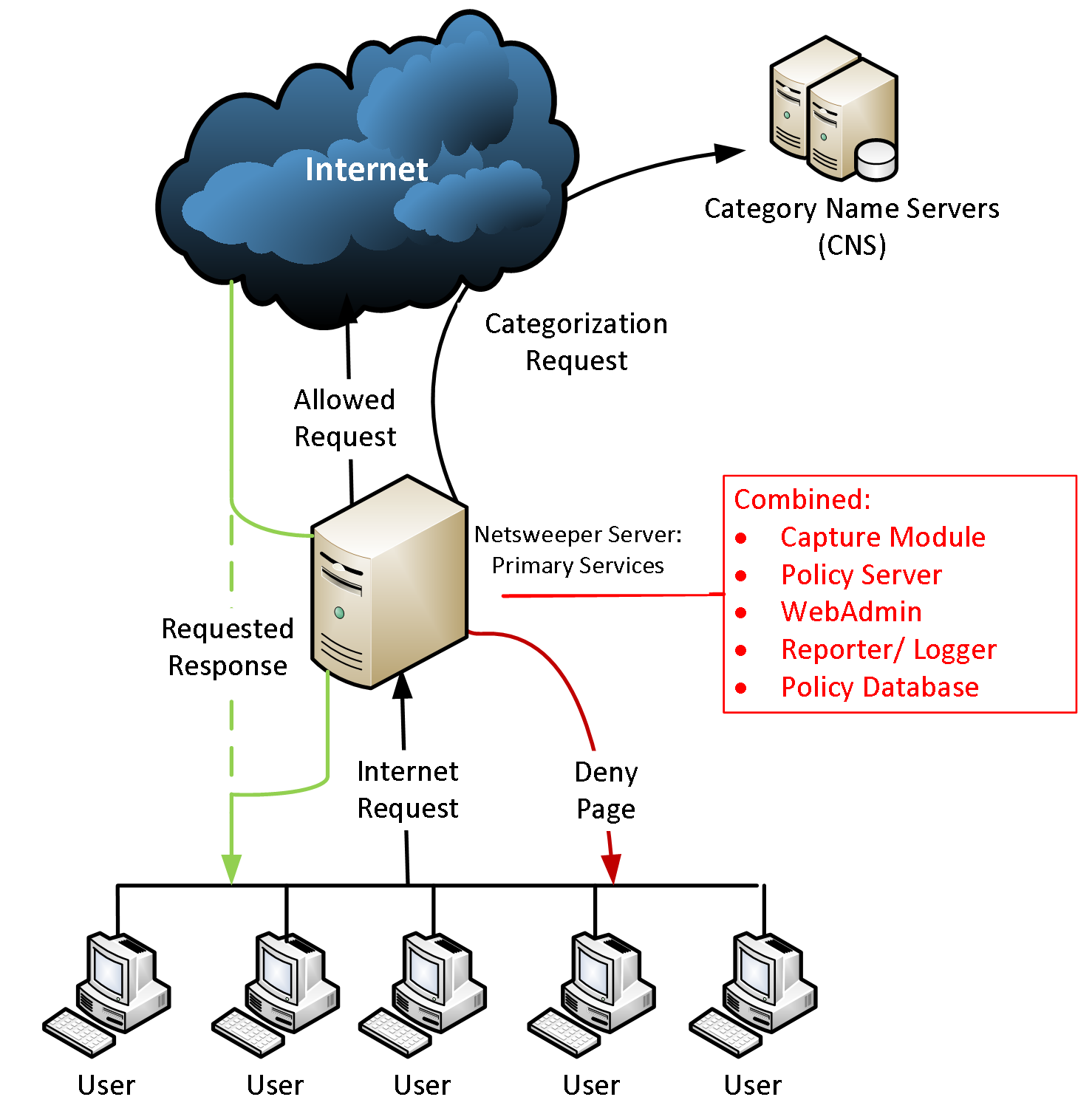
Netsweeper can be configured and deployed as an explicit proxy, transparent proxy, out of band (port mirroring), inline or DNS URL Filtering system. Netsweeper Policy servers are deployed at the Internet gateways and communicate with a cloud-based Category Name Service (CNS) to provide near real-time updates for URL classifications. Policy decisions are enforced on a per user, per group or global basis with time of day filtering and allowed or denied list overwriting the cloud-based classifications.
Filtering Type Comparison
The following table shows a comparison between the different types of Netsweeper filtering. Please see relevant documentation for more information.
|
Filter Type |
NSProxy |
NS |
NS |
Client |
|---|---|---|---|---|
|
URL Filtering |
Y |
N |
Y |
Y |
|
Full SSL Decryption |
Y |
N |
N |
Y |
|
Off Network Filtering |
Y |
Y |
N |
Y |
|
IP Based Policies |
Y |
Y |
Y |
N |
|
Username based Policies |
Y |
N |
Y |
Y |
|
Cloud Based Option |
Y |
Y |
Y |
Y |
|
On-site Option |
Y |
Y |
Y |
Y |
|
Categorization based on URL |
Y |
N |
Y |
Y |
|
Filtering Override |
Y |
N |
Y |
Y |
|
SafeSearch |
Y |
N |
Y |
Y |
|
YouTube SafeSearch |
Y |
N |
Y |
Y |
|
Features |
Port Mirror |
NSProxy |
DNS |
Client Filter |
|---|---|---|---|---|
|
HTTPS Filtering Level |
Hostname |
URL with Selective SSL Decryption |
Domain Name |
URL |
|
Safe Search |
- |
Yes |
Yes |
Yes |
|
Policy Level |
Per IP address |
Per user |
Per IP |
Per user |
|
Granular Social Media Controls |
- |
Yes |
- |
Yes |
|
Cloud Hosted |
- |
Yes |
Yes |
Yes |
|
Authentication |
RADIUS, DHCP Syslog, AD |
RADIUS, DHCP Syslog, AD, LDAP |
RADIUS, DHCP Syslog, AD, LDAP |
AD, LDAP |
|
Installation on device |
Not required |
Certificate on device for SSL Decryption |
Not required |
Client app, browser, browser extension |
|
Capacity per Policy Server (16 core CPU, 16 GB RAM) |
150,000 web requests/second |
10GBPS, 6 BPS SS: |
10,000 lookup/second |
150,000 policy lookup/second |
|
Virtualization |
Yes, but need dedicated access to NIC (VMWare) |
Yes |
Yes |
Yes |
Port Mirror Deployment
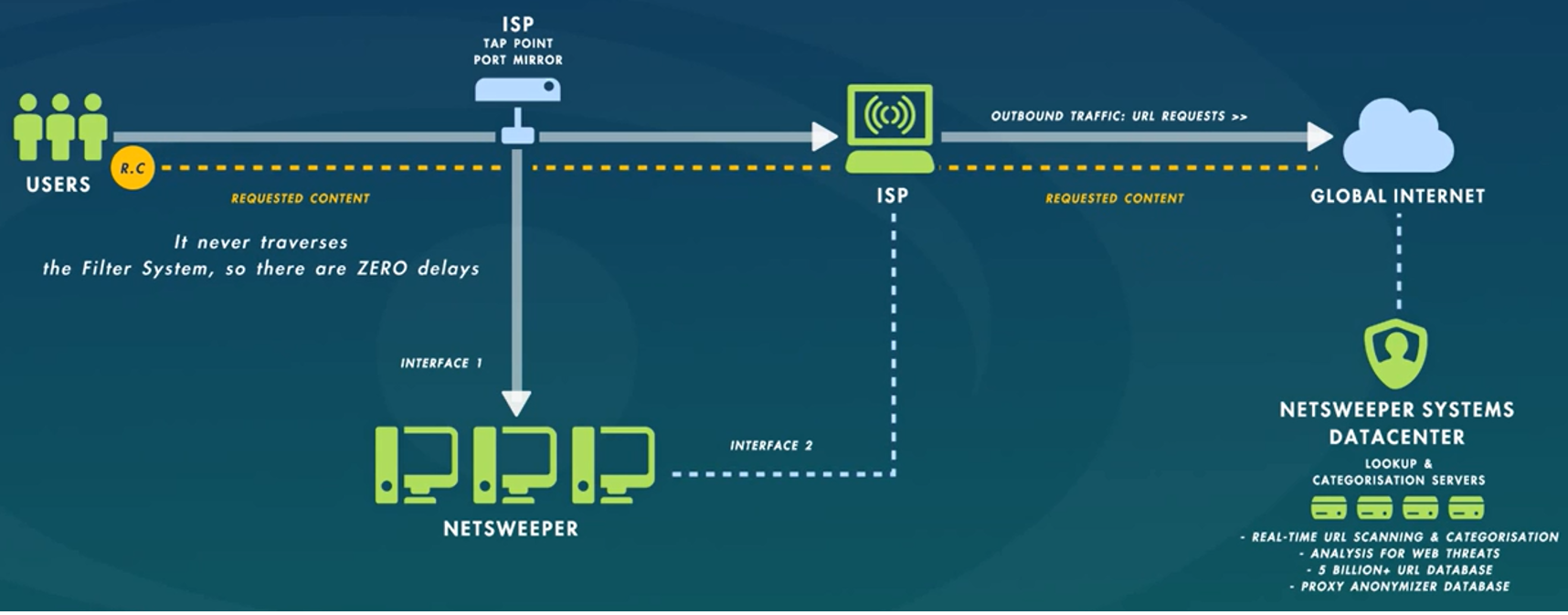
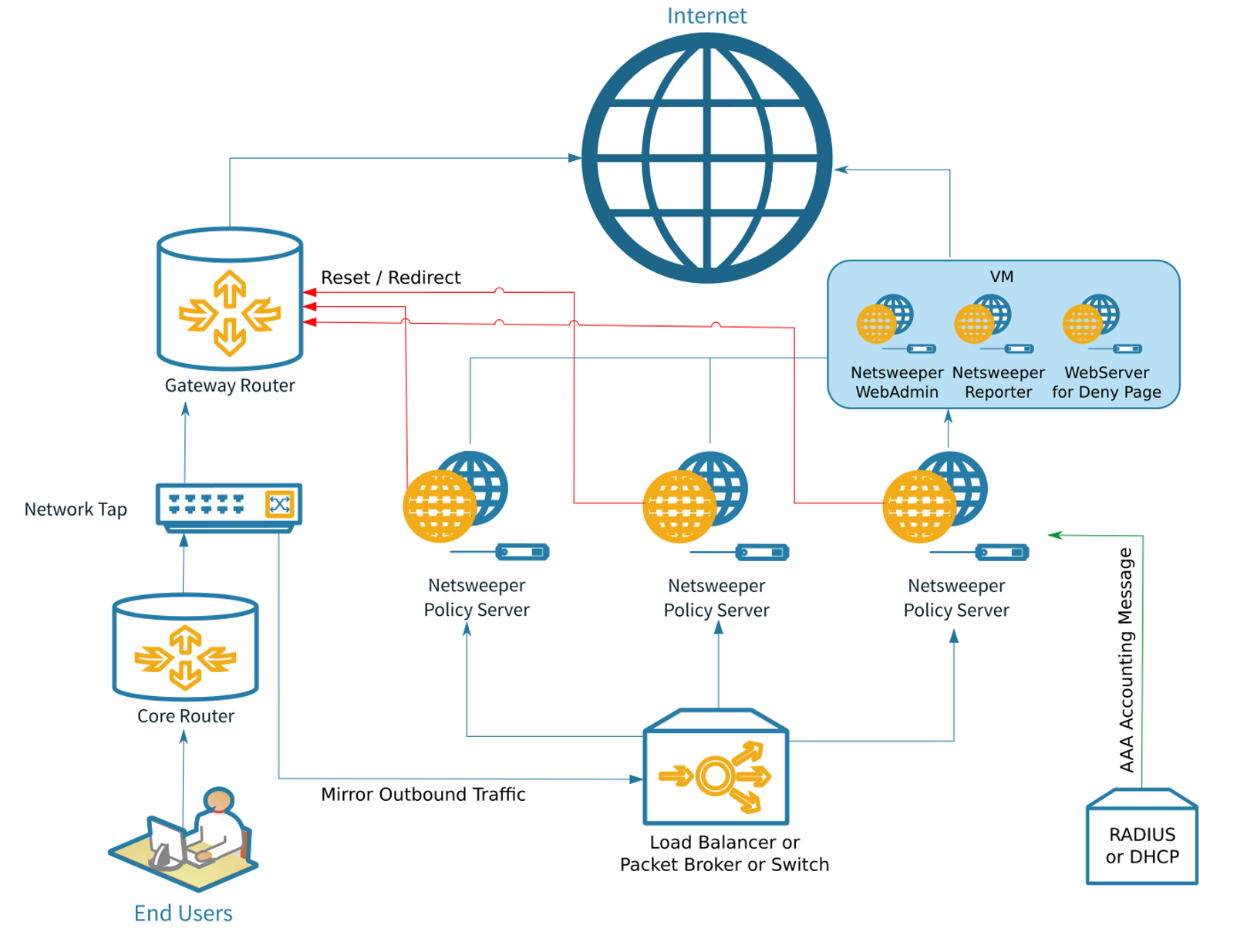
Port Mirroring is an 'Out of band' deployment, designed for content filtering in large networks. It requires a copy of outbound web traffic from a network tap, switch, router, or DPI. It is fast, effective, no latency, no network risk web filtering. One Intel-based server 16 core CPU, 16GB RAM, 10GE Intel NIC can filter 150,000 web requests per second.
NSProxy Deployment
-
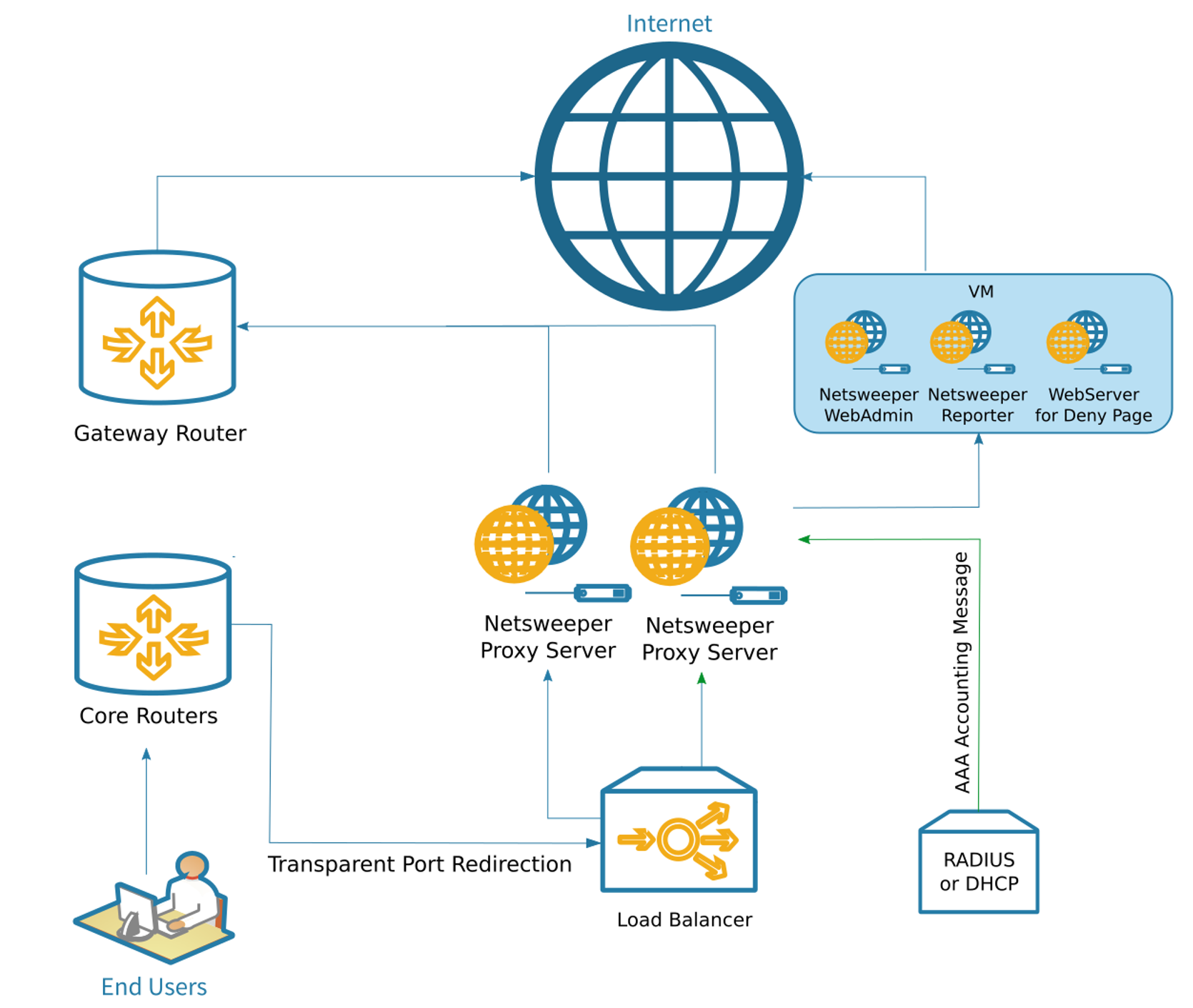
Proxy based deployment, explicit or transparent proxy deployment·
-
Selective inspection and decryption at the edge gateway allows trusted SSL traffic through and decrypts per your policies for optimal security and throughput·
-
Advanced social media SSL protection allows access to safe parts of social media pages while restricting others·
-
Search keyword and embedded URL filtering features of Netsweeper software can be enabled for SSL/TLS secure websites like Google, Yahoo, and Bing.·
-
Decryption for individual workstations and or devices operating on Windows, Mac or Chrome·
-
Authentication behind NAT with HTTP/S cookies injection·
-
A single Intel-based server with 16 core CPU, 16GB RAM, 10GE Intel NIC can filter 10 Gbps of traffic & decrypt 6 Gbps of traffic·
-
Load balanced to multiple Policy Servers for scaling and redundancy
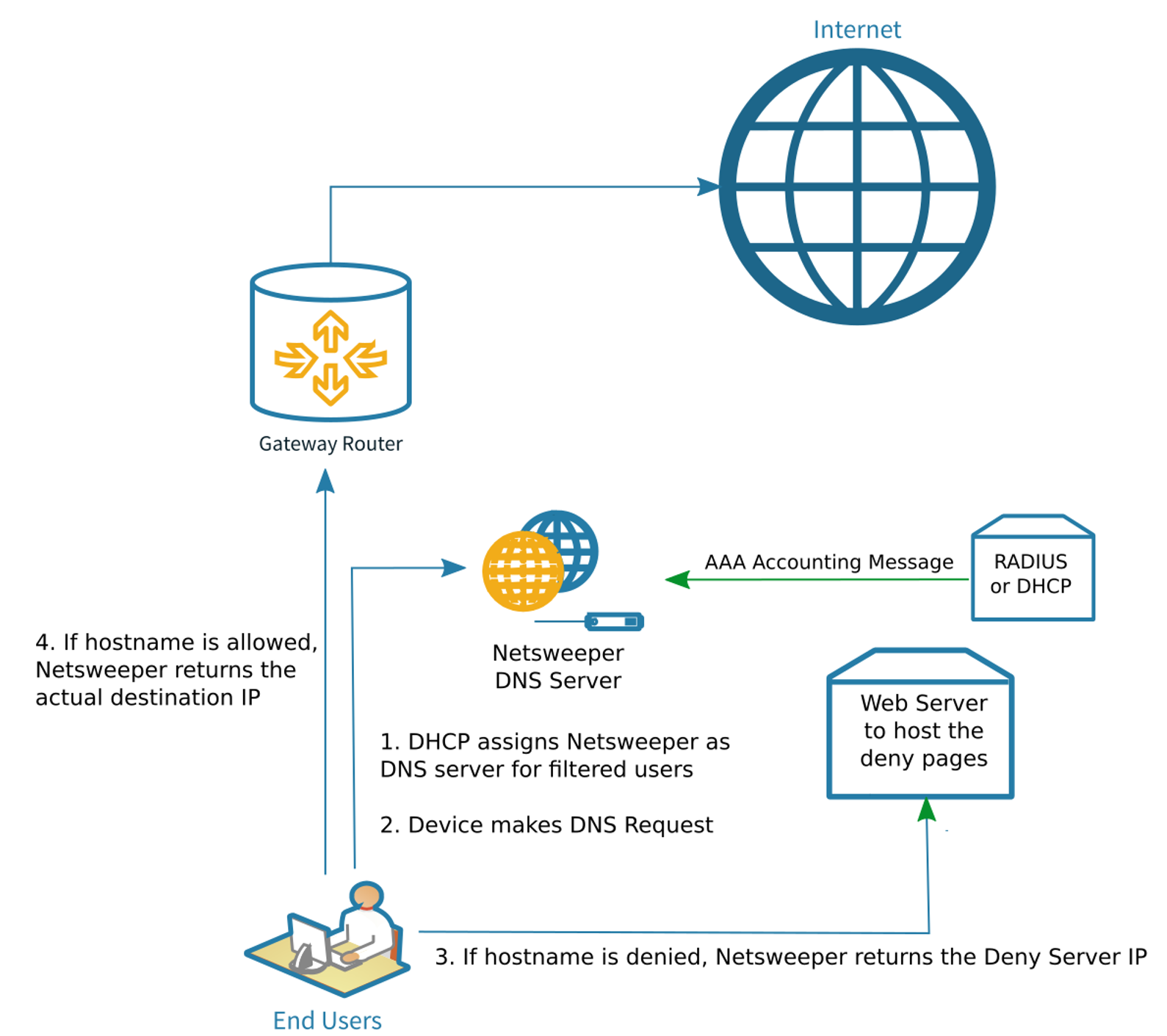
DNS Deployment
· Specify Netsweeper as DNS Server for filtered users
· Filtering is at the hostname level when the DNS lookup is made
· Per user filtering policy is enforced based on unique IP – requires RADIUS or DHCP logs integration
· Enforce Safe Search on Google and Restricted Mode on YouTube
· Traffic is logged at the hostname level and reports can be generated
· Ideal for managed networks e.g. schools & enterprise where users are restricted from changing network settings
Client Filter
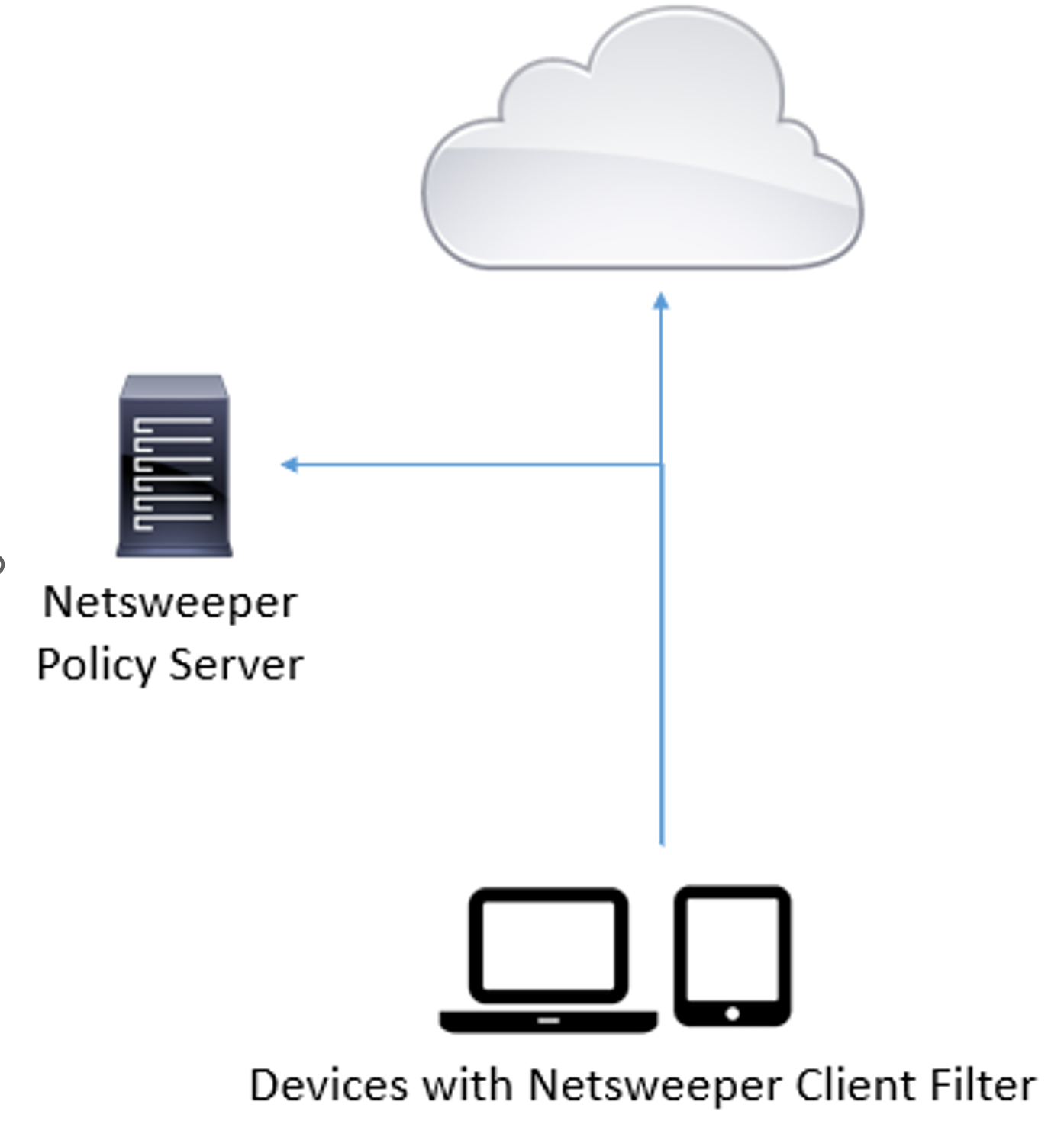
· Netsweeper Client Filters follows policy set in the Netsweeper Policy Server
o Apple iOS Safe Browser
o Android Safe Browser
o Chromebook Browser Extension
o Chrome Browser Extension
o Windows Filtering
o MacOS Filtering
· Filter the full URL for HTTPS, selective SSL Decryption for Windows & MacOS
· Enforce safe results on search engines
· Custom Branding
· The filtering policy management, logs & reports are done on the Netsweeper Manager in the Netsweeper Policy Server
Additional Features
Netsweeper Categories
Netsweeper comes with a complete set of categories available for your filtering needs. Categorization updates are downloaded and applied automatically by the system. If a web URL is categorized incorrectly, categorization updates are handled by our support team, and updates are then pushed out via a list update, which happens within 6 – 12 hours of opening the support ticket.
Netsweeper URL categories are divided into 6 sections: Countries, Mobile Apps, Protocols, System, Web Apps, Web Content.
Netsweeper can apply polices based on the Geo IP location of the destination server.
Categories and Groups include:
Mobile Apps include: Real Gambling Apps, Apple Maps APP, Apple Radio APP, BBM APP, Google Map APP, Google Play Store APP, Instagram APP, iOS Message & FaceTime, iTunes
Protocols include: Email Protocols, File Sharing, Instant Messaging
Media Protocols: iTunes, Real Player, RTSP, Windows Media Player
Web Content
Adult: Abortions, Alcohol, Child Erotica, Child Pornography, Criminal Skills, Extreme, Gambling, Hate Speech, Intimate Apparel, Match Making, Matrimonial, Nudity, Occult, Pay to Surf, Peer to Peer, Pornography, Profanity, Substance Abuse, Tobacco, Weapons
Information: Advertising, Alternative Lifestyles, Classifieds, Education, Environmental, General News, Health, Journals and Blogs, Legal, Medication, Political, Portals, Real Estate, Religion, Sex Education, Social Networking, Technology, Travel, Web Storage
Miscellaneous: Business, HTTP Errors, Investing, Job Search, Parked, Phone Cards, References, Sales, Search Engine, Vehicles, Web Chat, Web Email
Recreation: Arts and Culture, Culinary, Educational Games, Entertainment, Games, Humor Sports, Streaming Media
Security: Ad Blocking, Adware, Directory, Infected Hosts, Malicious Web Obfuscation, Malware, Phishing, Privacy, Remote Access Tools, Under Construction, Viruses, Web Proxy
Custom categories, allowed or denied lists can be created and maintained inside the Netsweeper Web Based Administration system. Individual users can be assigned access to specific lists that can be managed.
Deny Pages
Netsweeper can display a custom deny page which is edited in the WebAdmin using a WYSIWYG editor or return 401, 403, 404. 450, 500 and 503 HTTP Response code to the web browser.
Allow and Deny Lists
Netsweeper allows the creation of individual allowed/denied lists as well as shared lists that can be used to monitor, allow or deny specific data such as URL, Scheme, Path, Query strings, File Extension and Regular Expressions. Any of these can be defined to manage specific content.
Netsweeper has created a URL Lookup function within the Web Administration interface that allows the IT administrator to test conditions to determine if the content is allowed or denied.
Reporting
The Netsweeper Reporter subsystem enables you to make different kinds of reports for those requests. It can gather requests that match some criteria (e.g. requests issued from a specific IP address or requests to some web site), sort them, calculate statistics, and present the results as tables or charts.
Logging
The Netsweeper logging framework is based on a high performance, custom developed, logging framework named LogMod5, it is built on a graph-based framework which allows the user to construct custom logging designs with a high level of flexibility, one of which is the ability to export logs to SYSLOG.
Updating the URL Database
Netsweeper provides a single URL database that is cloud based which is downloaded in real-time as users are accessing content on the Internet. Administrators may enter allowed and denied URL entries on a user, group or global basis. Additionally, administrators can re-classify a URL if they do not agree with the cloud based classification.
Netsweeper developed its own URL Classification system to scale with the growth of the Internet. When a user makes a request to access a URL that is not in the local Netsweeper server, the request is sent to the cloud based scan and classification system which in seconds will classify the URL and then share that classification across the globe. The Netsweeper is a crowd sourced URL classification system that classifies URLs as users are accessing them.
SNMP Capabilities
The Netsweeper product suite has the capability to integrate with any SNMP based Management system.
Ability to Integrate with Various Browser and OS
Netsweeper is deployed at the network level and therefor is compatible with all systems including web browsers, mobile apps, Google Apps for Education, mobile devices, and operating systems since no client software is installed on systems. Netsweeper uses standard RFC compliant methods to integrate with any network and works alongside any other RFC compliant device or application.
Obtaining an End Users Identity
Netsweeper is integrated with an existing directory system such as Microsoft AD, Novell LDAP, Apple LDAP, OpenLDAP or Radius Accounting to assign users based on their group or attribute to the correct filtering policy. This however requires that the users IP address be not behind a NAT as all filtering policies are assigned based on IP address while the user name is assigned to a specific filtering policy.
Ability to Differentiate by Group, Network or Device
Netsweeper filtering policies are applied based on IP addresses or subnets. These IP addresses or subnets can be grouped into policies. Policies include allowed or denied URLs, Categories including application protocol signature. Netsweeper can assign unknown or un-authenticated users into a ‘catchall’ policy with its own restrictions via the users or device IP address.
Filtering policies are defined based on the IP address of the User or device. These IP addresses can be assigned into a group or common policy. Policies can include specific URLs to allow or deny, categories and custom deny pages. All policies are applied to the user or device IP address. When the user authenticates against a supported system, the username is logged along with the request. Netsweeper uses a seamless and agent-less integration with popular directory services and provides complete user identification, enabling simple, application-based policy definition per user or group.
APIs to Integrate with Netsweeper Database
Netsweeper provides APIs to allow customers to integrate with the Netsweeper database via a simple to use Web API. There are two specific versions of the API that are available:
· Direct URL
· SOAP API (WSDL)
About Firewalls and Interfaces
Netsweeper is not a ‘firewall’ but rather a Packet Inspection System that is able to detect a variety of protocols using its unique outbound inspection system. Policies are defined based on ‘category’ which means that application protocols are ‘categories’ that can be turned off and on a per IP, per subnet, per group or global basis.
Netsweeper utilizes Radius Accounting packets which are generated by the Wireless Access Controller to identify when a user has authenticated. No additional software or agents are required.
All Internet traffic is IP based therefore BYOD devices that don’t already authenticate against a captive portal or directory service are filtered based on the device’s IP address. No additional software is required to be installed on the BYOD device since the filtering takes place using the devices IP address if the user does not authenticate using an existing captive portal. If the user authenticates against a captive portal, the captive portal can be queried or the portal can notify the Netsweeper that a particular user is authenticated.
High-level Components
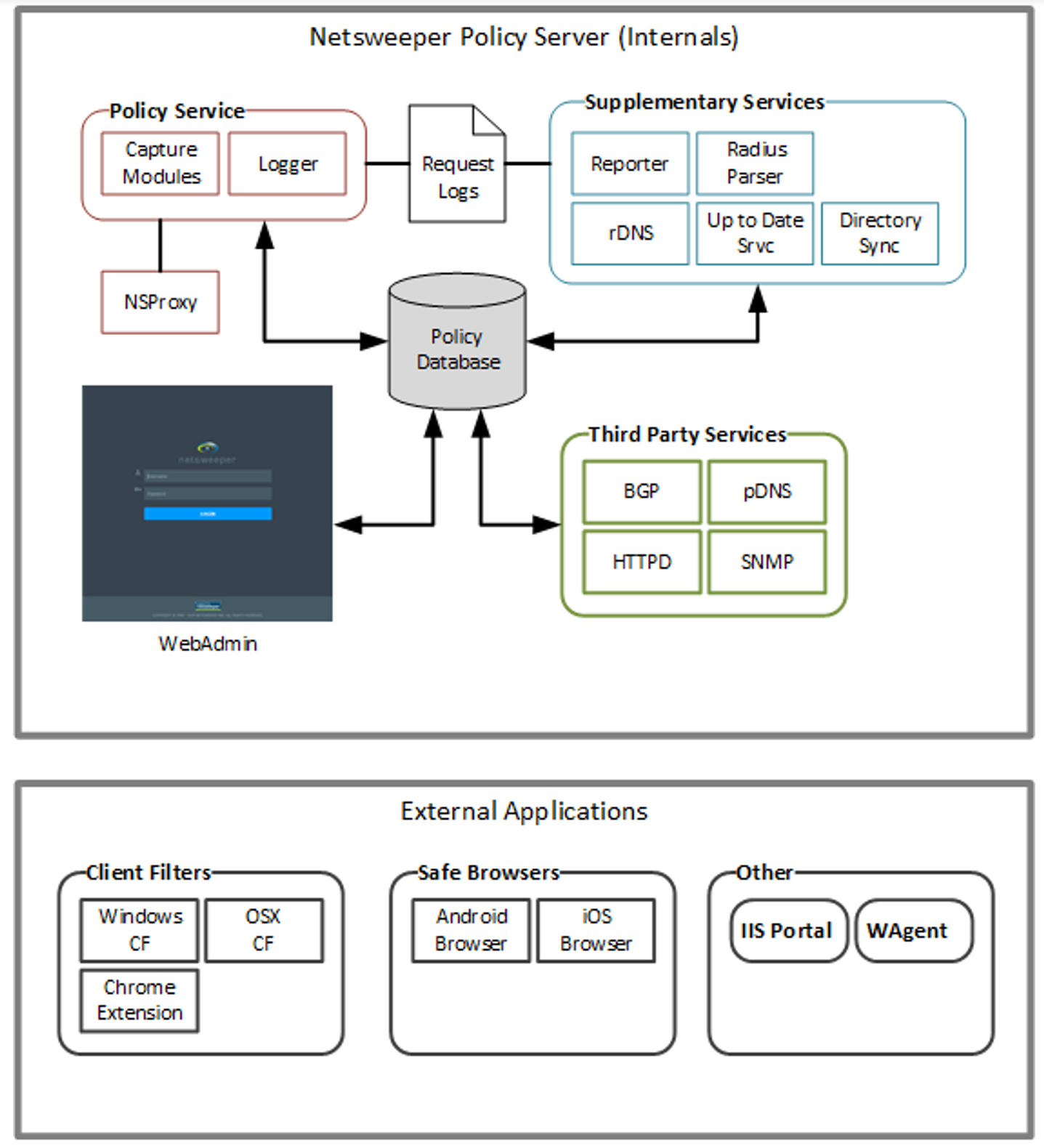
The Netsweeper Policy Server is a term often used to describe the collection of all Netsweeper services that reside on a Netsweeper server. It is important to note that this term can sometimes be confusing, because on the Netsweeper Policy Server resides many different services, including a 'Policy Service'.
The diagram below shows the Netsweeper Policy Server, and the services that reside on it.
Policy Service
The Policy Service, for which the Netsweeper Server is often named, is the heart of the Netsweeper filtering platform. Its primary function is to make policy decisions and return these decisions to the interceptor service, such as the Capture Module or Enterprise Filter. It also sends transaction information to the logging service for logging purposes.
Some important concepts regarding the Policy Service:
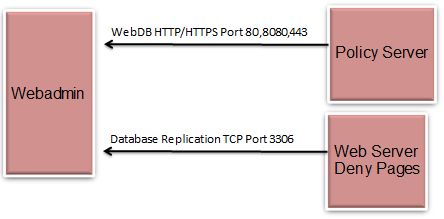
· The Policy Service loads the policy database into memory, through the WebAdmin service. It does not connect directly to the policy (MySQL) database. This is important to keep in mind when creating deployments with many policy servers/interceptors.
· While the Policy Service is configured by default to receive policy requests from the Capture Module, it can also receive requests from the Netsweeper Client Filter, Proxy Caches, and many other interceptor devices/services.
· The Policy Service is also known as the NSD (Netsweeper Daemon.)
Category Name Service (CNS)
At the heart of the Netsweeper solution is the Netsweeper data centres. The Categorization engines scan the words and images from all new URLs and assign them to content categories. Netsweeper’s millions of users worldwide generate more than 240 million web requests every hour, and the new URIs from among those are evaluated by our cloud-based categorization and added continuously to our Master Categorization Name Servers which in turn provide those categorizations to our customers.
Deployments
Multi-server Deployments
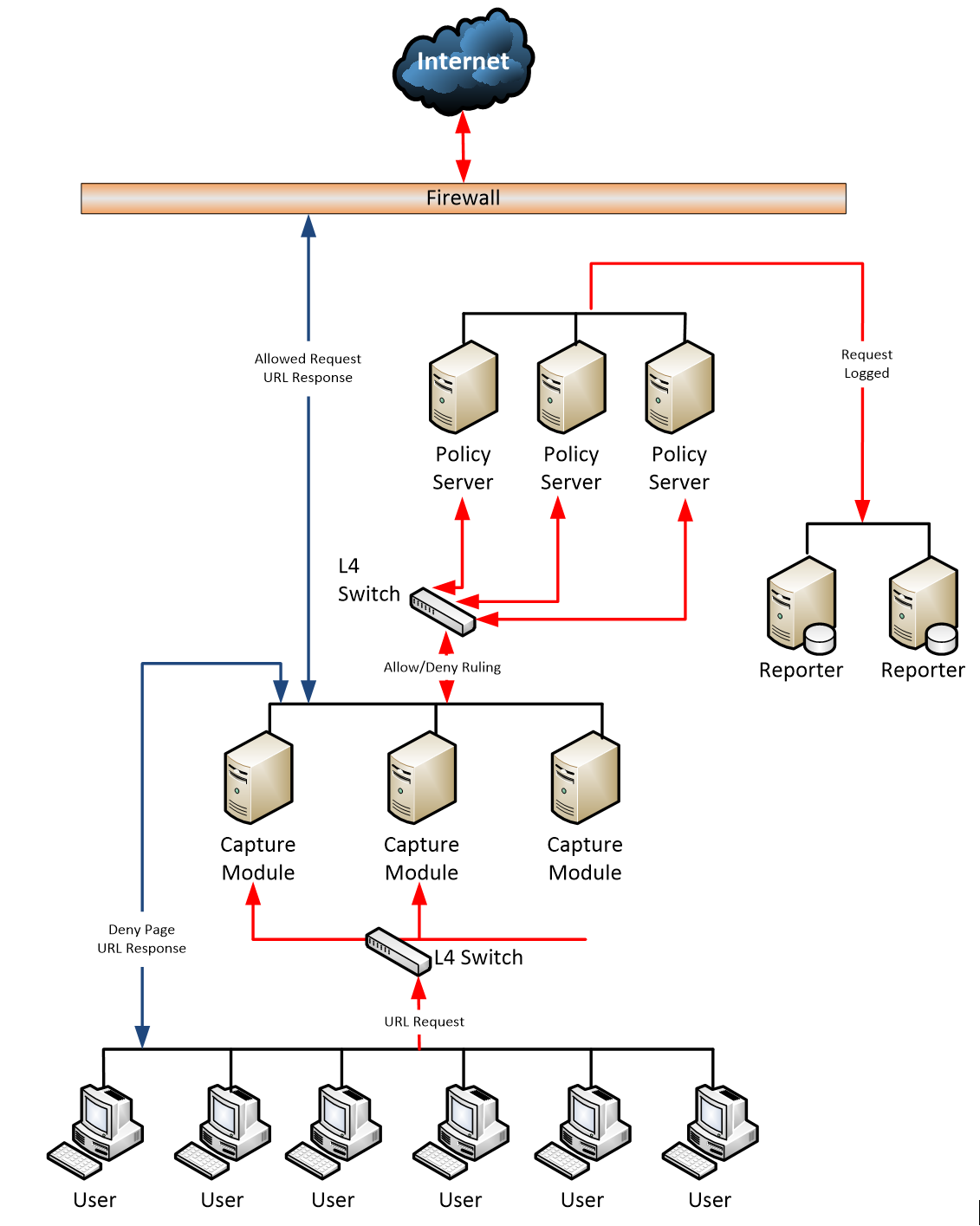
In a typical, high-demand network, multiple Policy Servers and Capture Modules can accommodate a high volume of outgoing internet traffic and provide failover support. Inbound traffic does not travel through the Capture Module. A Layer 4 (Transport Layer) switch manages load balancing by routing or forwarding URL requests to available Policy Servers and Capture Modules. In addition, Reporters assume all logging and reporting functions to preserve processing power on the Policy Servers and Capture Modules.
See the document ‘Configuration - Multiple Server Setup and Installation Guide’ for more information.
Remote Loggers and Reporters
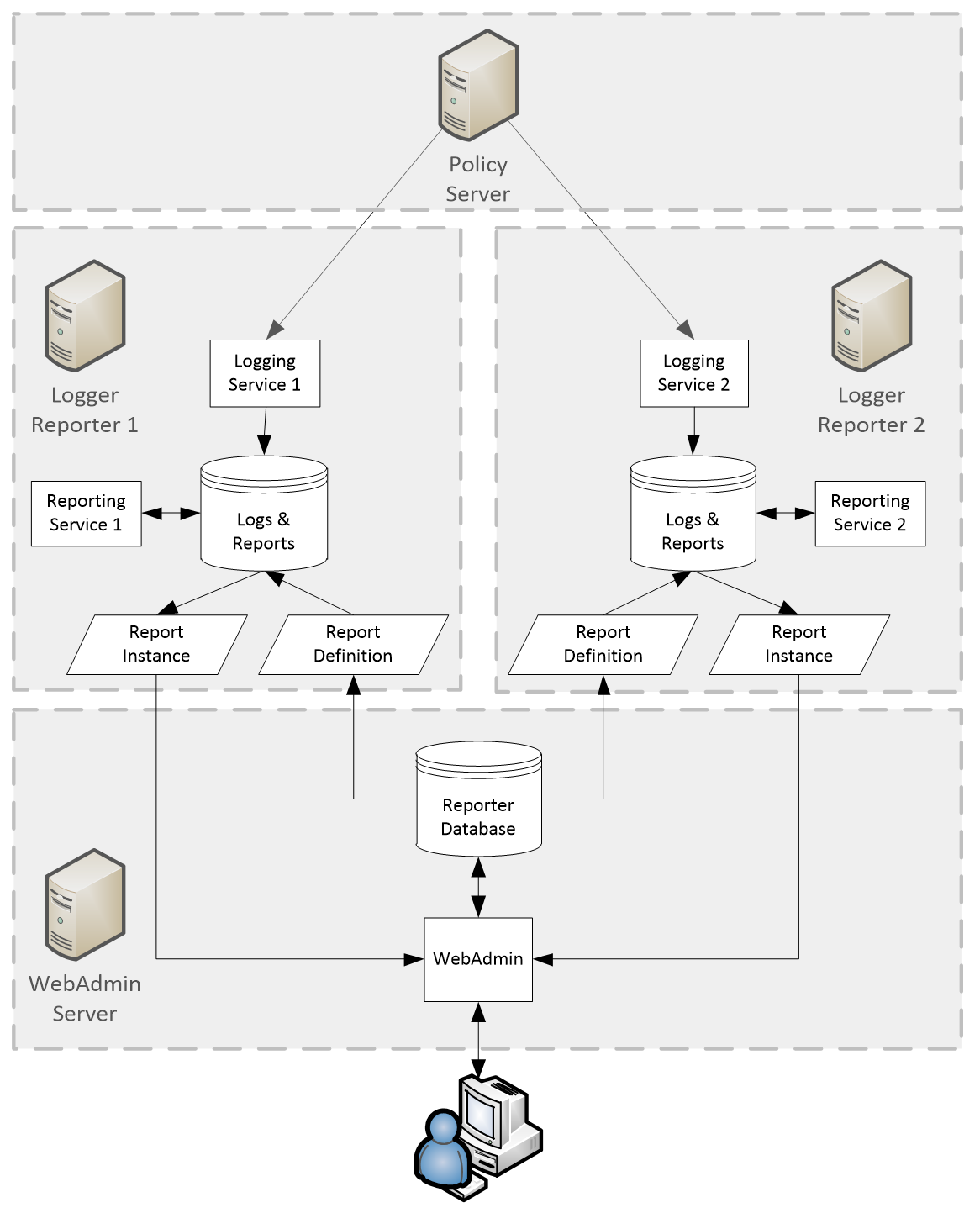
The logging and reporting architecture allows for multiple reporting servers to work together to generate reports. All servers share the same reporter database but have their own local set of request logs and save the report instances locally.
See the document ‘Configuration – Reporters’ for more information.
High Availability Web Cluster
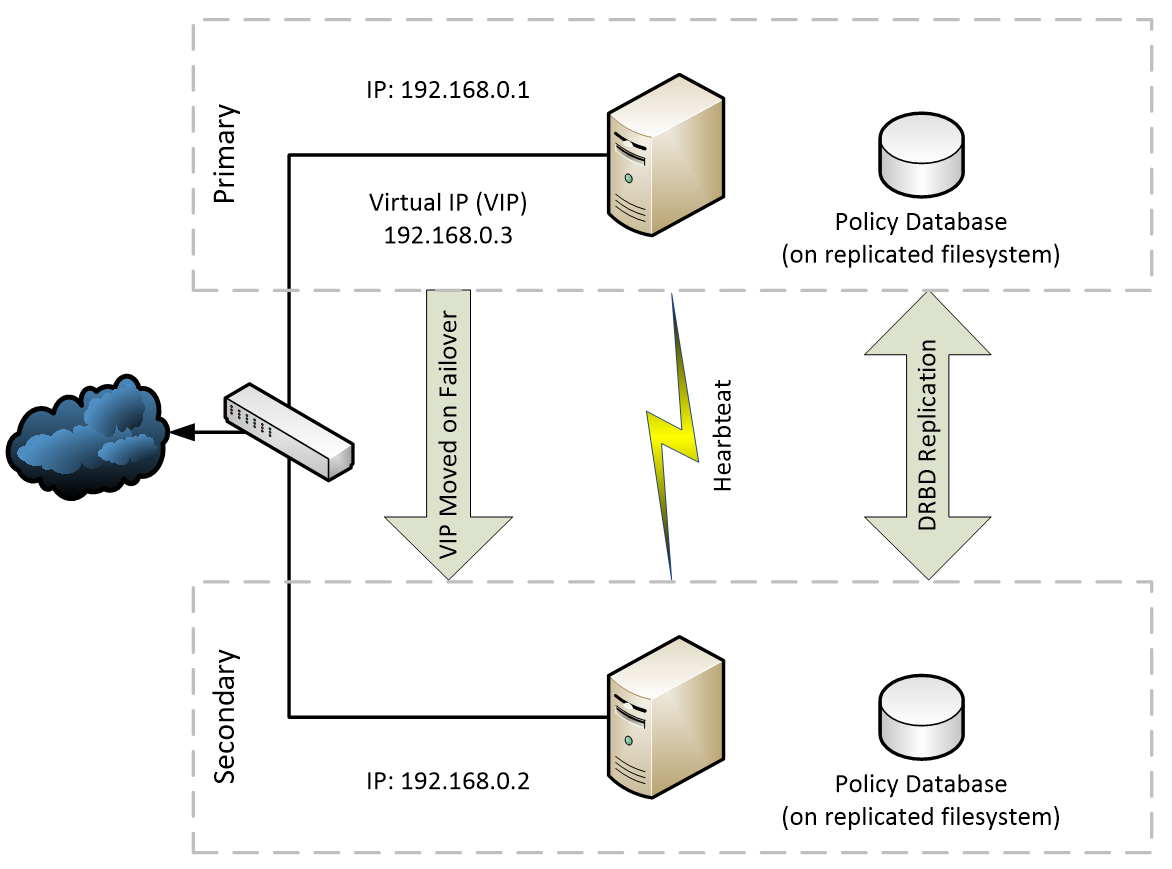
A web cluster is two connected computers working together and seen as a single system. It creates redundant groups or clusters to provide continuous service and failover capabilities to utilize a minimum of downtime. Each node has its own IP as well as the Virtual IP (VIP) that can be migrated to the other node either through a failure of the active node or as an administrative action. DRBD is used to replicate services between the servers, and these services are monitored using Heartbeat.
For more information, see ‘Configuration - Web Cluster’.
Network Connectivity
-
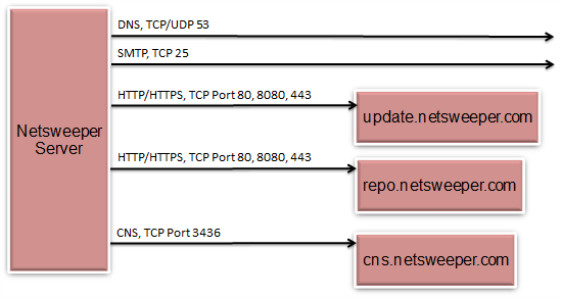
Netsweeper requires certain network resources
-
Proper firewalling is important to meet most security policies
General Connectivity
· All Servers
§ DNS
§ CNS
§ Mail Server
§ Netsweeper Updates
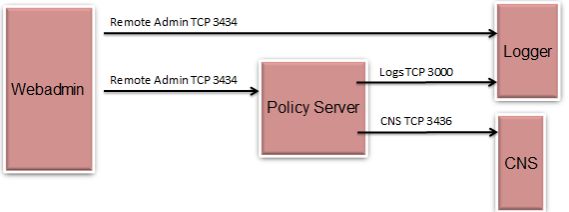
· WebAdmin to Policy Servers
§ Database replication
§ Remote Admin
· Policy Servers to Logger
§ Remote Logging
All Servers
WebAdmin and the Policy Server
WebAdmin Database
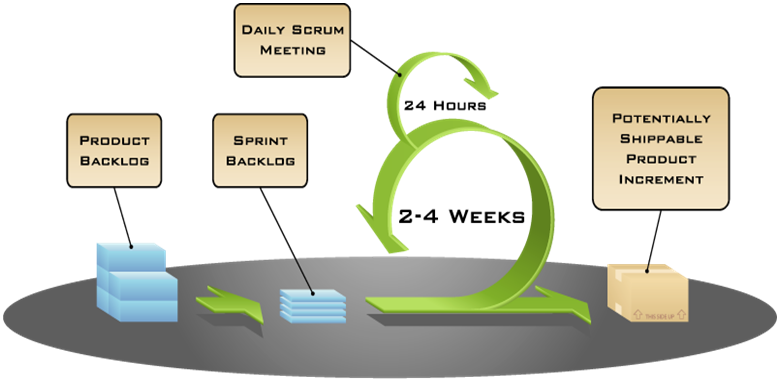
Agile Methodology
Netsweeper development uses an Agile software development process called 'Scrum'. Scrum is an iterative development cycle where requirements and solutions evolve through collaboration with cross-functional teams. It allows development to focus on delivering the highest business value in the shortest time by rapid and repeated inspection of the actual working software (every two weeks to one month). In this process, the business sets the priorities and the teams self-organize to determine the best way to deliver the highest priority features. Requirements are captured as items in a ‘product back-log”. Items from this product back-log are promoted to the Sprint. The development Sprint progresses through a series of short daily meetings called ‘scrums’ to monitor progress and identify obstacles.