Radius Documentation
This document is divided up into seven sections. Select each of the below sections to view its contents.
 RADIUS Overview
RADIUS Overview
The Netsweeper product supports RADIUS integration and has a default configuration that facilitates quickly getting a proof of concept up and running. It can also be customized to meet the requirements of your network.
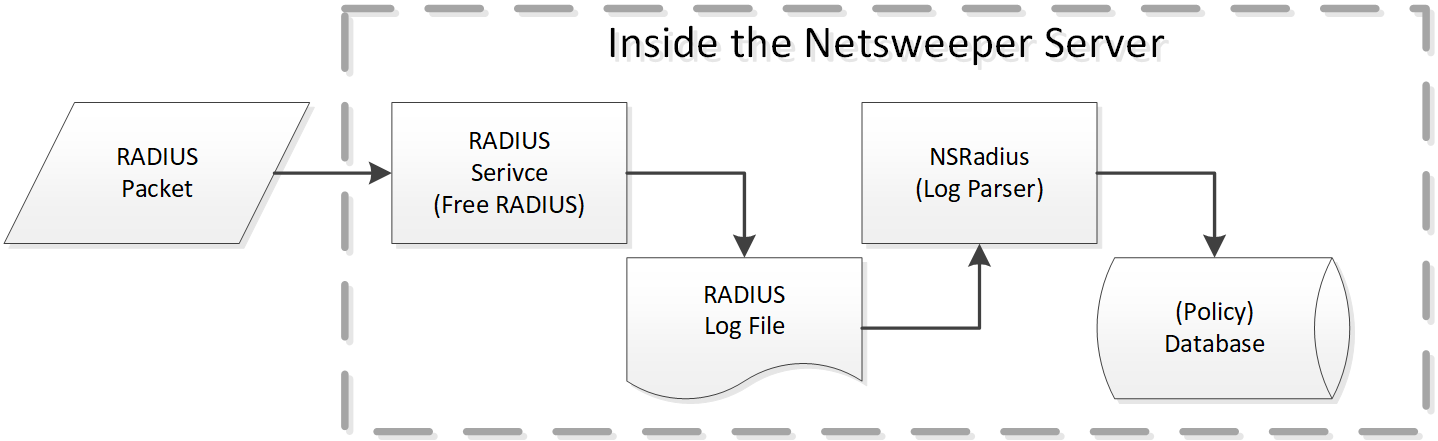
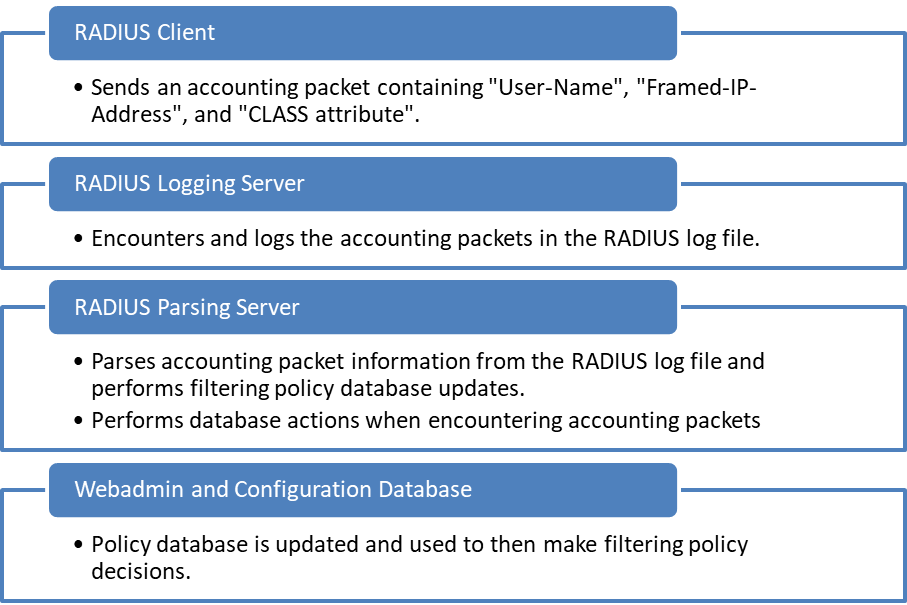
The Netsweeper RADIUS components consist of:
- RADIUS Logging Service on the Netsweeper server: This listens for accounting starts, interim updates, and accounting stops and logs these to the RADIUS log file.
- RADIUS Parsing Service on the Netsweeper server: This monitors the RADIUS log file and when encountering accounting packets will perform Netsweeper policy database actions (based on the type of account packet: start, stop, and update.)
The RADIUS service must always be deployed with the WebAdmin service. The RADIUS Server residing on the Netsweeper Server only requires accounting packets, and is not involved with authorisation. Accounting packets should be sent on port 1813.
By default, the Netsweeper RADIUS parser will associate the device with the group name defined in the RADIUS CLASS attribute.
Radius Parser and IPv6
The RADIUS Parser supports IPv4 and IPv6 addresses. Multiple IPs and IPv6 addresses for dynamic clients from the RADIUS Parser are enabled. A Client can use both IPv4 and IPv6 addresses with the same Client name. If setting $IP6ADDRESS_ATTRIBUTE is set to false instead of "Framed-IP6-Address", it will be ignored. The same rule applies to $IP6PREFIX_ATTRIBUTE and $IPADDRESS_ATTRIBUTE.
The list below shows the IPV6 settings that can be used to validate the new IP addresses. Please see ‘Radius Parser Configuration’ in this document for a description of these settings.
- $IP6ADDRESS_ATTRIBUTE = "Login-IPv6-Host";
- $IP6PREFIX_ATTRIBUTE = "Framed-IPv6-Prefix";
- $INTERFACEID_ATTRIBUTE = "Framed-Interface-Id";
- $IP6ADDRESS_ATTRIBUTE_VALID_REGEXP = false;
- $IP6PREFIX_ATTRIBUTE_VALID_REGEXP = false;
Monitoring RADIUS
Monitoring RADIUS
The Services Window
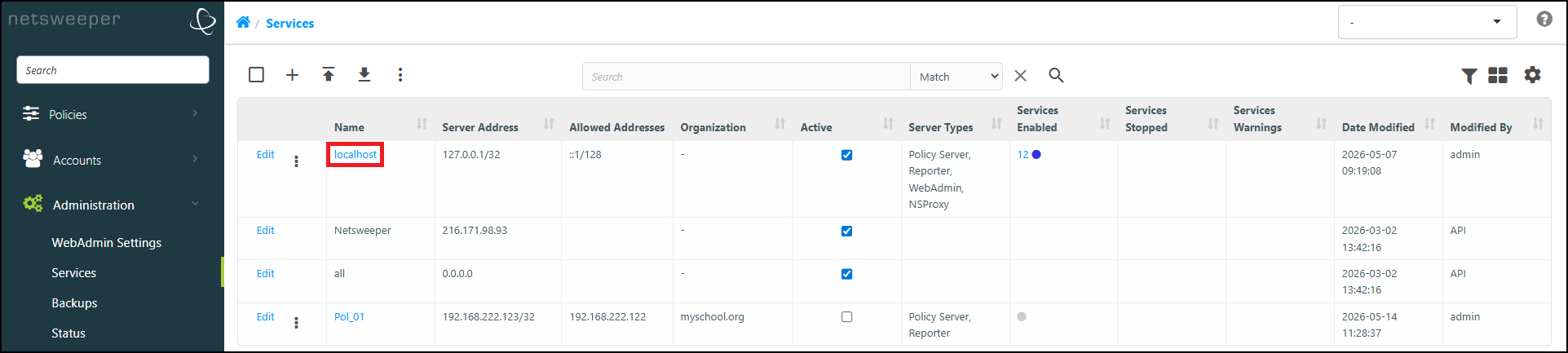
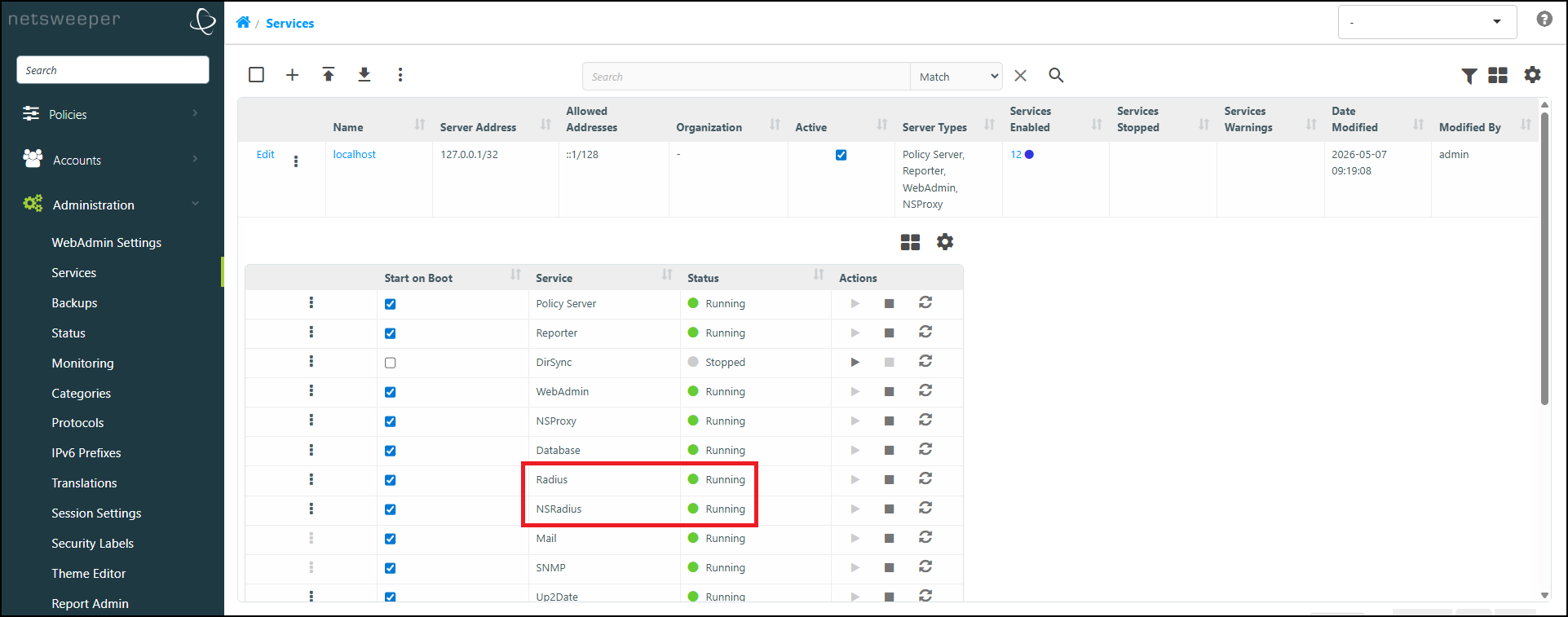
The 'Services' window allows for a quick, at-a-glance, view of the services running on each server within your Netsweeper deployment. You can reach this page by navigating to Administration > Services in your WebAdmin.
-
Select the Hostname of the desired server to expand its list of Services.
-
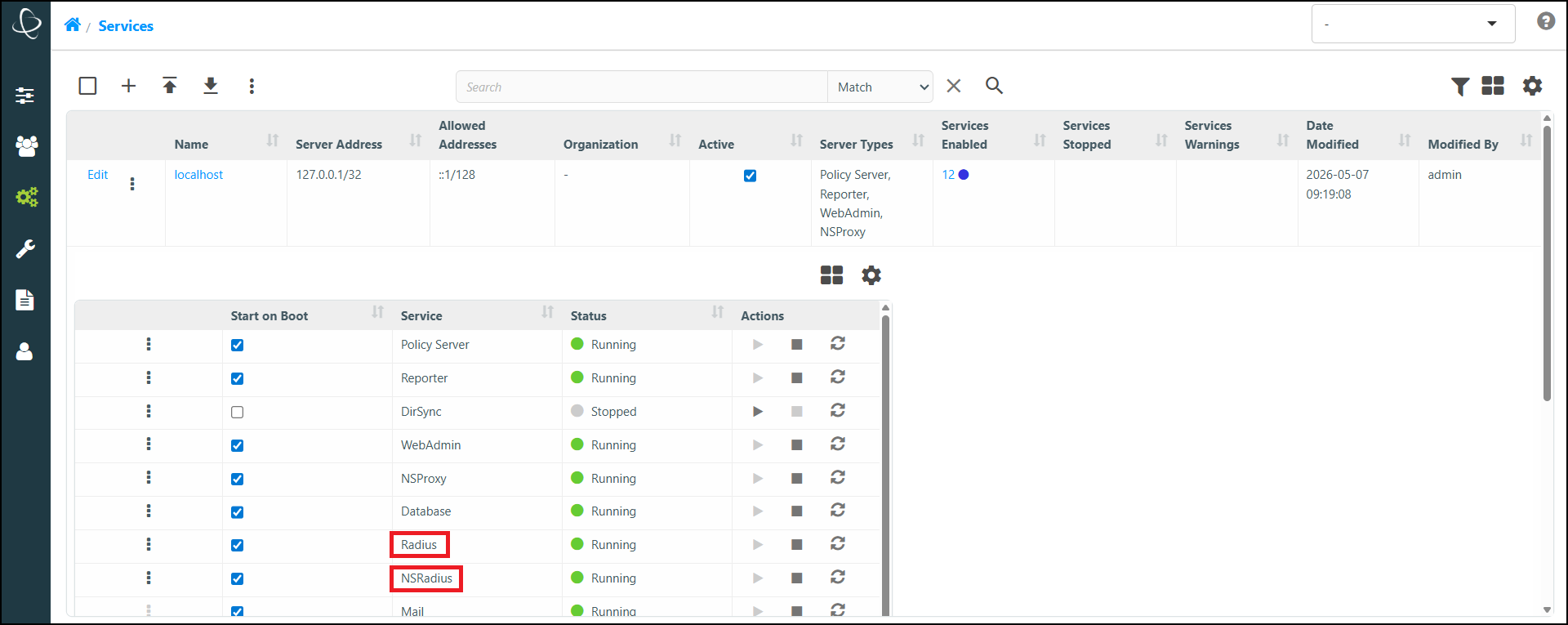
The list (and status) of Services for that server displays, including the Radius and NSRadius services.
To view services running on remote servers, they must be added in the Administration > Services window and configured correctly. Please refer to our Multiple Server Setup Guide for instructions on adding and configuring additional servers (if needed).
The RADIUS Log File
You can run the following command to observe what is occurring in the RADIUS log file under heavy RADIUS work load:
Command:
tail -f /var/log/radius/radius.log
Output:
Tue Feb 26 14:44:34 2013
 : Info: Loaded virtual server <default>

Tue Feb 26 14:44:34 2013
 : Info: Loaded virtual server inner-tunnel

Tue Feb 26 14:44:34 2013
 : Info:  ... adding new socket proxy address * port 40691

Tue Feb 26 14:44:34 2013
 : Info: Ready to process requests.
This log file will be renamed as radius.log.new as soon as the parser finished the previous log file.
You can monitor if the entire RADIUS system works successful by running the following 2 commands:
Command:
ps aux | grep radiusd
Sample Output:
[admin@localhost ~]$ ps aux | grep radiusd
        radiusd     5036  0.0  2.2 240960 85412 ?        Ssl  08:17   0:00 /usr/sbin/radiusd -d /etc/raddb
admin      97752  0.0  0.0 222012  1184 pts/0    S+   12:11   0:00 grep --color=auto radiusd
Command:
ps aux | grep radiusparser.php
Sample Output:
[admin@localhost ~]$ ps aux | grep radiusparser.php
root        7415  0.0  0.7 521580 28708 ?        S    08:23   0:10 php /usr/local/netsweeper/webadmin/bin/radiusparser.php -f /usr/local/netsweeper/logs/radius.log -p /var/run/radiusparser.pid
root        7423  0.0  1.4 544568 53356 ?        S    08:23   0:07 php radiusparser.php -n -f
admin 97933 0.0 0.0 222144 1108 pts/0 S+ 12:12 0:00 grep --color=auto radiusparser.phpRadius Configuration
Before providing alternative Netsweeper RADIUS configurations based on some common network/industry requirements, an overview of all Netsweeper RADIUS configuration settings is necessary. This will ensure a solid understanding of all Netsweeper RADIUS configuration settings.
In many cases, the Netsweeper RADIUS parser and Netsweeper Policy Database integration will be transparent and not require modifications of any sort.
In the case that a small segment of your users require filtering services, it is recommended to forward only the RADIUS traffic of the filtered subscribers. This will reduce the load on the filtering platform, (since not all traffic is being filtered,) and increase future scalability.
Netsweeper RADIUS Parser
The Netsweeper RADIUS Parser uses the RADIUS accounting log file to determine how to update the Netsweeper Policy Database through the Netsweeper WebAdmin APIs. It scans the RADIUS log for accounting detail events, using these events to invoke calls to the APIs.
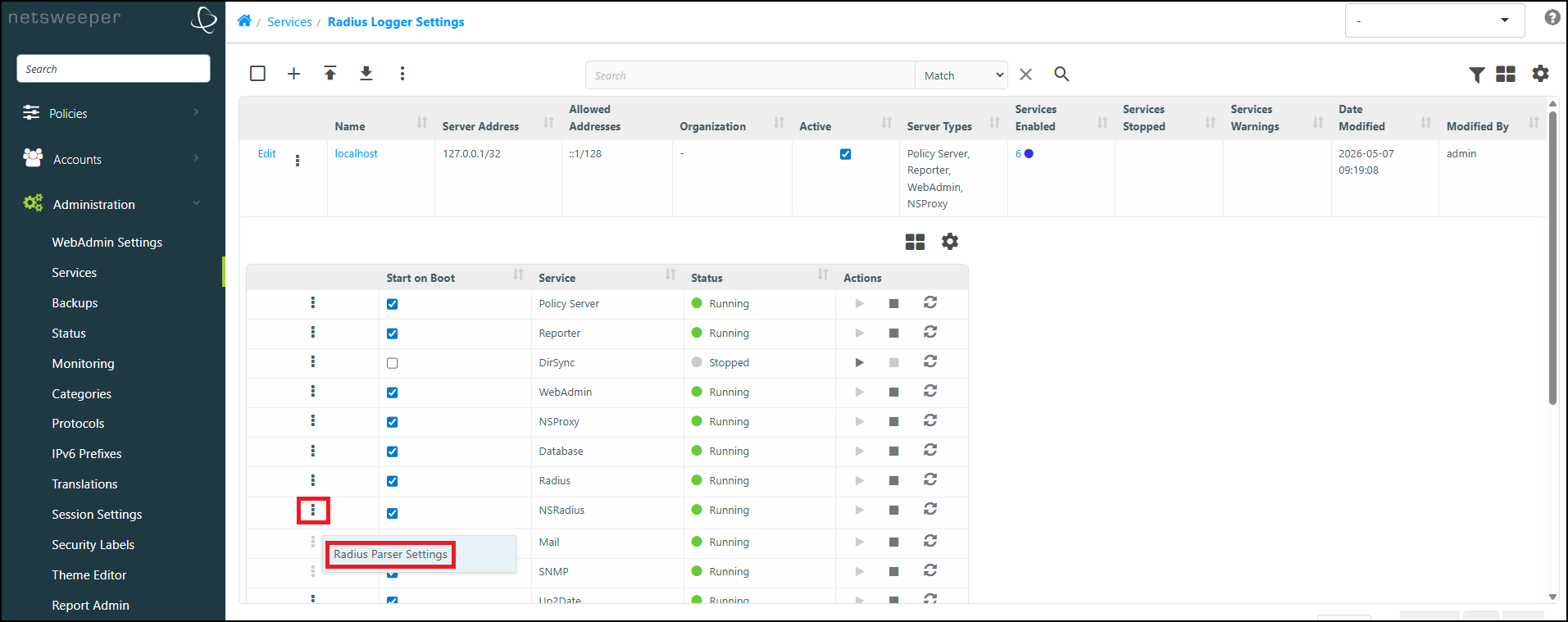
- Navigate to Administration > Services and select the Hostname of the server you wish to edit, to expand its list of Services.
- Select the 'More Actions' icon for the NSRadius service and choose Radius Parser Settings.
RADIUS Parser Configuration
The following table describes the RADIUS configurations.
| Configuration | Description |
|---|---|
|
$ENABLE_RADIUSPARSER_LOGGING= false; |
Set this to ‘true’ if you want to debug Radius and require logs from the parser. |
|
$RADIUSPARSER_LOGFILE_LEVEL=1; |
The logfile level to log: - 1 INFO -2 STATS - 3 ERROR |
|
$RADIUSPARSER_LOGFILE="radiusparser.log"; |
The logfile, will be in /usr/local/netsweeper/logs/ It will be rotated only once to the filename. We do not keep more history than one single log file. |
|
$RADIUSPARSER_LOGFILE_SIZE = 1048576 * 5; |
The size of the log file before we rotate. We only keep 2 logs default 5 MB each, total 10MB. |
|
$PROCESS_INTERIM = false; |
Process interim updates the same way as we process RADIUS Start packets. |
|
$GROUPNAME_LOOKUP_ |
Allows provisioning of clients in the appropriate group without the need for the CLASS attribute being present in the Accounting-Start packets received. This will cause clients to be looked up within the Netsweeper policy database. It is recommended that this setting is left at its default setting of ‘false’ to ensure efficient parsing performance. This should only be changed if required. |
|
$GROUPNAME_LOOKUP_FROM_ |
If we fail to lookup the groupname from the username in the Clients window, fall through to groupname attribute. |
|
$GROUPNAME_LOOKUP_FROM_ |
If we fail to lookup the groupname from the username in the Clients window, fall through to groupname attribute. |
|
$GROUPNAME_ATTRIBUTE = “Class”; |
Name of the attribute to use to determine the group to place the client into. This attribute MUST exist for the IP Address Assignment and it MUST exist if we are going to create the group. By default, we use the Class attribute for the group name. |
|
$USERNAME_ATTRIBUTE = “User-Name”; |
Name of the attribute that contains the client name to assign to the group. This is used to lookup a client from the WebAdmin. The group this client belongs to is then used. If you have multiple clients, the client with no IP Address or Subnet is first used. Otherwise, the first returned client is used. This does not currently support database partitioning and other advanced features. |
|
$ACCOUNTNAME_ATTRIBUTE = “User-Name”; |
Name of the attribute that contains the Account Name. |
|
$IPADDRESS_ATTRIBUTE = “Framed-IP-Address”; |
Name of the attribute that contains get the IPv4 Address. |
|
$IP6ADDRESS_ATTRIBUTE = " Framed-IP6-Prefix "; |
The attribute we get the IP6 Address from: Framed-IPv6-Address, Login-IPv6-Host, or Framed-IPv6-Prefix |
|
$IP6PREFIX_ATTRIBUTE = "Framed-IP6-Prefix";
|
The attribute we get the IPv6 Prefix from. The setting is used to check if the IP6 address is from IP6PREFIX_ATTRIBUTE. It is not used when the INTERFACEID_ATTRIBUTE is false. The INTERFACEID_ATTRIBUTE will be merged into the IP6ADDRESS_ATTRIBUTE only if the IPv6 address is from IP6PREFIX_ATTRIBUTE |
|
$INTERFACEID_ATTRIBUTE = "Framed-Interface-Id";
|
The attribute we get the IP6 interface identifier: Framed-Interface-Id. This is an optional attribute to merge with Framed-IPv6-Prefix for a full IPv6 address of an interface. Set the attribute false to disable merging of the interface id with the ipv6 prefix. |
|
$IPADDRESS_ATTRIBUTE_VALID_REGEXP = false;
|
The array or | segmented regular expressions for each IPADDRESS_ATTRIBUTE for validation. |
|
$IP6ADDRESS_ATTRIBUTE_VALID_REGEXP = false;
|
The array or | segmented regular expressions for each IP6ADDRESS_ATTRIBUTE for validation. |
|
$INTERFACEID_ATTRIBUTE_VALID_REGEXP = false;
|
The array or | segmented regular expressions for each INTERFACEID_ATTRIBUTE for validation. |
|
$PARTITION_ATTRIBUTE = "Class"; |
This attribute must simply exist and possibly have a value. |
|
$PARTITION_VALUE = false; |
This can be set to false, in which case the value will not be checked. Otherwise, the value must be the specific value for the IP Address assignment to occur. |
|
$PARTITION_CLEAN_START = false; |
This cleans up users that do not have a filtering group on RADIUS Accounting Stop. This will remove the Framed-IP-Address from the database if we cannot lookup the associated filtering group. This can happen if the PARTITION_ATTRIBUTE does not exist, or we cannot find the Client in the Clients window or if we cannot find the group. |
|
$PARTITION_CLEAN_STOP = false; |
This cleans up users that do not have a filtering group on RADIUS Accounting Stop. This will remove the Framed-IP-Address from the database if we cannot lookup the associated filtering group. This can happen if the PARTITION_ATTRIBUTE does not exist, or we cannot find the Client in the Clients window or if we cannot find the group. |
|
$CREATE_ACCOUNT = false; |
Set this to true if you want to create a WebAdmin account dynamically. |
|
$CREATE_ACCOUNT_PASSWORD = “”; |
Password for the account being created dynamically. |
|
$CREATE_ACCOUNT_ORGANIZATION = “radiusparser”; |
Organization for the account being created dynamically. |
|
$CREATE_ACCOUNT_CLASSIFICATION = “user”; |
Classification of the account being created dynamically. |
|
$CREATE_ACCOUNT_ASSIGN_ |
Assigns the account to the group. False is the default if used, the group will not be assigned. |
|
$CREATE_GROUP = false; |
Creates a group if it does not already exist. |
|
$CLIENT_API_DELETE_ |
If this is set to ‘true’ the client is deleted. If set to ‘false’ the client is expired. |
|
$GROUPNAME_LOOKUP_ |
This will not only look for a Client with the Username matching the RADIUS Accounting packet but will also look for Clients with an IP Address and subnet with a matching username. It is recommended that this be disabled. Feature added in 3.1.0 release. Enabling this option has a performance impact when Filtered and Non-Filtered subscriber RADIUS Traffic is sent to the Netsweeper system and the $GROUPNAME_LOOKUP_FROM_USERNAME option is enabled. |
|
$GROUPNAME_ATTRIBUTE_VALID_REGEXP=false; |
This option gives the ability to use arrays instead of the | to segment attributes (regexp may require a |). As an example, you can have an empty filter “/.+/|”; The second filter is empty, which means use the attribute if it exists. |
|
$WORKSTATION_ATTRIBUTE = "NAS-Identifier" |
The Attribute we get the workstation the Client we assign to the group from. |
|
$WORKSTATION_ATTRIBUTE_VALID_REGEXP = false |
The array or | segmented regular expressions for each WORKSTATION_ATTRIBUTE for validation. |
|
$WORKSTATION_STOP_VALIDATE=false |
If true we validate the Workstation matches the client when performing RADIUS Accounting Stop. |
|
$USERNAME_STOP_VALIDATE=false |
If true we validate the Username matches the client when performing RADIUS Accounting Stop. |
A Client can use both IPv4 and IPv6 addresses with the same Client name. If $IP6ADDRESS_ATTRIBUTE is set to false instead of " "Framed-IP6-Address", it will be ignored. The same rule is applied to $IP6PREFIX_ATTRIBUTE and $IPADDRESS_ATTRIBUTE.
Stripping Out Realms
Use these settings to strip out realms in the Radius Parser Settings. Realm handling now works for the Radius Parser and allows for username mangling and removing of the Realm associated with a User-Name RADIUS packet. This also works for the WebAdmin Login when configured in System Configuration> WebAdmin Settings.
$REALM_FIND_PCRE = "/^([^\@]*)\@*.*$/";
$REALM_REPLACE_PCRE = "\$1";
If you want to also include '\' characters, use these settings:
$REALM_FIND_PCRE = "/^([^\@\\\]*)(\@*|\\\*).*$/";
$REALM_REPLACE_PCRE = "\$1";
When you are done making changes to the 'Radius Parser Settings' file, select Submit to apply your changes and then Restart Radius.
Configuration Loading
Policy Server Polling and Client Loading
The groupclient_dynamic_clients setting causes the Netsweeper Policy Server to periodically scan for Client changes. By default, the groupclient_dynamic_clients setting is disabled and the Policy S server will completely reload the entire database because the webdb_applysettingscheck_enabled setting is enabled. webdb_applysettingscheck_enabled is an expensive operation when dealing with many Clients.
The following is from the nsd.conf configuration file showing the default settings:
# GroupClient Dynamic Clients
#
# This enables polling of the clientid table for changes, not deletes.
# Has the same effect of remoteadmin command 200
# Setting this to an integer greater than 0 will scan the clientid table every X seconds
# The default value is 0 ( disabled )
#
# NOTE! You will want to disable the apply settings check since this reloads the entire
# database.  It is recommended to also add this, or change the timeout values to a much
# longer interval for the apply settings checking.
#     webdb_applysettingscheck_enabled false
#
# Format:
#    groupclient_dynamic_clients 60
#
# Default:
#     groupclient_dynamic_clients 0
It is recommended that the groupclient_dynamic_clients setting is enabled by entering an interval (in seconds.) It is also recommended that the webdb_applysettingscheck_enabled setting is disabled, or the webdb_applysettingscheck_delay setting is utilized (by entering a duration in seconds) to limit the intensity of full configuration reloading by the policy server.
If the webdb_applysettingscheck_delay setting is disabled, then no configuration database changes will be loaded by the policy server (with the exception of clients loaded because of groupclient_dynamic_clients being enabled.)
GroupClient Lookup Order
The Netsweeper Policy Server will lookup clients in the policy database using an ordered list of lookup methods. For RADIUS integration, the dbip module is used, and will most likely be the only module required.
The default setting in the nsd.conf is outlined below:
# +-----------------------------+
# | Group Client Lookup Order   |
# +-----------------------------+
#
# This allows you to specify which type of clients are looked up first.  This
# can be used to fine tune how you wish to define the policy server operation
# for group associations.

# Format:
#    groupclient_lookup_order dbclientname dbip dbsubnet
#
#    Client Modules
#        nslam
#            nslam clients that are dynamically created
#        dbip
#            database clients that have a specific IP address
#        dbipport
#            database clients that have a specific IP address and the TCP port or the port range
#        dbsubnet
#            database clients that have a subnet mask != 32 or 255.255.255.255
#        dbclientname
#            database clients that only have a client name and no IP or subnet
#        dbclientnamerdns
#            database clients that perform a reverse DNS query for the requesting IP
#            this will act as dbclientname after host name is found
#            Note: the current implementation does not provide caching of host names
#                and will decrease performance.
#        dbclientnamegrouprestrict
#            does a dbclientname lookup then proceeds to make sure group restrictions pass
#            group restrictions are defined in a group which state what IP addresses dbclients
#            can come from
#        groupexternal
#            run the groupexternal_program to lookup the group.  See the groupexternal_* config
#            settings below for more information.  Note: this module uses the NSLAM framework
#            for caching of credentials.
#        usernamemangle
#            parses the provided username and lookups group by part of the user name.
#            See the groupclient_usernamemangle_* config settings below for more information.
#            It doesn't lookup for any client records.
#        groupname
#            Attempts to lookup the group based on the provided groupname.   The groupname
#            is normally not set, but for Trace URL Request, Surf by Group, or the Client Filter
#            it is possible the groupname is provided.    This module will attempt to lookup the
#            group based on the provided group.
#        httpheader
#            looks for group and user names in http request headers. The header title can be configured
#            See groupclient_httpheader settings below.
#
# Default 2.6.27.29: nslam module removed
#     groupclient_lookup_order dbclientname dbip dbsubnet
# Default 6.1.1: added groupname as first option
#     groupclient_lookup_order groupname dbclientname dbip dbsubnet
Change the groupclient_lookup_order to:
groupclient_lookup_order dbip
This will improve performance since only one module is used to lookup groups. If you feel your deployment requires more than only dbip, contact a Netsweeper Systems Engineer.
RADIUS Server Configuration
The default Netsweeper RADIUS configuration will work for most deployments. Typically, all that is required is the addition of a new RADIUS client to the RADIUS Server that resides on the Netsweeper Server.
Configure RADIUS to accept packets
The Netsweeper RADIUS server must be configured to accept packets from a RADIUS client (any entity that is sending the required RADIUS packets.)
For example, if the entity is located at IP 1.2.3.4, then add the following to the RADIUS server (residing on the Netsweeper Server) configuration:
client 1.2.3.4
{
secret = YourSecretYouConfigured
shortname = YourNasDevice
nastype = other
}
The configuration file for the RADIUS server is /etc/raddb/radiusd.conf. You can also access this file on local and remote hosts through the Administration > Services page.
Starting and Stopping the RADIUS Service
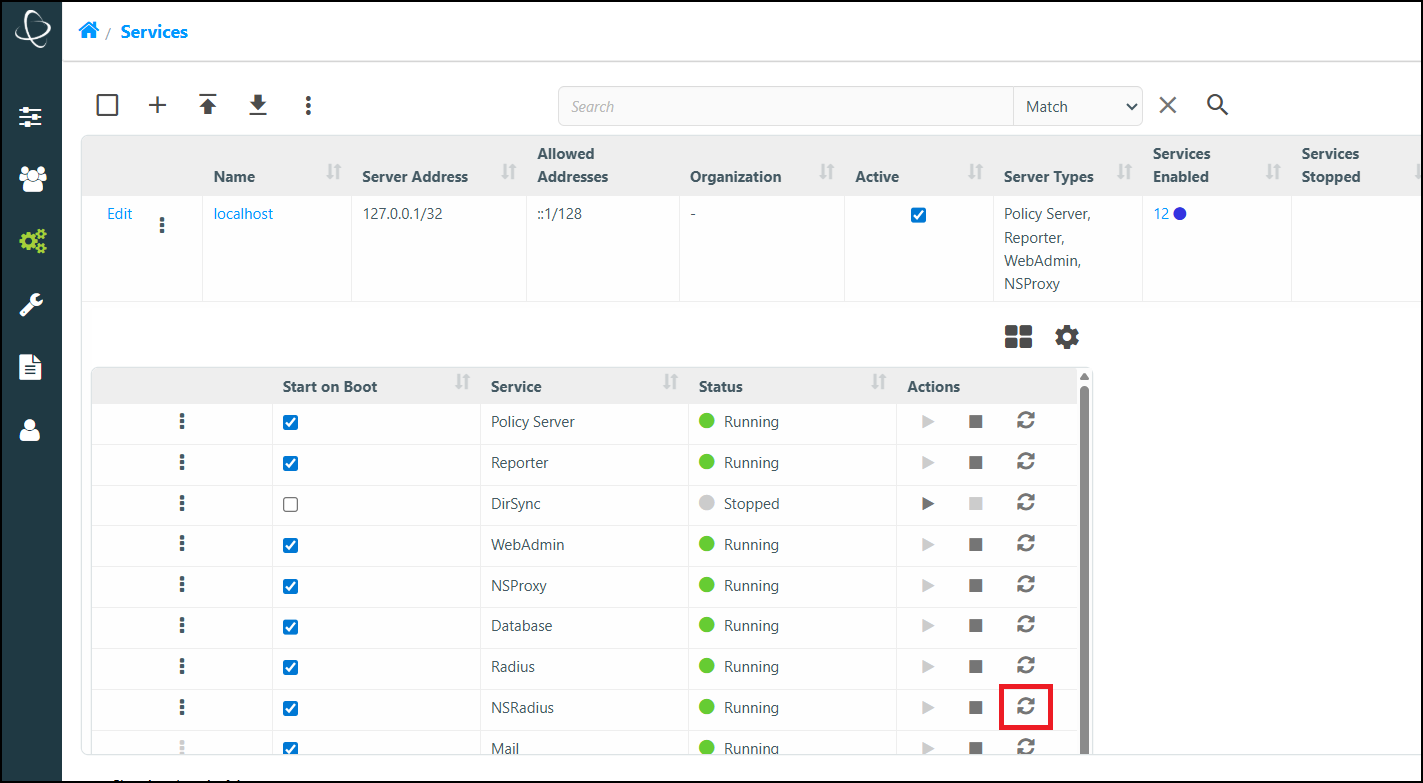
When changing the RADIUS server configuration, it must be restarted. The RADIUS service can be restarted from the WebAdmin interface by navigating to Administration > Services, choosing the Hostname of the server NSRadius is running on and selecting the Restart icon in the NSRadius column.
Generating Sample RADIUS Accounting Information
Use a fresh install of the Netsweeper product.
Run the following commands: (please note that the Radius and NSRadius services will need to be running).
Login a Client:
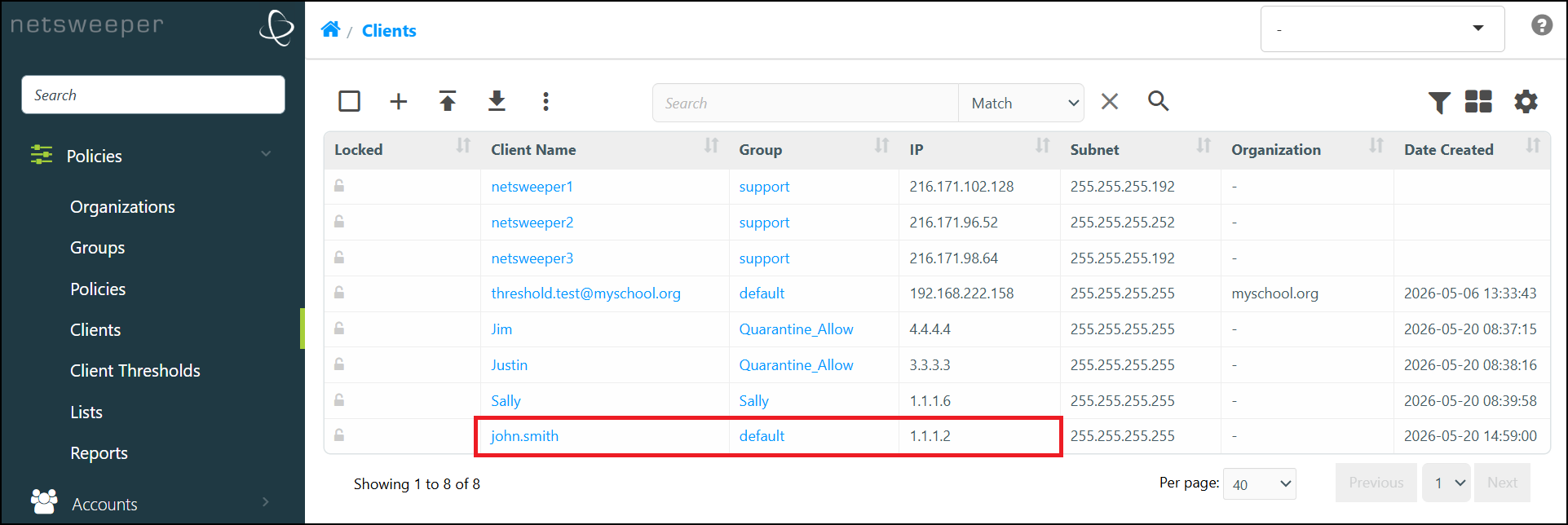
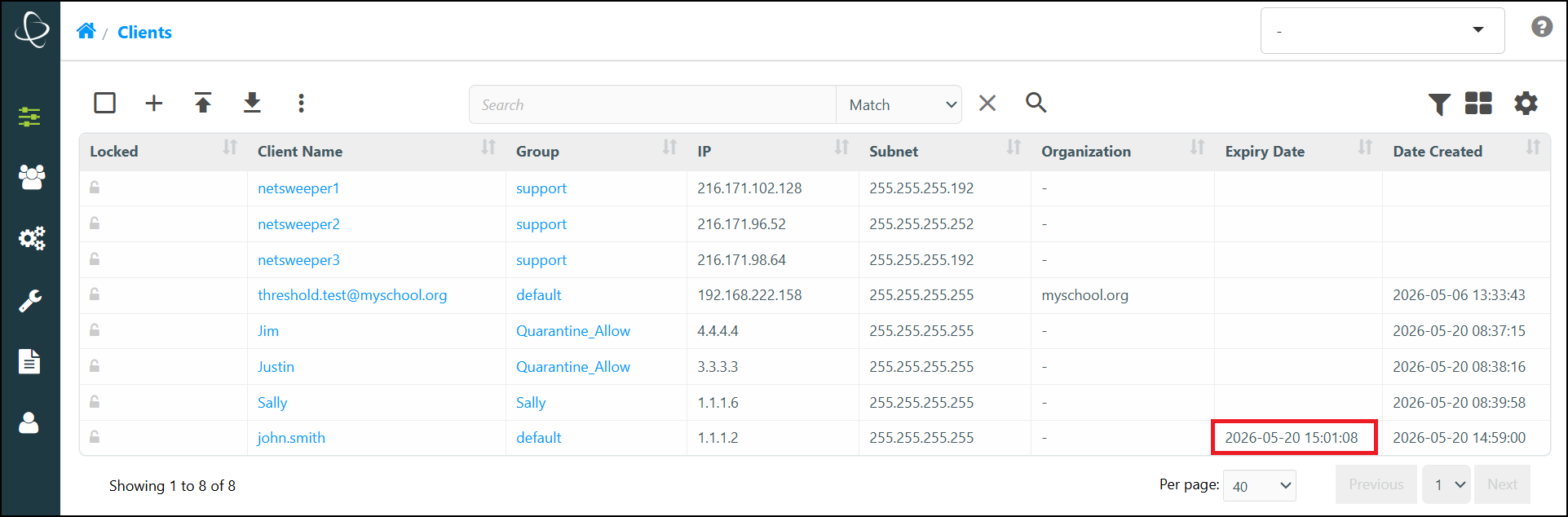
radacct User-Name=john.smith Acct-Status-Type=Start Framed-IP-Address=1.1.1.2 class="default" NAS-IP-Address=1.2.3.4You will have a new Client john.smith in the default Group.
Logout (expire) a Client:
radacct User-Name=john.smith Acct-Status-Type=Stop Framed-IP-Address=1.1.1.2 class="default" NAS-IP-Address=1.2.3.4The user john.smith will have an expiry time associated with the username.
Default and Alternate Configurations
Default RADIUS parser configuration
The default Netsweeper RADIUS configuration will work for most deployments. Typically, all that is required is the addition of a new RADIUS client to the RADIUS Server that resides on the Netsweeper Server.
Specific settings
/etc/raddb/radiusd.conf
The RADIUS configuration file must be updated to cause the RADIUS server to accept packets from your RADIUS client.
Radiusparser.php
No changes required.
Requirements and Considerations
- The RADIUS CLASS attribute must contain the filtering Group.
- The filtering Group must already exist in the Netsweeper database.
Without the CLASS attribute
In some situations, it may not be possible for a network operator to modify the CLASS attribute of RADIUS accounting packets. In this case, the Netsweeper RADIUS parser must know to lookup the appropriate filtering group name from the user name (client name) specified in the RADIUS accounting packets. The lookup is done using the Netsweeper Policy Database; therefore the client must already exist in the Netsweeper Policy Database and be assigned to a valid filtering group.
Specific Settings
/etc/raddb/radiusd.conf
The RADIUS configuration file must be updated to cause the RADIUS server to accept packets from your RADIUS client.
Radiusparser.php
$GROUPNAME_LOOKUP_FROM_USERNAME = true;
Requirements and Considerations
- Users (Client names) must exist and be assigned to a filtering Group.
- If you have multiple Clients, the Client with no IP address or subnet is first used, otherwise it falls back to the first returned Client.
- This does not currently support database partitioning and other advanced features.
Group Creation on-the-fly
There may be instances where a new filtering group is required to be created when it does not previously exist. This enables dynamic default filtering Group/Policy creation when an accounting-start packet arrives, and the Group is not known. This may be necessary where OSS/BSS integration does not provide pre-configuration of filtering Clients/Groups/Policies before a device comes onto the network.
Specific Settings
/etc/raddb/radiusd.conf
The RADIUS configuration file must be updated to cause the RADIUS server to accept packets from your RADIUS client.
Radiusparser.php
$GROUPNAME_LOOKUP_FROM_USERNAME
= false.
$CREATE_GROUP=true;
Requirements and Considerations
- Due to additional system load, scalability analysis should be performed when using this methodology.
- Additionally, default filtering Policy settings should also be considered.
Mixed Deployments – Username and Calling Station ID
In version 3.1 and above, the _ATTRIBUTE settings can be pipe, | , separated. This allows you to use Username and Calling-Station-ID for mixed deployments where RADIUS packets may be different between fixed and wireless subscribers.
Specific Settings
/usr/local/netsweeper/webadmin/bin/radiusparser.php
All webadmin/config/radiusparser.php configuration elements ending with:
_ATTRIBUTE can be PIPE | separated
Radiusparser
This will allow customers to have multiple attributes used. If there is a conflict in the accounting packet the first attribute is used.
radiusparser.php:$GROUPNAME_ATTRIBUTE = "User-Name|Calling-Station-Id|User-Name";
radiusparser.php:$USERNAME_ATTRIBUTE = "User-Name|Calling-Station-Id|User-Name";
radiusparser.php:$ACCOUNTNAME_ATTRIBUTE = "User-Name|Calling-Station-Id|User-Name";
radiusparser.php:$IPADDRESS_ATTRIBUTE = "Framed-IP-Address";
radiusparser.php:$PARTITION_ATTRIBUTE = "Calling-Station-Id|User-Name";
And that the defaults are now this
$GROUPNAME_ATTRIBUTE = "User-Name|Calling-Station-Id|User-Name";
$USERNAME_ATTRIBUTE = "User-Name|Calling-Station-Id|User-Name";
$ACCOUNTNAME_ATTRIBUTE = "User-Name|Calling-Station-Id|User-Name";
$IPADDRESS_ATTRIBUTE = "Framed-IP-Address";
$PARTITION_ATTRIBUTE = "Calling-Station-Id|User-Name";
Typical Metrics
The following metrics outline the performance of the RADIUS Server and the Netsweeper RADIUS Parser that reside on the Netsweeper Server. The performance of the RADIUS Parser is dependent on WebAdmin and Database performance. Generally, the system is capable of handling large amounts of RADIUS accounting packets; however, the RADIUS Parser will be limited in performance.
It is important to note that on most deployments, only a small portion of subscribers require WebAdmin and Database operations. Some installations may require an IP Address removal to be operational for all subscribers. The following test results will clearly outline these use cases.
These tests only measured the performance of the RADIUS service: how many RADIUS client packets can be processed and logged by the RADIUS service. Since the Netsweeper RADIUS parser reads and deletes the log entries at the same time, the parser service needs to be disabled.
RADIUS Inputs and Outputs
Radius Inputs and Outputs
This document details the inbound and outbound ports used by the RADIUS Service.
Inbound Ports RADIUS
Inbound ports that the RADIUS service uses.
| Port | Protocol | Comments |
|---|---|---|
|
1812 |
UDP |
Default listening port for the RADIUS Authentication. |
|
1813 |
UDP |
Default listening port for the RADIUS Accounting. |
RADIUS Configuration Windows
You can access the RADIUS Configuration windows by navigating to Administration > Services and selecting the Hostname of the desired server to expand its list of services.
.
There are two separate RADIUS services listed in the WebAdmin 'Services' window; 'Radius', (The RADIUS Logger,) and NSRadius, (The RADIUS Parser).
-
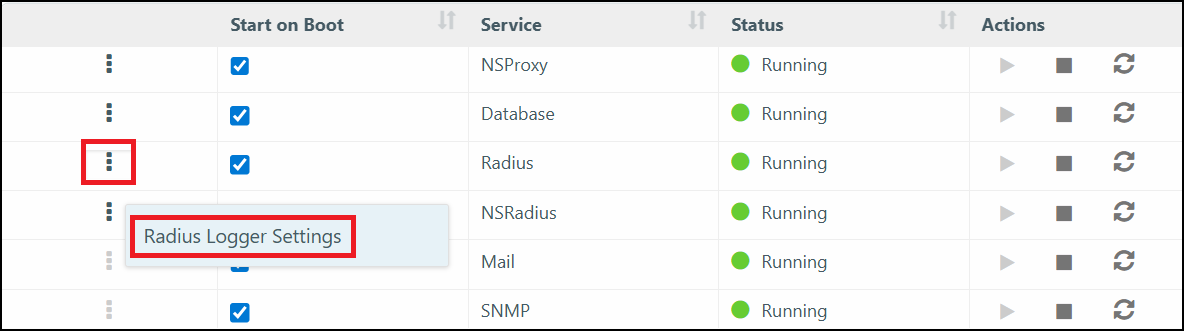
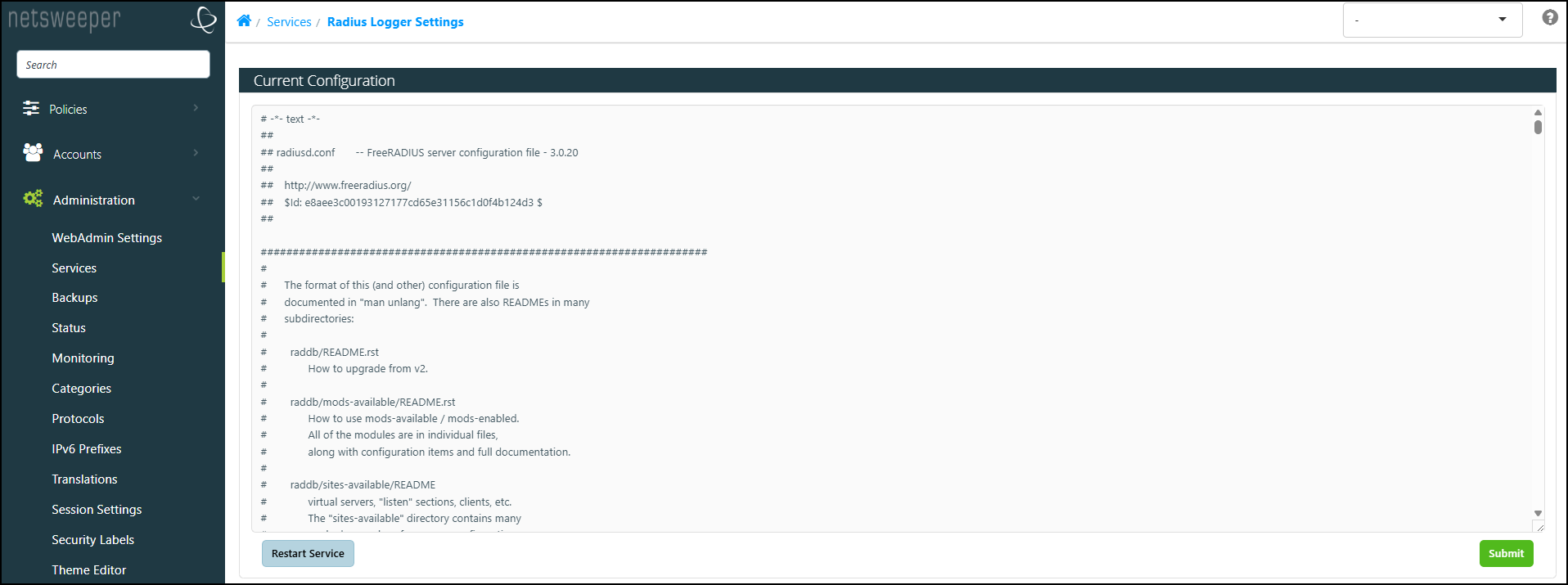
To access the RADIUS Logger configuration, select the 'More Actions' icon for the Radius service and choose Radius Logger Settings.
-
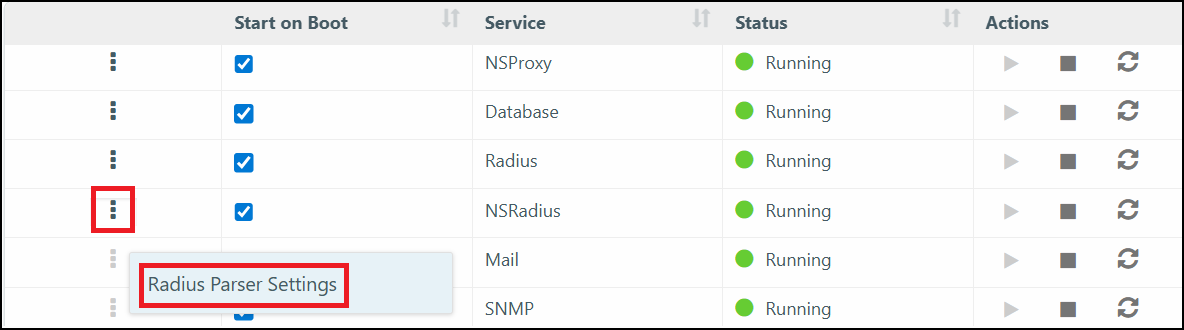
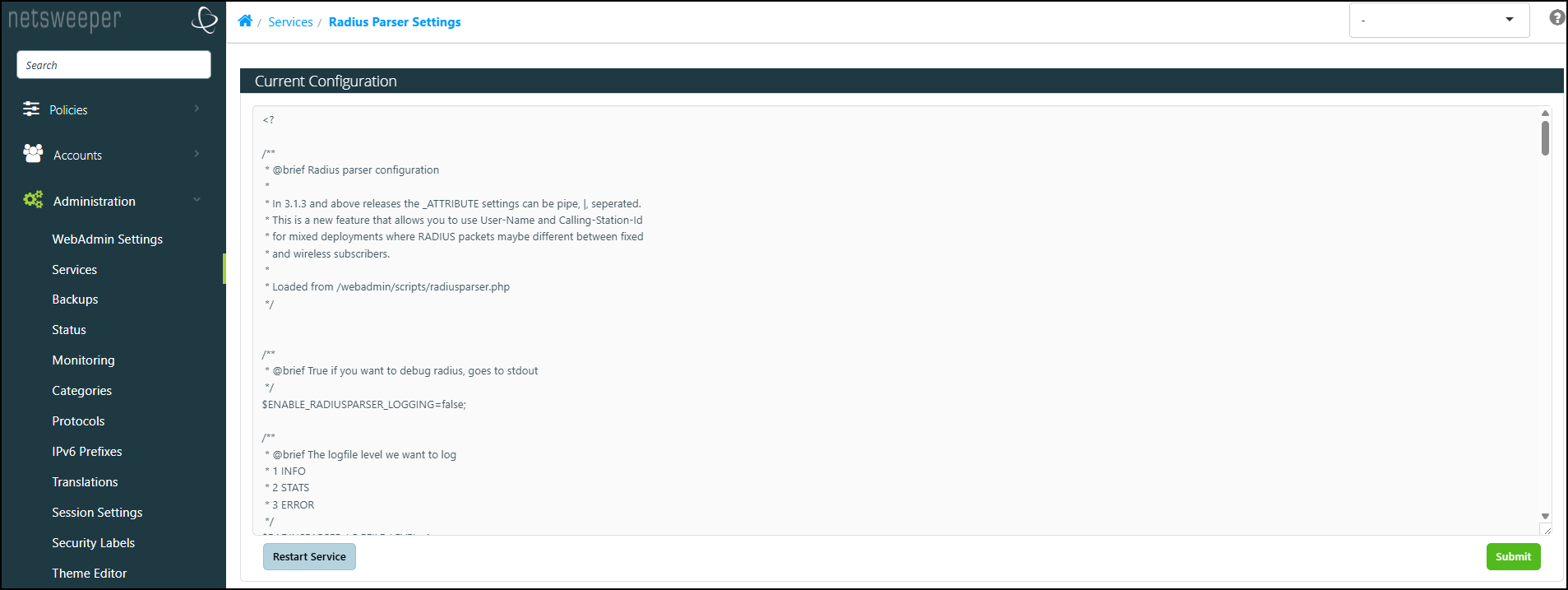
To access the RADIUS Parser configuration file, select the 'More Actions' icon for the NSRadius Service and choose Radius Parser Settings.
RAIDUS Logger Settings - radiusd.conf
The ‘Radius Logger Settings’ window is used to configure RADIUS Logging and its parameters.
Radius Parser Settings
The 'Radius Parser Settings' window is used to configure how RADIUS parses network traffic.
Outputs RADIUS
Outbound Ports RADIUS
Outbound ports that the RADIUS service uses.
| Port | Protocol | Comments |
|---|---|---|
|
The RADIUS service does not use any outbound ports. |
||
Radiusd Output
The RADIUS logging service produces log files in the following location:
/usr/local/netsweeper/logs/radius.log
This log file is then parsed by the Netsweeper RADIUS parsing service for accounting start, stop, and continue messages.
There is a log file /usr/local/netsweeper/logs/radiusparser.log which can be monitored to make sure that the radius parser is operating properly.
The /usr/local/netsweeper/logs/radius.log does not exist for more than a few seconds. If it last for more than 30 seconds this indicates that something is not working properly. This log file will move to radius.log.nsw and be processed and then deleted. Therefore, radius.log and radius.log.nsw should not exist for a more than a few seconds if the radiusparser is processing log entries properly.
Netsweeper RADIUS Parser Output
By default, the RADIUS Parser uses the ‘Class’ attribute in the log file as the ‘Group Name’.
The Group name must exist in the database in order for the Client to be assigned. If the Group name does not exist, it is not created.
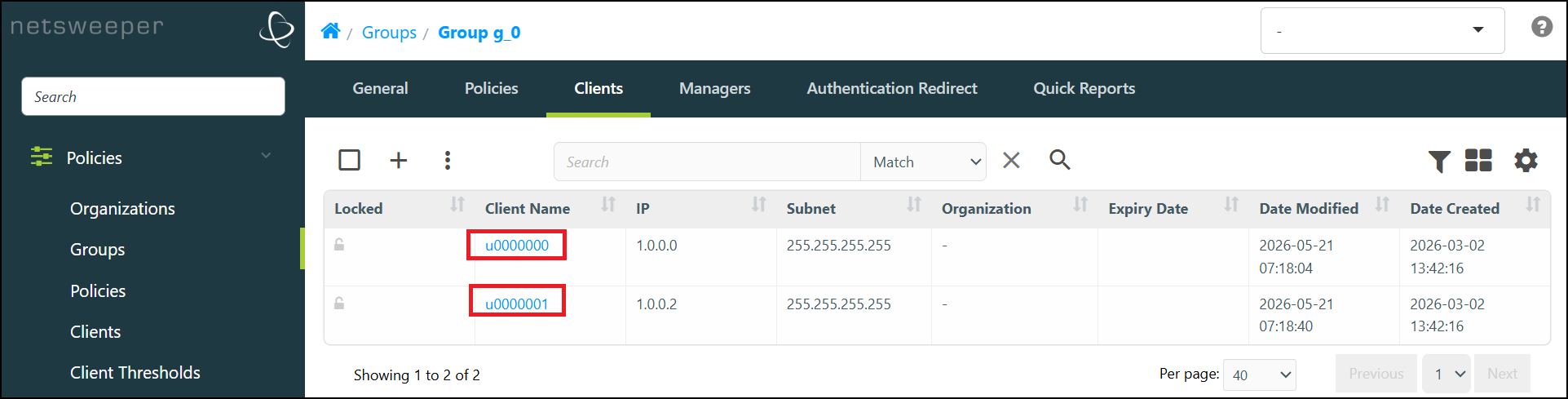
In the example below the class attribute is ‘g_0’ and will be used to assign the Client (based on IP) to the Group ‘g_0’:
Framed-IP-Address = 1.0.0.0
User-Name = "u0000000"
Class = "g_0"
Acct-Status-Type = Start
Framed-IP-Address = 1.0.0.1
User-Name = "u0000001"
Class = "g_0"
Acct-Status-Type = Start
To verify your Clients have been added, navigate to Policies > Groups, select the 'List' tab, choose the desired Group, and select the Group's 'Clients' tab.
RADIUS CLI Commands
radiusd CLI Commands
Use these commands to view or control the RADIUS service.
| Argument | Description |
|---|---|
|
service radiusd status |
Checks status |
|
service radiusd start |
Starts the service |
|
service radiusd stop |
Stops the database server |
|
service radiusd restart |
Restarts the service |
|
radiusd --help |
Additional commands |
|
chkconfig radiusd off |
Disable (off) or enable (on) the service |
|
tail -f /var/log/radius/radius.log |
Use this command to observe what is occurring in the Radius log file under a heavy Radius work load |
|
ps aux | grep radiusd |
Use this command to check processes |
radiusd Additional Commands
Run this to view additional commands.
radiusd -h
| Option | Description |
|---|---|
|
-C |
Check configuration and exit. |
|
-d raddb_dir |
Configuration files are in "raddbdir/*". |
|
-f |
Run as a foreground process, not a daemon. |
|
-h |
Print this help message. |
|
-i ipaddr |
Listen on ipaddr ONLY. |
|
-l log_file |
Logging output will be written to this file. |
|
-m |
On SIGINT or SIGQUIT exit cleanly instead of immediately. |
|
-n name |
Read raddb/name.conf instead of raddb/radiusd.conf |
|
-p port |
Listen on port ONLY. |
|
-s |
Do not spawn child processes to handle requests. |
|
-t |
Disable threads. |
|
-v |
Print server version information. |
|
-X |
Turn on full debugging. |
|
-x |
Turn on additional debugging. (-xx gives more debugging). |
RADIUS File Locations
The following file locations may be helpful in troubleshooting RADIUS service problems.
| Description | File Location |
|---|---|
|
Configuration for RADIUS logging service |
/etc/raddb/radiusd.conf |
|
Radius logging service (currently processed) |
/usr/local/netsweeper/logs/radius.log |
|
Radius logging service global output |
/usr/local/netsweeper/logs/radiusparser.log |
|
Configuration for RADIUS parsing service |
/usr/local/netsweeper/webadmin/config/radiusparser.php |
Troubleshooting RADIUS
Troubleshooting Radius
Checking RADIUS status
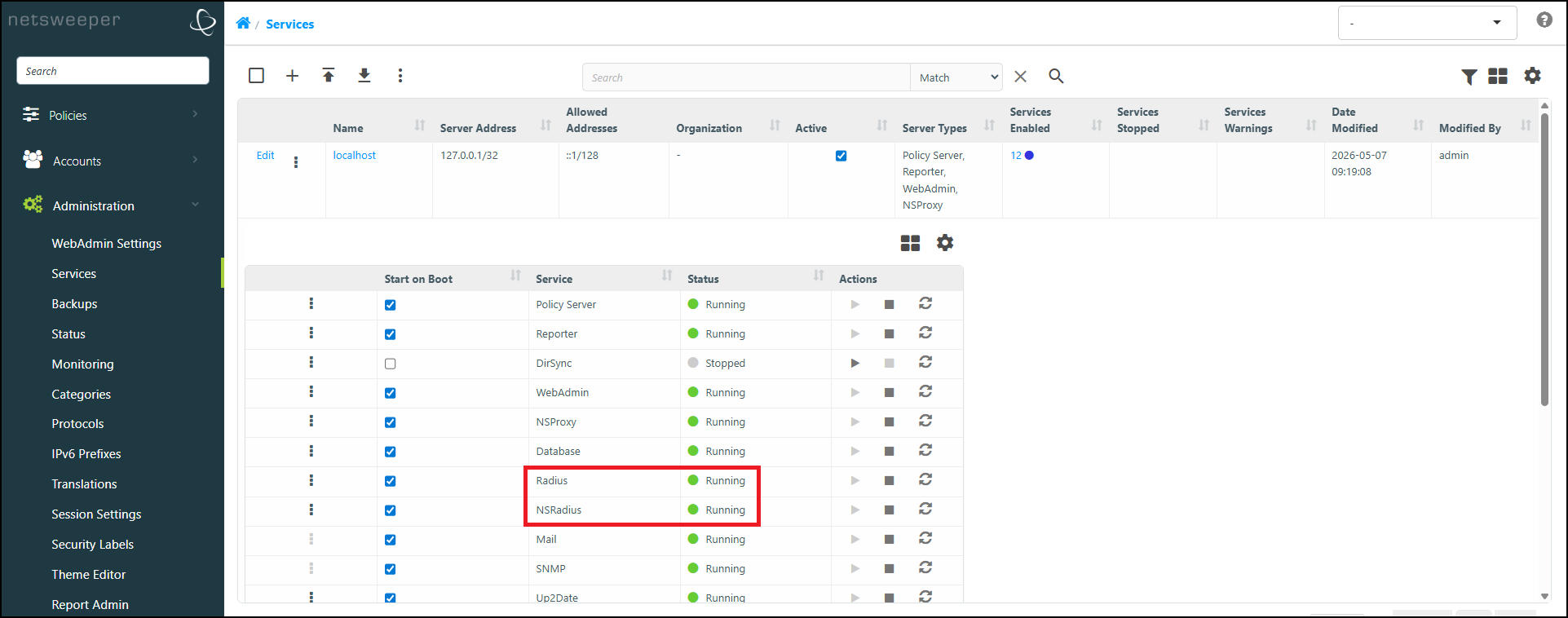
There are two separate RADIUS services listed in the WebAdmin 'Services' window; 'Radius', (The RADIUS Logger,) and NSRadius, (The RADIUS Parser). The status of each service can be checked by navigating to Administration > Services and selecting the Hostname of the desired server.
-
You can start, stop, and restart the services in this window as well as set (or unset) the services to start whenever the host server boots.
-
To access the RADIUS Logger configuration, select the 'More Actions' icon for the Radius service and choose Radius Logger Settings.
-
To access the RADIUS Parser configuration file, select the 'More Actions' icon for the NSRadius Service and choose Radius Parser Settings.
Accounting-Start Requests Are Not Creating Clients
This indicates the configuration was not properly completed, or the RADIUS server was not restarted.
- It you are using the CLASS attribute (see the RADIUS Configuration section of this document), make sure that the CLASS attribute value is a valid WebAdmin Group, (keeping in mind that this is case sensitive).
- Restart the radius server and retest.
High Radius Accounting Start-Stop Loads
If there are high RADIUS loads, (accounting-start and accounting-stop events occurring around 200 per second,) look at the /usr/local/netsweeper/logs/radiusparser.log files.
Considering which file is growing, it’s possible to determine if (and how far) the Netsweeper system may be falling behind. If this file remains unchanged for over 5 minutes this may indicate an API call is taking a long time to process, indicating a policy server misconfiguration.
Proper Recovery Procedures when Radius/NSRadius Fails
The following are potential steps for proper recovery when Radius and/or the NSRadius fails.
- Monitor the size of the /usr/local/netsweeper/logs/radiusparser.log
- The file should grow slightly and then be rotated.
- The file should not constantly grow above 1M on heavily loaded systems.
- If the size grows beyond normal size, alarms should be triggered.
- Restart radius server 'service radiusd restart' (this will also restart the radius parser service).
We also recommend removing previously provisioned Clients from the database in order to recover to a known state. You can remove them directly via the Clients window. The following commands will remove any Clients from the database that were previously provisioned via Netsweeper’s NSRadius Radius Parser.
mysql –unetsw –p
Enter your MYSql password. (The default is 'internet').
USE NSDConfig;
DELETE FROM clientid WHERE subnet="255.255.255.255";
Once this command is run all filtered subscribers must sign off and sign on depending on the radius configuration. If processing Interim-Update packets, the next Interim-Update will provision the subscriber into the properly filtering group again.
Checking the Status of the RADIUS Service
You can check the status of RADIUS by viewing the logs located at:
/usr/local/netsweeper/logs/radiusparser.log
The radius packet will look similar to the example below. Test123 has been processed and the number of entries are shown.
1369418640 Child: Processing /usr/local/netsweeper/logs/radius.log
1369418640 Group exists: filter123
1369418640 Assigning test123 to group filter123 with IP 72.14.204.103
1369418640 Child: Processed 1 of 1 entries in 0.01 seconds, after api signal 0.01 seconds
1369418640 Child: Processed /usr/local/netsweeper/logs/radius.log with 1 entries
1369418640 Child: Processing /usr/local/netsweeper/logs/radius.log
RADIUS Appendix
Appendix - Radius
System Architecture Diagram
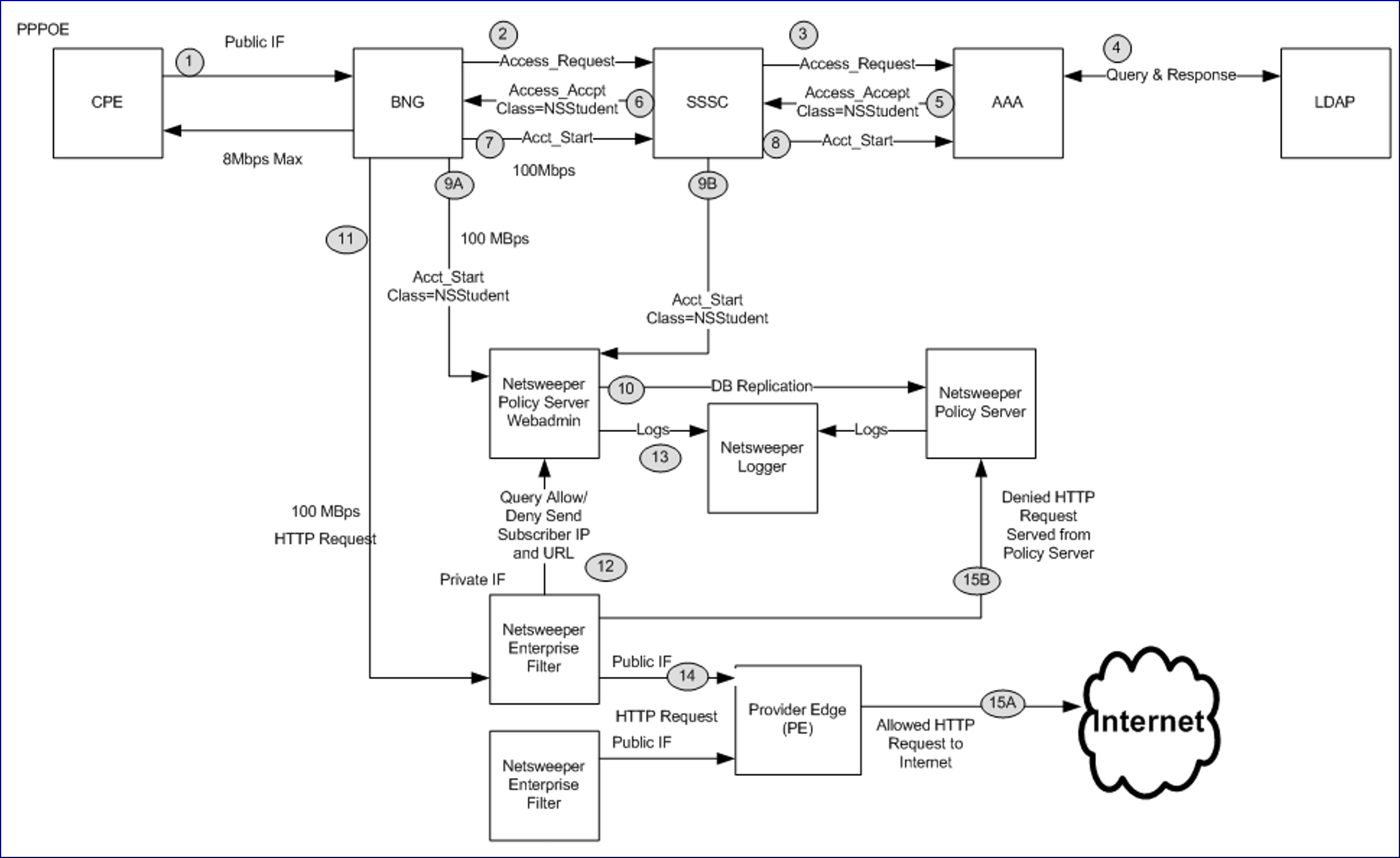
Diagram Keys
1. Subscriber logs into the network.
2. The BNG sends an access request to the SSSC
3. SSSC requests information from AAA
4. AAA queries LDAP service.
5. AAA returns access accept
6. SSSC returns access accept back to the BNG
7. Accounting Start is sent to the SSSC
8. Accounting start is sent to the AAA server
9A. This occurs at the same time as step 7. Accounting Start is sent to the Netsweeper WebAdmin. This can be sent by the BNG.
9B. Same as the above step, except Accounting Start is sent from the SSSC. Note: only one integration point should be used.
10. Netsweeper database replication occurs to update all policy server processes.
11. Subscriber makes a HTTP request to the internet. This request is routed through the Netsweeper Enterprise Filter
12. The Enterprise Filter queries the policy server to determine if the request should be allowed or denied. This is load balanced between the two Policy Servers.
13. The Policy Server logs the Subscribers request and the policy decision.
14. The request is allowed or denied.
15A. If the request is allowed, it goes out to the Internet.
15B. If the request is denied, the deny page is served from the Policy Server that processed the connection.
Radius Signon and Signoff
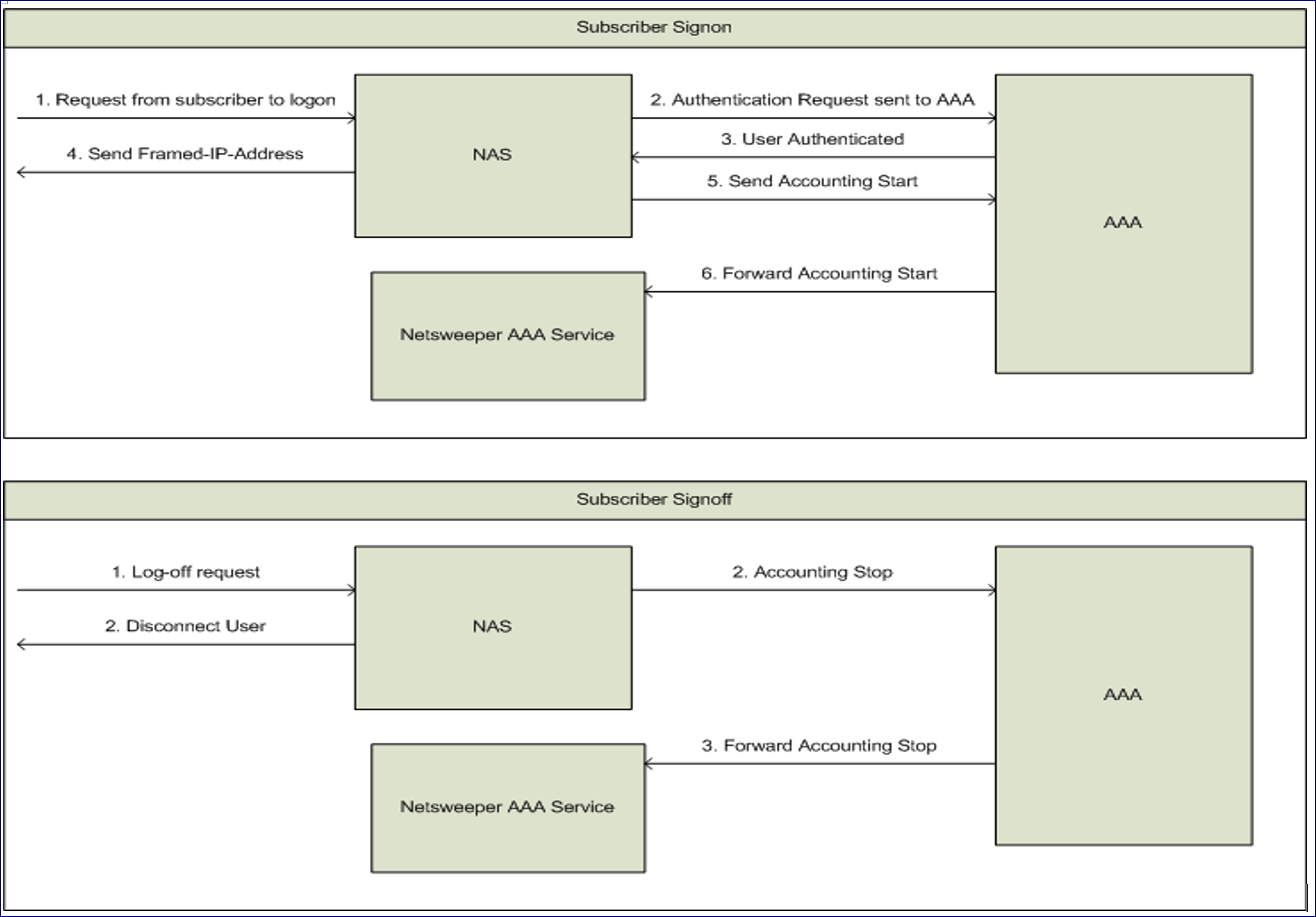
Signon Sequence Diagram
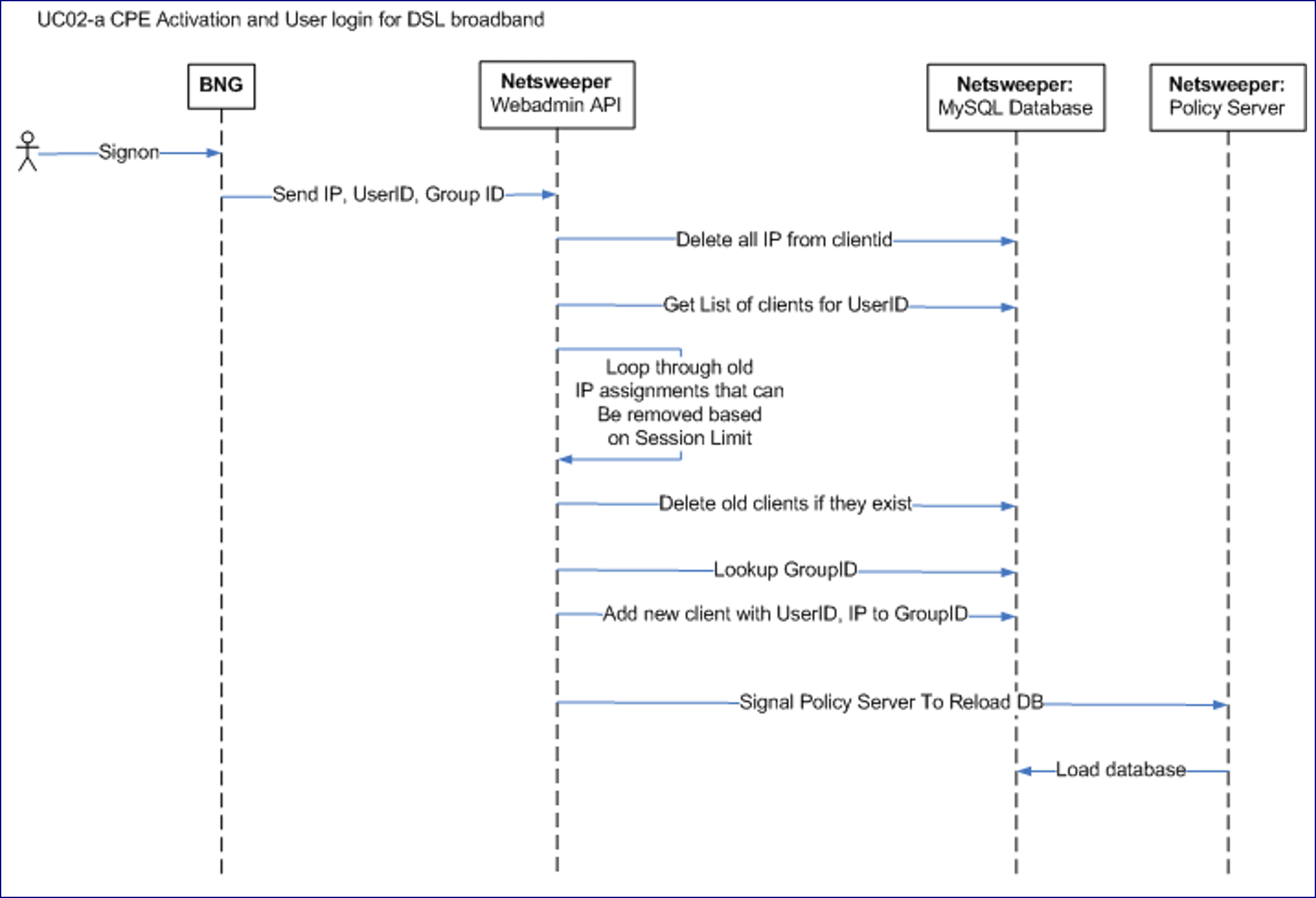
Signon Flow Diagram
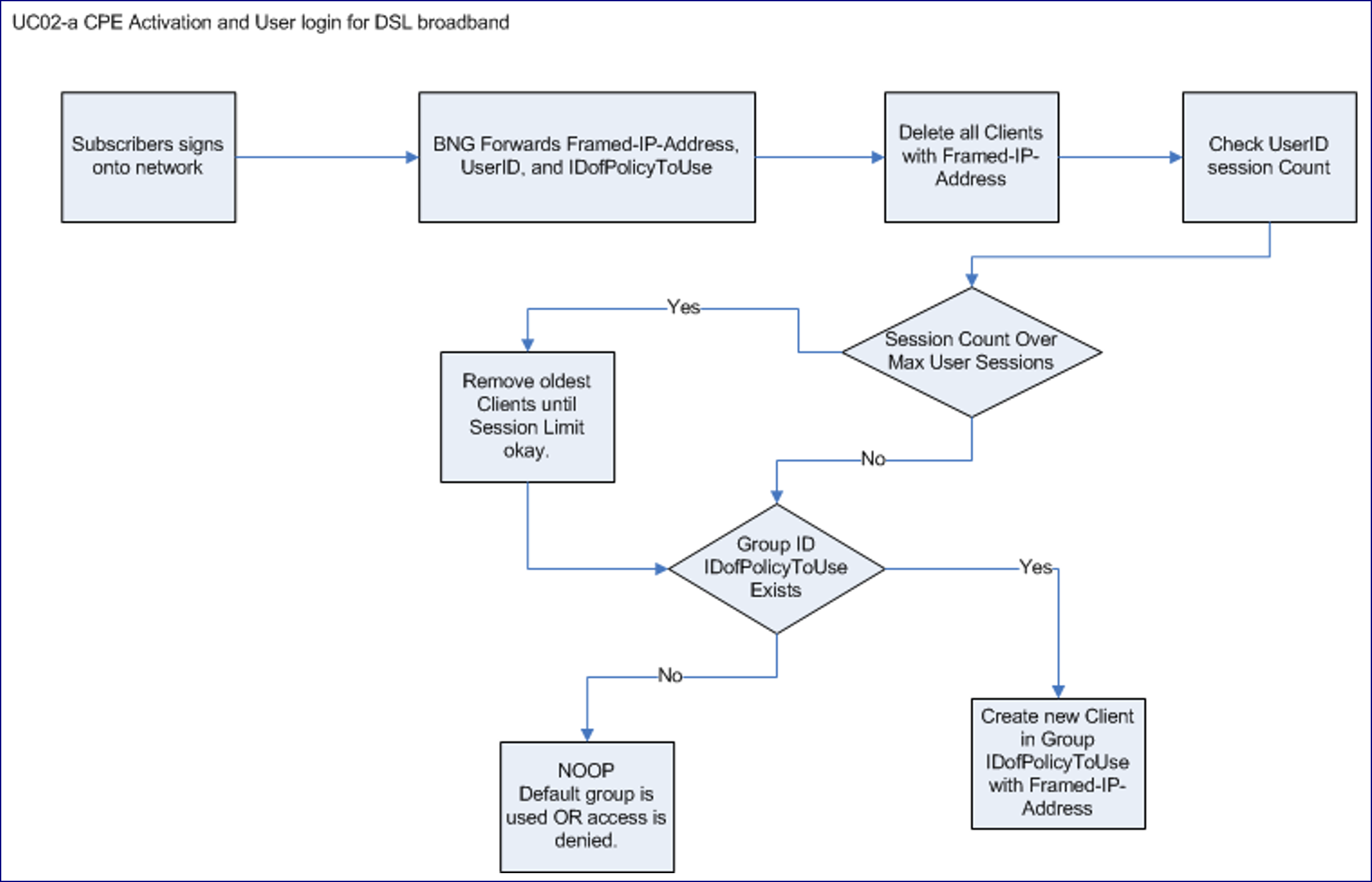
Signon Sequence Diagram
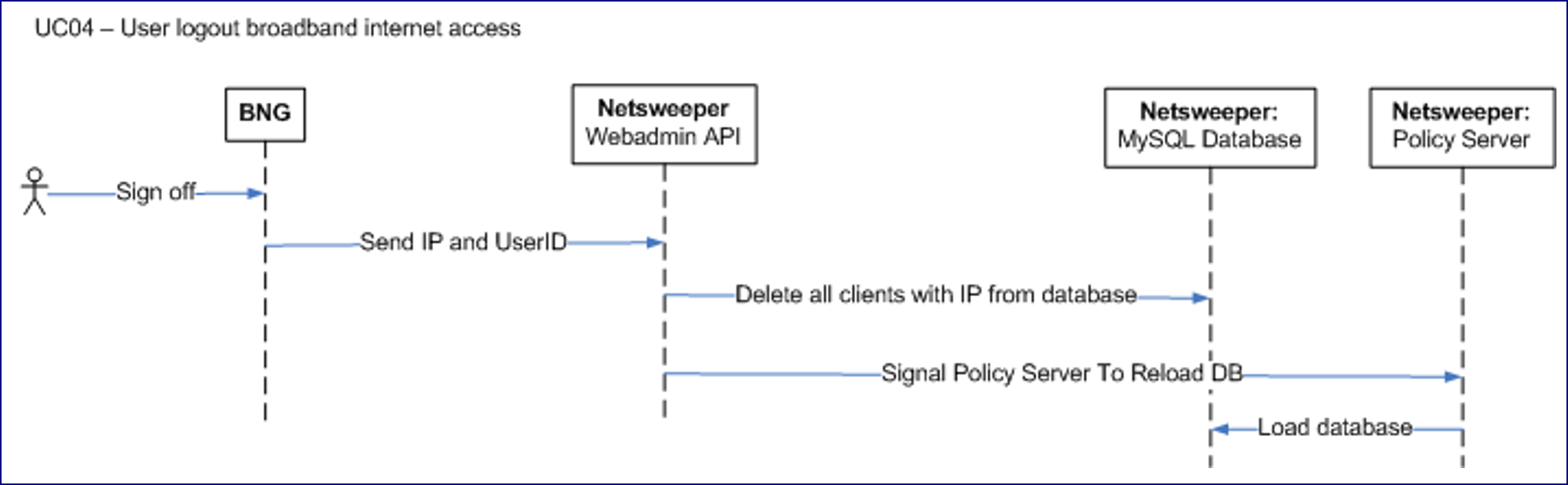
Signoff Flow Diagram

High-level Design
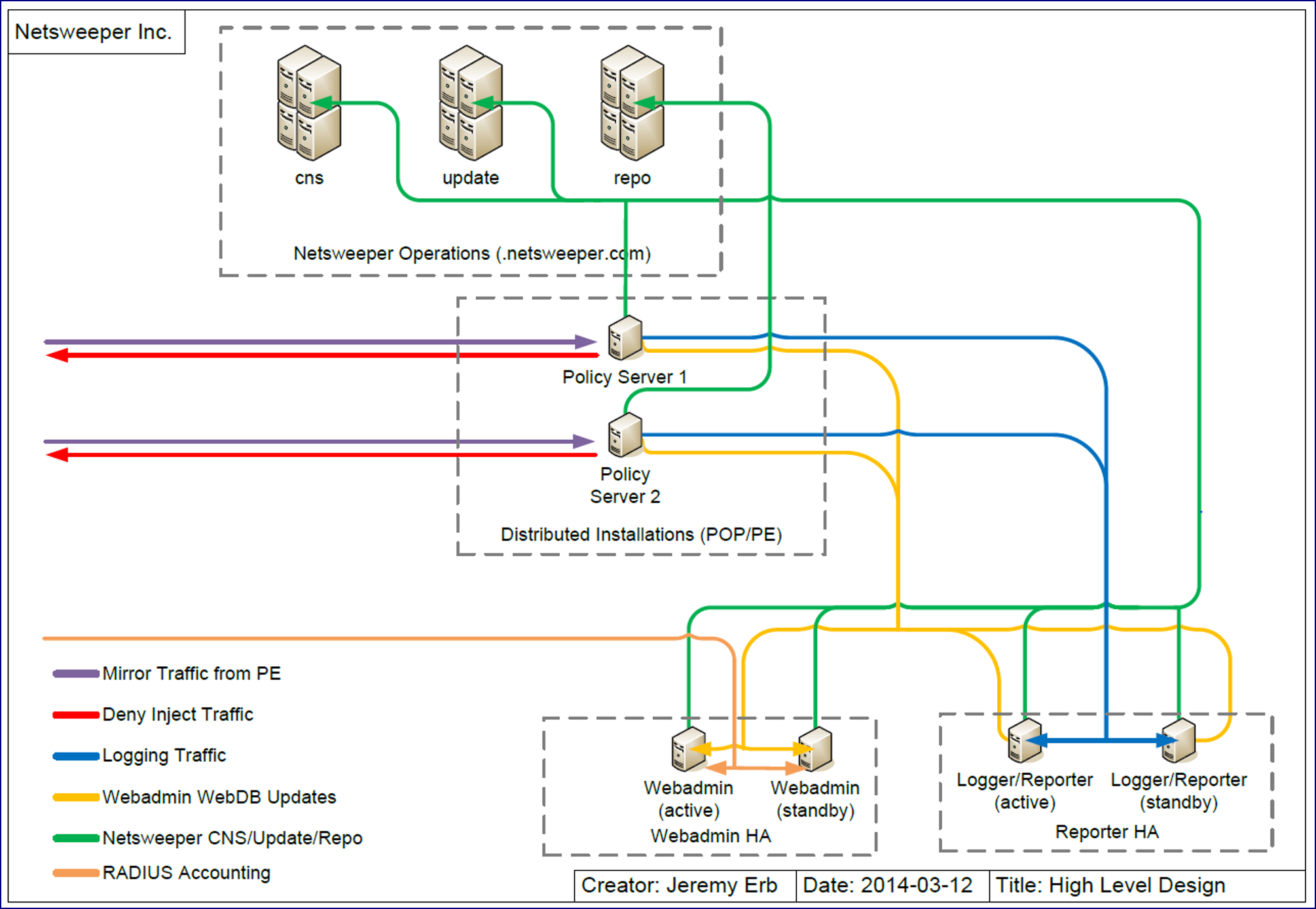
Traffic Flow Diagram