Introduction - Authentication Portal API
This section outlines the Authentication Portal API. It describes how to create a third-party Authentication Portal, replacing the default Netsweeper Authentication Portal. This allows customization of the authorization process to meet various business requirements.
Please see the ‘Authentication Redirect’ section of the WebAdmin API document for more information.
Authentication Portal Inputs and Outputs
The following sections define Authentication Portal inputs and outputs.
There are two URLs that must be handled by the Authentication Portal:
- Authentication Portal initial request
- Authentication Portal domain redirect
Authentication Portal Initial Request
When a request is redirected to the Authentication Portal, the portal is provided with all the same information as a Netsweeper deny page via the Query String. This information can be used to display messages or indicate why the user was denied.
None of this information should be used for authentication purposes since it can be modified by a user. This information should only be used for information purposes and not for authentication or authorization.
The following is an example Authentication Portal request:
http://example.com/webadmin/authportal/login.php?cat=33&dpid=6&rememberme=0&rememberme_expire=0&ttl=-200&groupname=Grade%5f09&policyname=Grade_09_Policy&username=%2d&userip=255.255.255.255&connectionip=127.0.0.1&nsphostname=localhost.localdomain&protocol=admin&dplanguage=-&orgid=3&orgname=myschool%2eorg&error=0&url=http%3a%2f%2ffacebook%2ecom
| Argument | Description |
|---|---|
|
cat |
Comma separated list of category numbers of the origin URL denied |
|
dpid |
The Deny Page ID that points to a customizable Deny Page. |
|
rememberme |
This is the option of the group that has been enabled to run authentication redirect |
|
rememberme_expire |
This is the expire time of the group after user is authenticated and redirected |
|
ttl |
Time to live for the category, or possibly a static time to live if categories are from a local source and not the CNS network or CNS Cache |
|
groupname |
Group name the request was processed in |
|
policyname |
Policy name that was active during processing |
|
username |
User name of the client, or in the original request Can be a “-“ to indicate no client was used to place this request into the group, and no user name was contained in the original request |
|
userip |
Source IP address seen by the policy server and surrogate device |
|
connectionip |
IP address of the surrogate device. Generally 127.0.0.1 unless using a remote cache, or other device |
|
nsphostname |
Hostname of the policy server that processed the request |
|
protocol |
Protocol that the request was processed on |
|
dplanguage |
Language the interface should be in. Defined in a group or policy |
|
error |
0 = success (no
errors) 2= The Portal and the Policy server have different settings for cookie encryption. Message: ‘Error at cookie decryption. Probably the WebAdmin and the Policy Server have different cookie encryption settings.’ |
|
orgid |
The ID of the Organization the user belongs to. |
|
orgname |
The name of the Organization the user belongs to. |
|
url |
Origin URL that was denied |
Currently the Authentication Redirect group settings are not passed to the Authentication Portal. When using an external Authentication Portal, settings on a per group basis will need to be determined by the group name and above information.
Designating Response Type
Response Type arguments of HTTP 302 and HTTP Iframe are available to the group_set_auth_redirect API and as an option in WebAdmin on a per group basis.
Authentication Portal Domain Redirect
Once the Authentication Portal has determined the user has been successfully authenticated, the Authentication Portal can set the required cookies and perform any other required actions. The required action is to inject a cookie into the original domain request to the URL. This is completed by appending a netsweeper= query argument on the original URL request.
If a user is redirected to the Authentication Portal from http://sex.com, you would redirect the user back to the following URL:
http://sex.com/?netsweeper=TOKEN
The Policy Service and Enterprise Filter or Capture Module will take care of parsing the TOKEN and adding the cookie value to the original request to the URL. The TOKEN must be in the following format:
netsweeper=USERNAME; expires=TIMESTAMP; path=/; domain=DOMAIN
The above string, which is a cookie value, must be base64 encoded.
The above is an insecure method and can be prone to both replay attacks and username injection by crafting special URLs.
Once the above is completed, the user will be able to browse to the domain of the site denied. If they navigate to a new site, they will be redirected to the Authentication Portal again. The Authentication Portal can optionally handle automating the login process via cookies and automatically redirect.
Policy Server Authentication Portal Authentication Detection
When a user navigates from one domain to another, Authentication Portal redirection will occur. Depending on the number of users and scalability of the Authentication Portal, this may cause an increased load on the Authentication Portal system. The Policy Service is able to parse cookies set on the Authentication Portal and these cookies can be set during the final Authentication Portal Domain Redirect. This will allow the Policy Service to automatically parse these cookies and formulate the redirect internally.
The following cookies are parsed from the Authentication Portal in the Policy Service. You can set these cookies during the login process to the Authentication Portal. These cookies can then be parsed from the browser on subsequent requests to the Authentication Portal.
netsweeperexpire=EXPIRETIME
netsweeper=USERNAME
By setting the above cookies during the Authentication Portal Authentication Portal Domain Redirect process, the user will not be prompted to log in to the portal again. Similarly, the portal does not need to process the request. The following transactions will occur once the user has been authenticated on the Authentication Portal.
- Browser to http://sex.com
- Redirects to http://myauthportal.example.com?ARGUMENTS
- Policy service parses the netsweeper= and netsweeperexpire cookies from browser in request made to http://myauthportal.exmaple.com?ARGUMENTS
- Policy service redirects to http://ORIGINALURL/?netsweeper=TOKEN
- Policy service redirects to http://ORIGINALURL
- Injects the cookie in TOKEN
Translating Category Numbers to Names
It is usually required to translate the category numbers to category names. This can be done using the Netsweeper Category XML definition. This is available on all WebAdmin services and can be downloaded when the filtering platform is upgraded. Categories can change from release to release and are always backwards compatible.
The following URL can be used to get the specific Netsweeper category definitions in XML format from your filtering platform.
http://policy.server.example.com:8080/webadmin/tools/category2xml.php
-
You can also view this file from the WebAdmin.
-
Navigate to Tools > Category Lookup and choose the Category Definitions tab.
-
Select the XML button.
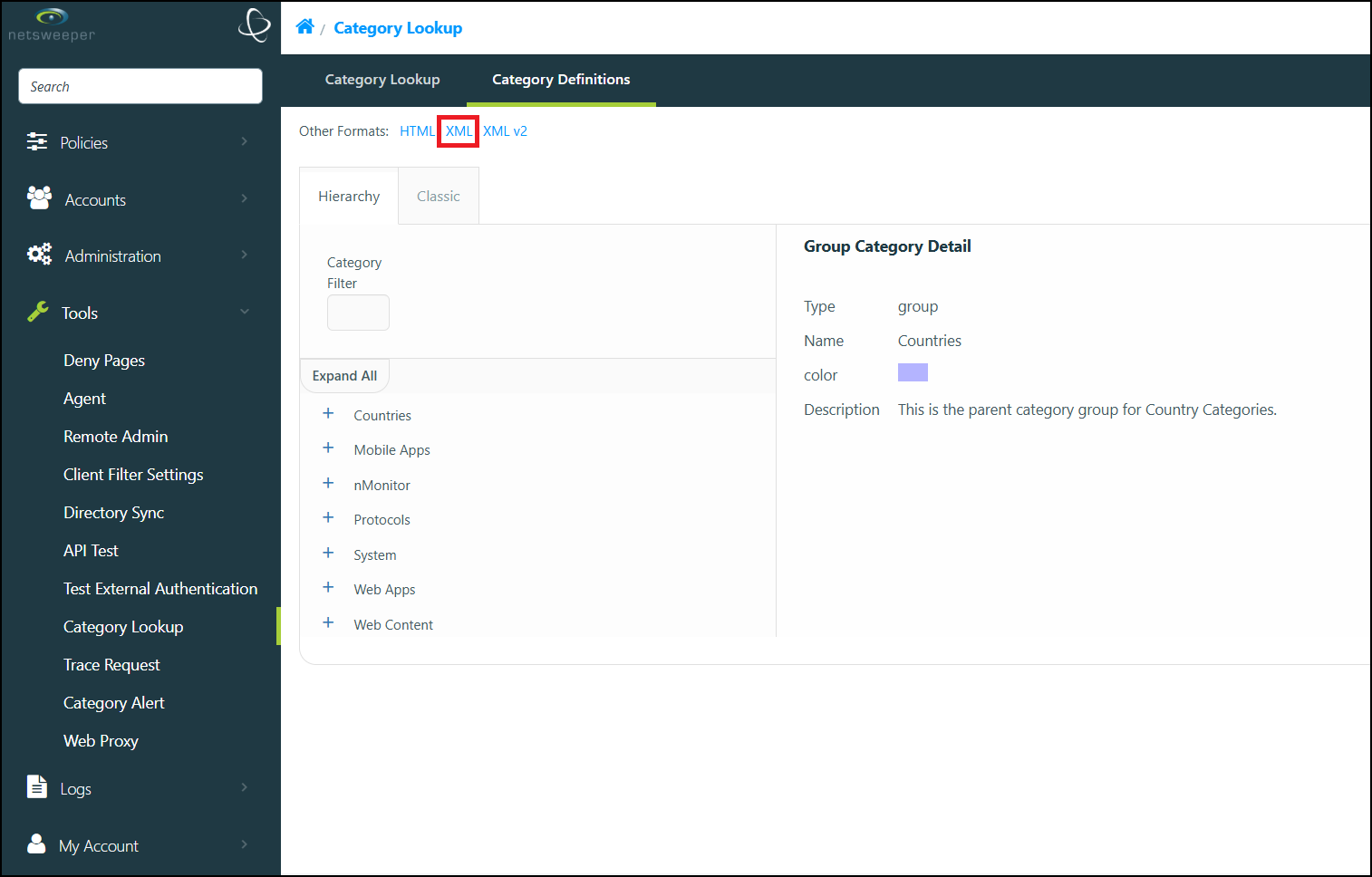
The file opens in a new browser tab.
Group Authentication Redirect Tabs
The auth portal can use the Deny Page Framework. The below example provides a basic configuration. For detailed information on our these features, (including detailed descriptions of every available setting,) please refer to our Authentication Redirect documentation.
- Choose the desired Group and navigate to their Authentication Redirect tab.
- In the Redirect from Group subsection, enable the options as shown here and
select the Save Changes button.
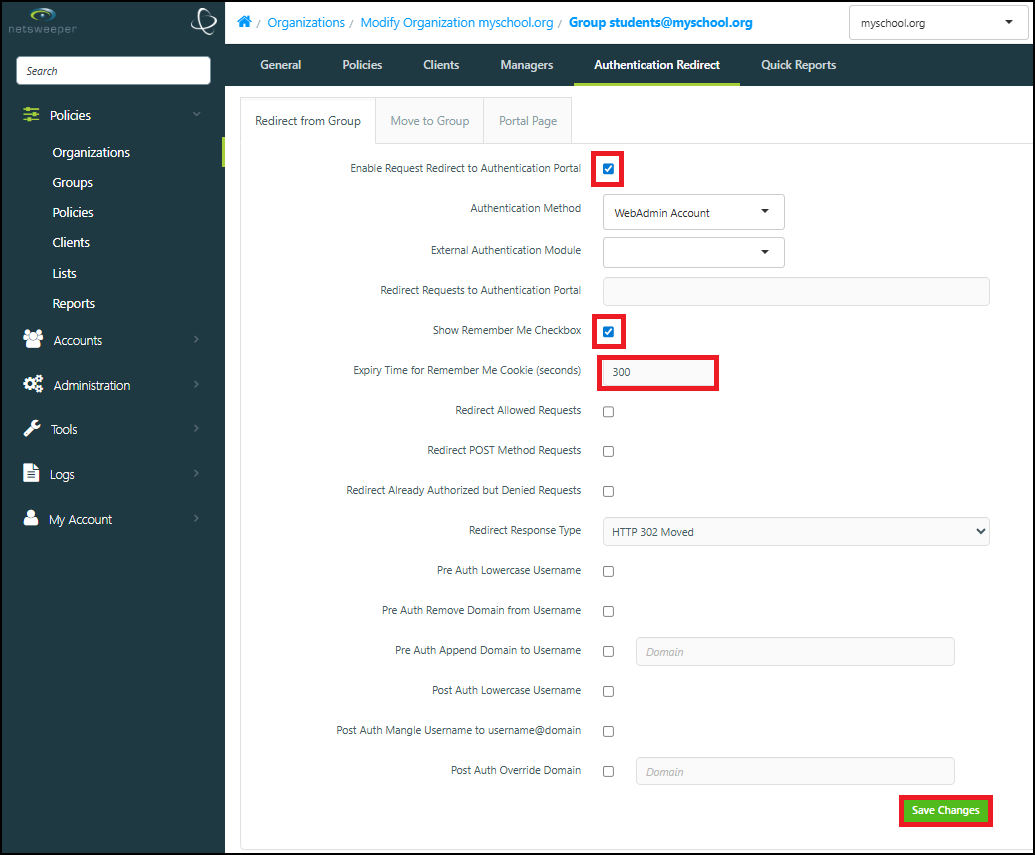
- Next, navigate to the Move to Group subsection and apply the following settings and select the
Save Changes button.
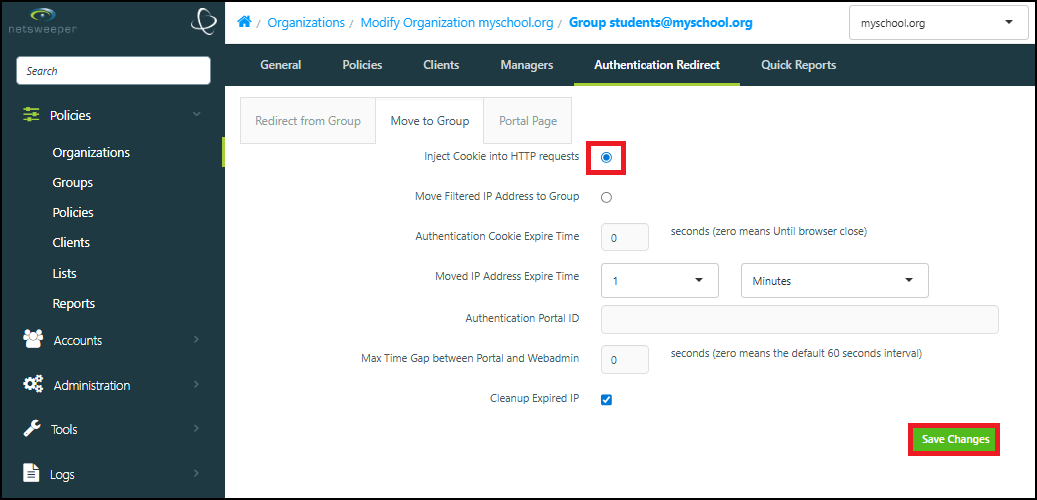
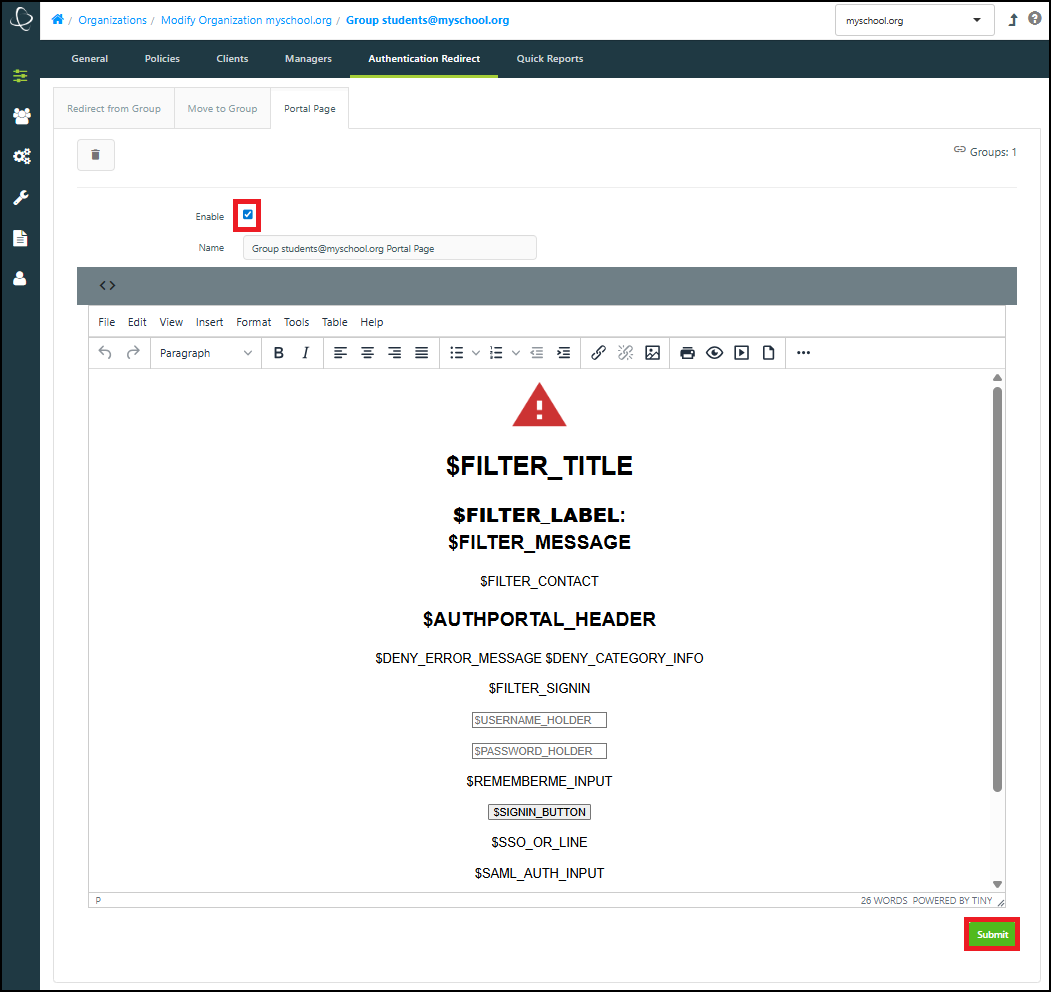
- Finally, navigate to the the Portal Page tab and select the Create Content button.
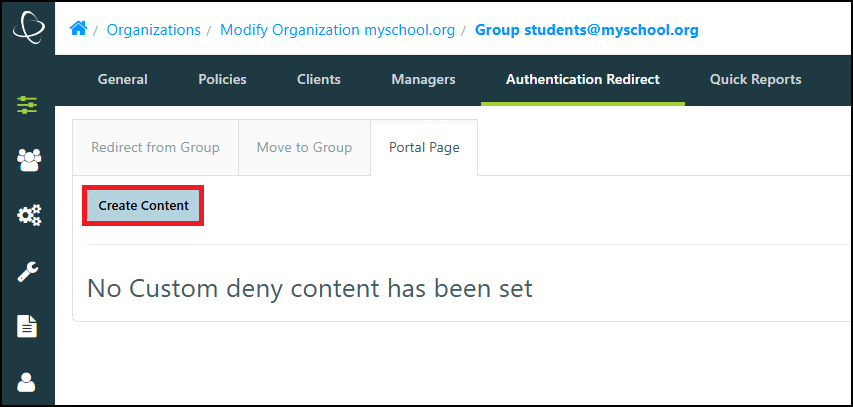
- Choose the Enable checkbox and select the Submit button to finish creating the Portal Page for this Group.